
Mac Geek Gab — Apple Tips, Tricks, and Troubleshooting
1,156 episodes — Page 4 of 24
Ep 1006Like a Caveman!
You’ve got the latest tips and tricks from this week’s Mac Geek Gab 1006 with special guest Adam Christianson joining Dave Hamilton and Pilot Pete. Dive into the efficiency realm with quick methods like opening QR codes on iOS without a secondary device and mastering keyboard shortcuts for Finder, dashes, and more. Get clued in on handy hints: Amazon’s departure from IFTTT integration, creating videos from sequential Live Photos, and making the most out of CarPlay cables. On the gear front, don’t miss out on the MagSafe PopSockets with Wallet and Dave’s take on the Sonos Move 2. And always remember, “Don’t Get Caught” being less of a Mac geek. Dive into the know-now, and keep your tech game strong! Chapters/Timestamps/Stuff mentioned: 00:00:00 Mac Geek Gab 1006 for Monday, October 30th, 2023 The MGG Discord Server is Live! The MGG Merch Store is Live! Quick Tips 00:00:01 Dan-QT-Open QR Codes on iOS Without Scanning from Another Device 00:03:02 Lawyer Jeff-QT-Sonoma Mail Links Attachments Back to their Messages 00:05:31 Spark’s Threads…and email in General Thunderbird 00:11:13 QT-Save a link to your Google Drive “Starred” Folder 00:16:32 John-QT-Keyboard Shortcuts for Finder, Dashes, and More 00:21:59 Brian-QT-1005-Enable iCloud Syncing of forScore App 00:23:22 QT-Give Shared Libraries time to sync When It Says It’s Syncing…Believe It! 00:28:34 PSA-Amazon is ending IFTTT integration on 10/31 00:29:47 Taha-QT-Create Video from Sequential Live Photos 00:34:36 Dale-QT-Swipe Down in iPhone Photos to Return to Gallery 00:36:54 Apple’s Scary Fast Event on Monday night Sponsors 00:40:19 SPONSOR: Green Chef makes eating well easy with plans to fit every lifestyle. Go to GreenChef.com/60mgg and use code 60mgg to get 60% off plus free shipping. Your Questions Answered and Tips Shared! 00:42:26 Paul-What’s the best CarPlay cable? Coiled cables for USB-A to Lightning, USB-C to USB-C, and USB-A to USB-C 00:45:27 CarLink Kit Adapter 00:48:06 Ben-How do I avoid drive errors when my Mac sleeps? OWC ClingOn Cable Lock 00:55:42 macOS Sonoma Fixes CoreAudio 00:59:30 Bill iPhone 15 or Apple watch first? Cool Stuff Found 01:05:58 Tony-CSF-Portable Standby Mode with Battery Packs MagSafe PopSockets with Wallet and Anker MagGo Black Battery Pack Speck Presidio Perfect-Clear Grip with MagSafe and ClickLock 01:12:42 CSF from Pepcom–TimePorter from Twelve South – $29.99 01:13:53 Use the Peanuts Face on Apple Watch 01:17:22 CSF-Sonos Move 2 01:21:42 Mac Geek Gab 1006 Outtro Bandwidth Provided by CacheFly Follow us on Mastodon Mac Geek Gab on Mastodon Dave Hamilton on Mastodon Pilot Pete on Mastodon Mona for Mastodon (for Mac, iPhone, iPad) Pilot Pete’s Aviation Podcast: So There I Was (for Aviation Enthusiasts) Dave’s Business Brain (for Entrepreneurs) and Gig Gab (for Working Musicians) Podcasts MGG Merch is Available! Mac Geek Gab YouTube Page Mac Geek Gab Live Calendar This Week’s MGG Premium Contributors MGG Apple Podcasts Reviews [email protected] 224-888-GEEK The Mac Geek Gab iPhone app Active MGG Sponsors and Coupon Codes List BackBeat Media Podcast Network

Ep 1005Saying "I Need Help" Costs Nothing
Dive into the latest and greatest from Mac Geek Gab 1005 with Dave Hamilton and Pilot Pete! For a seamless tech experience, here’s what you need to know: Get full-page screenshots on iOS with the “Screen” and “Full Page” tab option. Rotate your StandBy to Portrait to quickly kill that alarm. Don’t forget to adjust your iOS 17 alarm volumes. Explore the new crop features in iPhone photos and ensure your Apple TV settings match both dynamic range and frame rate. Need to keep an eye on your house? Just hold the TV button on your Apple TV remote to access Home View. Dive into Apple Silicon Diagnostics with a nifty Command-D trick after boot. Got burning questions? One phone number to always alert you? Try Google Voice. Airdrop acting weird? Learn about default applications. Explore the universe of “defaults write” commands with macOS Defaults. And for those living on the edge, Disaster Apps are here to keep you informed, from fires in California to quakes in Japan. And always remember, “Don’t Get Caught” in tech troubles! Chapters/Timestamps/Stuff mentioned: 00:00:00 Mac Geek Gab 1005 for Monday, October 23rd, 2023 The MGG Discord Server is Live! The MGG Merch Store is Live! Quick Tips 00:00:01 QT-Screenshot Entire Lengthy Web Page in iOS – Tab at top says “Screen” and “Full Page” 00:02:46 Abdul-QT-Rotate StandBy to Portrait Mode to Turn off Alarm 00:03:59 QT JP Ensure iOS 17 Alarms and Timers Volume Set 00:06:20 Tony-QT-New Crop Features in iPhone Photos 00:07:16 QT-Enable Apple TV – Settings – Video and Audio – Match Content – Both Match Dynamic Range and Match Frame Rate 00:12:16 QT-See Your Home View (Cameras and more) on Apple TV: Hold the TV button until the menu appears in upper right, then navigate left to Home (or Siri) eufy Cameras Homebridge (Homebridge on DSM7) 00:18:56 Rob-QT-Apple Silicon Diagnostics with Command-D after Boot Options Apple Diagnostics Reference Codes Sponsors 00:20:38 SPONSOR: LinkedIn Jobs. Go to LinkedIn.com/MGG and post your first job for free! 00:22:32 PODCAST: This Week In Tech: Every week, This Week in Tech gives you a no-holds-barred, deep dive into how big tech influences our culture and our lives. Your Questions Answered and Tips Shared! 00:23:30 John-How can I have one phone number that always alerts me? Google Voice Skype Voice Number 00:29:09 Bill AirDrop Default Application opening files by type. Bing AI 00:33:31 CSF-GoodReader 00:35:50 Jürgen-Can I sync passkeys? 00:41:59 David-How do we contact Apple Customer Relations today? Networking Questions Answered and Tips Shared! 00:50:34 David-Replacement for Eero Secure now that it’s discontinued? OpenDNS FamilyShield OpenDNS Home 00:56:01 Jerry-Is my Eero Blocking Some Websites? Cloudflare DNS Show Business 00:58:38 MGG Premium Thanks Fountain.fm Cool Stuff Found 01:01:50 Saurabh-CSF-macOS Defaults provides a list of all/many known “defaults write” commands 01:03:36 Andrew-Use SoundSource to Adjust Volume on Third-Party Monitors 01:06:07 Bob-CSF-PSA – Disaster Apps! (YMMV – Search Locally) CAL FIRE (California) MyShake (USA) Tornado by Red Cross (USA) Fires Near Me (Australia) LastQuake (Europe) Taiwan Central Weather Bureau (Taiwan) Yurekuru Call (Japan) Sistema de Alerta Sismica Mexicano (Mexico) 01:10:52 RodL-CSF-macOS Containers brings macOS Docker Containers to macOS 01:13:01 Mac Geek Gab 1005 Outtro Without music to decorate it, time is boring Bandwidth Provided by CacheFly Follow us on Mastodon Mac Geek Gab on Mastodon Dave Hamilton on Mastodon Pilot Pete on Mastodon Mona for Mastodon (for Mac, iPhone, iPad) Pilot Pete’s Aviation Podcast: So There I Was (for Aviation Enthusiasts) Dave’s Business Brain (for Entrepreneurs) and Gig Gab (for Working Musicians) Podcasts MGG Merch is Available! Mac Geek Gab YouTube Page Mac Geek Gab Live Calendar This Week’s MGG Premium Contributors MGG Apple Podcasts Reviews [email protected] 224-888-GEEK The Mac Geek Gab iPhone app Active MGG Sponsors and Coupon Codes List BackBeat Media Podcast Network

Ep 1004Head-Banging With AppleScript
You’ve got some juicy tidbits from Mac Geek Gab 1004 with Pilot Pete and Dave Hamilton. Ready? Raise your watch, say “five minutes,” and boom – timer set. Jazz up your Notebook with emojis in the folder names, create a dedicated email address for newsletters, and if you’re into privacy, set up DuckDuckGo as your default email. Navigating Safari 17? Set your default search for private browsing. Here’s a zinger – erasing junk in Mail wipes it for all accounts. Don’t get caught unprepared. Migrating your Photos Library or wondering about Time Machine backups post-macOS Sonoma upgrade? They’ve got you. And if you’re hunting for that one mail client to reign supreme, they dive deep into Thunderbird Supernova, Send Later, Canary Mail, and AI assistant integrations. Dive into your tech week informed and ready. Don’t get caught slipping! Chapters/Timestamps/Stuff mentioned: 00:00:00 Mac Geek Gab 1004 for Monday, October 16th, 2023 The MGG Discord Server is Live! The MGG Merch Store is Live! Quick Tips 00:00:01 QT Just Raise your watch and say “Siri, twenty minutes” and a timer will set 00:02:22 Tony-QT-Unsend Delayed Email with Command-Z 00:05:27 Mark M-QT-1002-Add Emojis to Notebook Folder Names in Notes 00:07:42 QT-Create a separate email address just for newsletters 00:10:15 Get a DuckDuckGo Email Address 00:11:59 Chicago Tom-QT-Set Default Search for Private Browsing in Safari 17 for macOS and iOS 17 00:14:32 Pensacola Craig-PSA-Erasing Junk or Trash in Mail Does So for ALL Accounts 00:16:18 Email Plus-Addressing 00:19:33 Lew-Use Shortcuts to Auto-Enable Airplane Mode 00:24:28 Todd-QT-Right-Click Twice to Copy Amazon Image to Clipboard Sponsor 00:26:45 SPONSOR: Fastmail, the email provider who puts your privacy first. Visit Fastmail.com/MGG for 10% off your first year 00:28:38 SPONSOR: CleanMyMac X is an all-in-one utility that can help all of us in the Mac Geek Gab community keep our Macs clean and safe. Get 5% off CleanMyMac X today (and for two weeks only!) at MacPaw.app/macgeekgab. Your Questions Answered and Tips Shared! 00:30:37 Innocuoso-How do I migrate my Photos Library to a new disk? 00:37:45 QT-macOS Monterey-and-later has Resumable Copy Operations 00:39:33 Gino-Do I Need to Start My Time Machine Backups Fresh after Upgrading to macOS Sonoma? 00:40:58 PCUnix-PSA-Some Apple TV 4Ks need to be replaced to control LG Televisions 00:42:45 CrazyNinjaPapa-Replacing a Synology DiskStation with a Mac mini? 00:51:50 Walter-1003-Apple Silicon requires True Thunderbolt to Boot Externally on *some* Macs? 00:56:37 Jedd-One Mail Client to Rule Them All? Thunderbird Supernova Send Later for Thunderbird Canary Mail AI Assistant for Thunderbird Show Business 01:08:25 Premium Thanks Fountain.fm 01:10:14 Migrating To a New iPhone 01:21:45 Mac Geek Gab 1004 Outtro Bandwidth Provided by CacheFly Follow us on Mastodon Mac Geek Gab on Mastodon Dave Hamilton on Mastodon Pilot Pete on Mastodon Mona for Mastodon (for Mac, iPhone, iPad) Pilot Pete’s Aviation Podcast: So There I Was (for Aviation Enthusiasts) Dave’s Business Brain (for Entrepreneurs) and Gig Gab (for Working Musicians) Podcasts MGG Merch is Available! Mac Geek Gab YouTube Page Mac Geek Gab Live Calendar This Week’s MGG Premium Contributors MGG Apple Podcasts Reviews [email protected] 224-888-GEEK The Mac Geek Gab iPhone app Active MGG Sponsors and Coupon Codes List BackBeat Media Podcast Network

Ep 1003Schrödinger's Ringtone
Dive into a tech-filled journey with Pilot Pete and Dave Hamilton! This week on Mac Geek Gab, they serve up quick tips just for you: from enabling your iPhone Camera’s “Spirit Level” and Grid features in iOS 17, tweaking wallpaper settings in Sonoma, to a crucial warning about editing ringtones on iOS 17. As you listen on, they address listener questions, guiding you through choices like the optimal external SSD for a Mac mini Boot Drive, shedding light on the complexities of Bluetooth versions, and demystifying notifications like “Diagnostics are In Flight”. Wrapping up the episode, your two favorite geeks help you discover cool tools and hacks, spotlighting gems like OnyX for macOS Sonoma and Tresorit for encrypted large file transfers. And always remember, as you navigate the tech landscape with Mac Geek Gab’s insights, “Don’t Get Caught” off guard! Chapters/Timestamps/Stuff mentioned: 00:00:00 Mac Geek Gab 1003 for Monday, October 9th, 2023 The MGG Discord Server is Live! The MGG Merch Store is Live! Quick Tips 00:00:01 Rod L-QT-Enable iPhone Camera’s “Spirit Level” and Grid features in iOS 17 * 00:04:55 Keith-QT-Find My shows the route that the lost device is taking 00:09:01 rnDoug-QT-PSA-Adjust Stage Manager’s Wallpaper Settings in Sonoma 00:10:12 Scott-QT-PSA-Editing Ringtones on iOS 17 Will Lose Them 00:12:32 Stephen-QTR-Hold Space Bar on your iPhone Keyboard to Act Like a Trackpad 00:14:31 Martin-QT-Beware Tags Hiding Notes from Older Versions of macOS 00:16:30 Robb-QT-Enable Voice Isolation for Phone 00:18:34 QT-AirPods Pro Transparency is affected when you start speaking (not during phone calls) 00:20:01 Gavin-QT-Flip Your iPhone to Clean an Always-Off Screen 00:25:24 DanThurston-QT-Two-Finger Tap on Mac Dock Icon brings up that App’s windows Sponsors 00:21:17 SPONSOR: Private Internet Access VPN – Save 82% off your VPN service PLUS four free months with a two-year plan at PIAVPN.com/mgg. 00:23:22 SPONSOR: BBEdit, the power tool for text from Bare Bones Software; now with integrated Notebooks and extended language support. Your Questions Answered and Tips Shared! 00:26:15 GBurlie-Which External SSD for Mac Mini Boot Drive? OWC Envoy Pro FX Samsung T7 SSD 00:31:00 Dick-Do I Need a New USB Cable for my SSD? What’s the Difference Between USB4 vs. Thunderbolt (3/4) Cables? (segment starts about 47-minute mark) 00:35:24 Gray-Bluetooth Keyboard and Trackpad No Longer Pairing TP-Link Bluetooth 5.0 USB Adapter 00:42:50 Differences between Bluetooth versions 00:46:09 Gary-How do I choose which fields NameDrop shares? 00:48:31 Richard-What is “Diagnostics are In Flight”? 00:50:39 Barb-Junk Mail Started Going To The Wrong Mailbox 00:52:55 Soft Titanium is Soft MagSafe PopSocket Show Business 00:56:37 Premium Thanks Fountain.fm Apple Podcasts Subscriptions) Cool Stuff Found 01:00:29 Rod L-CSF-OnyX for macOS Sonoma is out! 01:01:18 Rod L-CSF-Revolver to cycle through open Chrome tabs 01:02:48 Rod L-CSF-Tresorit for sending large files with encryption for free 01:03:55 CSF-Targus ErgoFlip EcoSmart Mouse 01:05:43 LewInVT-CSF-994–OnAirParking is less expensive than ParkWhiz (for multi-day parking) SpotHero 01:08:59 Ben-CSF-987–Pebblebee Card – Rechargable Find My wallet-sized tracker 01:10:08 Jedd-CSF-Data Jar for persistent storage for Shortcuts 01:12:55 Mac Geek Gab 1003 Outtro Bandwidth Provided by CacheFly Follow us on Mastodon Mac Geek Gab on Mastodon Dave Hamilton on Mastodon Pilot Pete on Mastodon Mona for Mastodon (for Mac, iPhone, iPad) Pilot Pete’s Aviation Podcast: So There I Was (for Aviation Enthusiasts) Dave’s Business Brain (for Entrepreneurs) and Gig Gab (for Working Musicians) Podcasts MGG Merch is Available! Mac Geek Gab YouTube Page Mac Geek Gab Live Calendar This Week’s MGG Premium Contributors MGG Apple Podcasts Reviews [email protected] 224-888-GEEK The Mac Geek Gab iPhone app Active MGG Sponsors and Coupon Codes List BackBeat Media Podcast Network
Ep 1002Support For The Tag-Challenged!
In this week’s Mac Geek Gab, Pilot Pete and Dave Hamilton dive into a treasure trove of quick tips and solutions for Apple enthusiasts. Right off the bat, they explore quirky functionalities like cutting paper out of pictures and plopping it into Notes, crafting stickers with iOS 17, and utilizing the optimized charging mode in watchOS 10. The duo also delves into the iPhone 15’s new 80% battery optimization feature, while also revealing how a simple battery replacement could rejuvenate an aging iPhone. The discussion transitions into handy tricks for new iPhone users, ensuring they “Don’t Get Caught” in a data drought by re-enabling Low Data Mode, and how updating to tvOS 17 allows your iPhone to locate your elusive Siri Remote. The second half of the show is a deep dive into listener questions, where the hosts unravel the conundrum of using tags versus folders in Notes and training iCloud’s Junk Mail Filters to behave. They also navigate the maze of password management, debating the merit of frequent password changes. Tech aficionados will appreciate the segment on the best multi-ended USB-C cables and a roundup of cool finds like the Jellycuts app for writing Shortcuts as code, making VPN apps a reality on Apple TV with Tailscale, and a review of portable, budget-friendly 1080P screens. The episode wraps up with a look at wireless earbuds with interactive case screens, keeping listeners tuned in to the latest gadgets and gizmos in the Apple ecosystem. Chapters/Timestamps/Stuff mentioned: 00:00:00 Mac Geek Gab 1002 for Monday, October 2nd, 2023 The MGG Discord Server is Live! The MGG Merch Store is Live! 00:02:27 MGG Zoom Hangout on Sunday, 10/8, 7pm EDT: Let’s Talk Email Clients and Service Providers! Quick Tips 00:00:01 Mac-QT-Cut Paper Out of Picture and Put it in Notes 00:05:06 Todd-QT-Make Stickers with iOS 17 and Store in a Stickers album 00:06:13 JT Ray-QT-watchOS 10’s Optimized Charging Mode for Some Models 00:07:15 DLH-iPhone 15 Battery Optimization Gets New 80% Option AlDente 00:10:50 Aron-QT-Replace Your Battery for a Faster iPhone 00:12:45 QTs for Bartender 00:15:48 Larry-QT-iMessage Could Take Up To 24 Hours to Propagate on a New iPhone 00:18:46 QT-Re-enable Low Data Mode if you got a new iPhone (or a new eSIM) 00:20:24 QT-Update to tvOS 17 and your iPhone can Find your Siri Remote Sponsors 00:23:34 SPONSOR: Fastmail, the email provider who puts your privacy first. Visit Fastmail.com/MGG for 10% off your first year 00:25:35 PODCAST: Twit.TV has THREE Apple focused shows: MacBreak Weekly, iOS Today, and Hands-on-Mac. Learn more at Twit.TV/Apple Your Questions Answered and Tips Shared! 00:26:42 Jeepster-Are Tags or Folders better in Notes? 00:35:09 Bill-How to train iCloud’s Junk Mail Filters? SaneBox 00:42:03 Allison – Changing Passwords Often might not be the best advice Synology 2FA 00:47:47 William-Best USB-C Capable multi-ended cables? Rolling Square inCharge XL Show Business 00:51:36 Premium Thanks Cool Stuff Found 00:54:04 CSF-Stephen Robles’ SuperMute Shortcut ToolboxPro 00:57:31 Saurabh-CSF-Jellycuts to write Shortcuts as Code instead of Drag-and-Drop 01:00:02 Andrew-CSF-Tailscale for Apple TV – VPN Apps now Possible on AppleTV (also Rod L/PorthosJon) 01:07:49 Inexpensive, 15” 1080P Screens INNOCN N1F PRO 1080p 15” Portable Screen ($114) ViewSonic VA1655 ($112) Dave’s 4K Option KYY 4K Screen ($220) 01:15:04 Wireless Earbuds Whose Cases Have Interactive Screens JBL Tour Pro 2 ($250) Poly VFREE 60+ UC ($295) 01:20:56 CSF-iHeartRadio to get your local game broad 01:21:50 Mac Geek Gab 1002 Outtro Bandwidth Provided by CacheFly Follow us on Mastodon Mac Geek Gab on Mastodon Dave Hamilton on Mastodon Pilot Pete on Mastodon Mona for Mastodon (for Mac, iPhone, iPad) Pilot Pete’s Aviation Podcast: So There I Was (for Aviation Enthusiasts) Dave’s Business Brain (for Entrepreneurs) and Gig Gab (for Working Musicians) Podcasts MGG Merch is Available! Mac Geek Gab YouTube Page Mac Geek Gab Live Calendar This Week’s MGG Premium Contributors MGG Apple Podcasts Reviews [email protected] 224-888-GEEK The Mac Geek Gab iPhone app Active MGG Sponsors and Coupon Codes List BackBeat Media Podcast Network

Ep 1001Talk Nerdy To Me
In this weeks Mac Geek Gab, Dave Hamilton and Pilot Pete jump straight into the tech jungle with a myriad of Apple tips and tricks. Starting with a listener’s CarPlay guidance to silence directions, they roll into watchOS 10 tweaks, including the revamped way of switching watch faces. Dennis Jurgensen shares insights about this change, while Doug introduces the ambient light-triggered night mode. With a nod to “talking nerdy”, your two favorite geeks touch upon Apple Watch’s battery capacities, its waterproof design, and the intricacies of migrating data, especially when it comes to authenticator apps and eSIMs. Their commitment to the audience shines as they delve into iOS 17 features, explore health data syncing, and dissect iCloud settings. But the tech talk doesn’t stop there. The episode dives deep into home networking, discussing data usage, mesh networks, and the quest for optimal Wi-Fi speeds. They offer router recommendations, troubleshooting pearls, and personal tales of Wi-Fi interference. With a hearty thanks to their loyal listeners and supporters, they underscore the importance of community engagement. And in the spirit of the show, Dave and Pete remind everyone, “Don’t Get Caught” unprepared in the rapidly evolving world of tech. Chapters/Timestamps/Stuff mentioned: 00:00:00 Mac Geek Gab 1001 for Monday, September 25th, 2023 The MGG Discord Server is Live! The MGG Merch Store is Live! Quick Tips 00:00:01 Jeff-QT-Tap Next Turn in iOS 17 CarPlay to Toggle Voice Directions 00:02:21 Dan Bach the Math Jock-Fun Math with 1001 00:04:29 Tony-QT-Use Double-Tap on Older Watches 00:05:38 Dennis-QT-Long Press to Switch Watch Faces in watchOS 10 00:07:33 RnDoug-QT-watchOS 10’s “Modular Ultra” face has ambient-light triggered night mode 00:09:27 Ben-QT-Check your Watch’s Battery Capacity (because we keep them for a long time) Settings > Battery > Battery Health 00:10:31 Deborah – Waterproof Watches 00:13:30 MGG Hangouts 00:14:36 Gary-Backup and Restore your Authenticator Apps when Getting a new iPhone 00:17:30 Does an eSIM migrate to a new phone? 00:18:11 Jon-QT-Reactivate Facetime and iMessage after switching your SIM 00:19:09 CarPlay Fixes the “Alerts Only” vs. “Go” bug with sound 00:20:43 Andrew-QT-Long Press CarPlay’s AppBlock Icon for Siri Sponsors 00:21:34 SPONSOR: Green Chef makes eating well easy with plans to fit every lifestyle. Go to GreenChef.com/60mgg and use code 60mgg to get 60% off plus free shipping. New TiPhones, iOS 17, and Upgrading 00:23:35 PorthosJon-QT-1000-Use a Lightning to USB-C Cable to Migrate iPhones 00:27:11 Michael-Can I keep Health Data if I start from scratch with a new iPhone? 00:30:44 Makenz-How do I control iOS 17’s Featured Photos Lock Screen? 00:34:51 Bill-What Should I Do With My Old Physical SIM When I Upgrade to eSIM? Show Business 00:39:28 Thanks to our MGG Premium Members Fountain.fm Networking Questions Answered and Tips Shared! 00:43:11 Joe-How can I see my monthly bandwidth usage by device at home? Synology Routers eero Pro 6 DD-WRT LITFA 00:52:58 Craig-Will Older Devices Still Slow Down my Wi-Fi Network? 00:58:20 Scott-My Network Keeps Slowing Way Down 01:03:17 Which Mesh to Get? Plume UniFi Synology Mesh TP-Link Deco 01:09:41 Bob-Is My Wi-Fi Speed Confused? 01:15:27 LED Lights Interfering with Garage Door RF Signals Garage Door Opener LED Bulb 01:17:41 Mac Geek Gab 1001 Outtro Bandwidth Provided by CacheFly Follow us on Mastodon Mac Geek Gab on Mastodon Dave Hamilton on Mastodon Pilot Pete on Mastodon Mona for Mastodon (for Mac, iPhone, iPad) Pilot Pete’s Aviation Podcast: So There I Was (for Aviation Enthusiasts) Dave’s Business Brain (for Entrepreneurs) and Gig Gab (for Working Musicians) Podcasts MGG Merch is Available! Mac Geek Gab YouTube Page Mac Geek Gab Live Calendar This Week’s MGG Premium Contributors MGG Apple Podcasts Reviews [email protected] 224-888-GEEK
Ep 1000Thanks for Teaching Us to Fish
In this, the 1000th episode of Mac Geek Gab, Pilot Pete and Dave Hamilton dive into the realm of iOS 17, shedding light on offline map downloads, storage optimization, and Apple’s music recognition. They tackle a barrage of listener questions, discussing solutions for Spotify users with Shazam’s Apple Music default and quick tips for text shortcuts. As your two favorite geeks venture deeper, they uncover iOS 17 and CarPlay intricacies, Siri’s limitations, and valuable electronics maintenance hacks. With a keen eye on innovation, they spotlight apps like Al Dente and iStat Menus and share discoveries such as Zoom’s new AI summarization feature and a fun smart wifi lamp. As they always say, “Don’t Get Caught” missing out on the latest tips from your fellow audience members. Hitting quadruple digits is no small feat, and this is all thanks to you for listening, engaging, and staying involved. Thank you for 1,000! Here’s to even more to come! Chapters/Timestamps/Stuff mentioned: 00:00:00 Mac Geek Gab 1000 for Monday, September 18th, 2023 The MGG Discord Server is Live! The MGG Merch Store is Live! Quick Tips 00:00:01 QT-Download Offline Apple Maps as soon as you get iOS 17 00:03:21 QT Kent – iOS / iPadOS text suggestion phrase 00:06:25 Stephen-QT-Long-Press Shazam in Control Center for Music History 00:07:47 JT Ray-998-Can I link Shazam to Spotify instead of Apple Music? 00:09:19 QT – Clif – Quick Flight Info in Messages 00:11:37 QT-iOS 17 Settings > Control Center > Add “Ping My Watch” 00:12:13 JT Ray-QT-iOS 17 Shortcuts lets you control Cellular Data 00:14:36 QT-iOS 17 Spotlight can bring you to specific Settings panes 00:18:23 QT-Enable iOS 17 Advanced Tracking and Fingerprint Protection for ALL Browsing in Settings > Safari > Advanced 00:19:35 QT-In iOS 17, You can tap the AA button in Safari and Listen To Webpage. Pause with Now Playing widget in Control Center 00:21:57 Siri Gets Better! 00:24:05 iOS 17 – Deep Links in Spotlight 00:25:02 QT-Split Screen View in CarPlay (not new) (and iOS 17’s “layered” view for CarPlay where you can still see what’s behind) Sponsor 00:27:43 SPONSOR: LinkedIn Jobs. Go to LinkedIn.com/MGG and post your first job for free! MGG Hits Quadruple Digits 00:29:31 MGG Ep1 wasn’t MGG: TMOToGo Intro Rich-Thank You For Teaching Us To Fish Kent-The Value of Bullheaded Persistence Your Questions Answered and Tips Shared! 00:47:52 Joe-Should I setup my new iPhone wirelessly or from a local backup? 00:54:38 Gary – Does Photos App need to be open to find duplicates? Remove Duplicate Photos in Photos on Mac 00:57:13 Brian-Best advice for conditioning an old battery? Cool Stuff Found 01:00:33 CSFR-AlDente 01:02:51 JFB-CSF-MenuMeters … from MGG Ep1 (and a fork that works up to at least Big Sur) iStat Menus 01:04:55 Saurabh-CSF-DotFiles to Automate a Clean Mac Setup 01:06:05 PorthosJon-CSF-GhostBlanket Screen Keyboard Imprint Protector 01:09:49 CSF-Use Zoom IQ for Text-Based Meeting Summaries 01:11:05 Andrew Woodward-CSF-Meross Smart LED Lamp for Desktop On Amazon 01:14:50 Mac Geek Gab 1000 Outtro Bandwidth Provided by CacheFly Follow us on Mastodon Mac Geek Gab on Mastodon Dave Hamilton on Mastodon Pilot Pete on Mastodon Mona for Mastodon (for Mac, iPhone, iPad) Pilot Pete’s Aviation Podcast: So There I Was (for Aviation Enthusiasts) Dave’s Business Brain (for Entrepreneurs) and Gig Gab (for Working Musicians) Podcasts MGG Merch is Available! Mac Geek Gab YouTube Page Mac Geek Gab Live Calendar This Week’s MGG Premium Contributors MGG Apple Podcasts Reviews [email protected] 224-888-GEEK The Mac Geek Gab iPhone app Active MGG Sponsors and Coupon Codes List BackBeat Media Podcast Network

Ep 999Geeky Reactions to Apple's Wonderlust Event
Jeff Gamet joins Dave Hamilton today to dissect and share reactions to Apple’s iPhone and Apple Watch announcements at their Wonderlust event. Topics include the iPhone 15 and iPhone 15 Pro, the Apple Watch Series 9 and Apple Watch Ultra 2, changes to cables, thinner bezels, titanium, and more. Listen as your two favorite geeks for the week share whether or not they’re going to be buying any of this gear and, if so, which…and why. Press play, enjoy, and don’t get caught! Chapters/Timestamps/Stuff mentioned: 00:00:00 Mac Geek Gab 999 for Tuesday, September 12th, 2023 00:02:13 Apple Wanderlust Event, 2023 00:03:34 Thinner Bezels on iPhone 15 00:08:42 iPhone 15 00:22:42 USB4 Cables work like Thunderbolt cables – Mac Geek Gab 996 00:27:01 iPhone 15 Pro 00:37:52 Will you be buying an iPhone this year and, if so, which one? Sponsors 00:40:38 SPONSOR: Private Internet Access VPN – Save 82% off your VPN service PLUS four free months with a two-year plan at PIAVPN.com/mgg. 00:42:31 SPONSOR: BBEdit, the power tool for text from Bare Bones Software; now with integrated Notebooks and extended language support. 00:44:22 iOS and iPadOS 17 & watchOS 10 Due on 9/18 macOS Sonoma due 9/26 Birkin Bag 00:47:00 Apple Watch S9 Eliza on Apple ][… on your Mac! Double-Tap: AssistiveTouch becomes tap gestures on watch 01:00:18 Apple Watch Ultra 2 01:02:39 Will you be buying an Apple Watch this year and, if so, which one? 01:08:22 AirPods Pro 2nd Gen (USB-C) iCloud+ adds 6TB and 12TB plans. 01:10:17 Mac Geek Gab 999 Outtro Bandwidth Provided by CacheFly Follow us on Mastodon Mac Geek Gab on Mastodon Dave Hamilton on Mastodon Pilot Pete on Mastodon Mona for Mastodon (for Mac, iPhone, iPad) Pilot Pete’s Aviation Podcast: So There I Was (for Aviation Enthusiasts) Dave’s Business Brain (for Entrepreneurs) and Gig Gab (for Working Musicians) Podcasts MGG Merch is Available! Mac Geek Gab YouTube Page Mac Geek Gab Live Calendar This Week’s MGG Premium Contributors MGG Apple Podcasts Reviews [email protected] 224-888-GEEK The Mac Geek Gab iPhone app Active MGG Sponsors and Coupon Codes List BackBeat Media Podcast Network
Ep 998We're Just Here For The Free Wi-Fi
In this episode of Mac Geek Gab, Pilot Pete and Dave Hamilton take you on a tour of Cool Stuff Found and answers to pesky questions…with a little story time thrown in for good measure! Kicking off Cool Stuff Found, MarkM introduced a savvy shortcut, allowing users to harness the power of the Shazam widget on the Apple Watch to identify songs swiftly. Walter stepped into the limelight with his endorsement of ChronoAgent. This tool is a must-have for those keen on syncing Logic files between two Macs, be it locally or remotely. Andrew, not to be outdone, shone a light on NETGEAR LTE modems, providing users with a reliable solution for internet failover protection. TNPapa’s praise for ShareMouse resonated with listeners, especially for those eager to share their keyboard and mouse effortlessly between a Mac and PC. Meanwhile, Dave piqued interests with his discovery of a CarPlay app, offering real-time weather maps for drivers. He also captivated audiences with a memorable anecdote about Steve Jobs, who personally ensured the inclusion of Mac Geek Gab in the iTunes podcast directory during its initial phase. As the episode unfolds, Rosemary Orchard’s company, Snailed It, took center stage. The tech community will be thrilled to hear that they plan to honor the legacy of the late iOS developer Alex Hay. They pledge to continue the development of his essential Mac apps, ensuring his innovations live on. Jeepster then discussed the wonders of the OpenCore Legacy Patcher, a tool that breathes new life into older, unsupported Macs by allowing them to run new macOS versions. Dave returned to the spotlight with his recommendation of SODI’s adjustable MagSafe mount, an ingenious device for those wishing to use their iPhone as a Continuity Camera. Paul, an aficionado of the entertainment world, championed Callsheet, a platform that provides a deep dive into intricate movie and show details. And for the photography enthusiasts, Pete’s suggestion of the Aureday flexible tripod is a game-changer, transforming iPhones into versatile webcams. Answering your questions, Dave and Pete joined forces to provide crucial tips for the Mac community, offering insights on keyboard shortcuts and target disk mode. Their expertise was evident when they assisted Mr. Ed with extracting data from an older Mac. Kirit’s inquiry about integrating Xfinity’s Storm Ready Wi-Fi with personal routers led to a pivotal piece of advice: there are times where it makes sense to opt for a double NAT setup over bridge mode. Interestingly, it was highlighted that Sonos requires a Wi-Fi password to operate, a welcome requirement in today’s tech landscape. Pete, always vigilant about security, underscored the importance of disabling router default admin accounts. Lastly, Gary’s quest for an efficient way to scan QR codes on the Mac culminated in the recommendation of the QR Scan app. Tune into Mac Geek Gab for these insights and immerse yourself in the riveting world of tech! Chapters/Timestamps/Stuff mentioned: 00:00:00 Mac Geek Gab 998 for Monday, September 4th, 2023 The MGG Discord Server is Live! The MGG Merch Store is Live! Cool Stuff Found 00:00:01 MarkM-CSF-997–Shazam Shortcut for Apple Watch 00:02:23 Walter-CSF-ChronoAgent to Auto-Sync Directly Between Two Macs, locally or remote 00:06:03 Andrew-CSF-NETGEAR 4G LTE Broadband Modems for Failover Protection – LM1300 (USA-only, $85) and LM1200 (USA, Europe, Australia, New Zealand, $150) 00:13:21 TNPapa-CSF-ShareMouse to Share Keyboard and Mouse with Multiple Computers (Cross platform!) 00:14:42 CSF-Car.Play Weather Navigation… finally! 00:18:00 Story Time: Steve Jobs approved Mac Geek Gab 00:25:24 Alex Hay’s Apps Will Be Supported and Developed by Snailed It (aka Rosemary Orchard’s Company) 00:26:59 Jeepster-CSF-Open Core Legacy Patcher to install new macOS on old Macs 00:30:05 CSF-SODI Continuity Camera MagSafe mount, very adjustable. And the Stouchi Mount, too! 00:34:24 Paul-CSF-Callsheet to figure out details for Movies and Shows 00:35:31 Pete’s Continuity Camera Mount: Aureday Flexible Tripod for Cell Phones. 00:37:25 Rod L-CSF-Microsoft Edge Split Screen with Two Simultaneously Active Tabs at once 00:38:40 Show Business Thanks to all of our Premium subscribers! Boostagram Thanks to Squigi for 2000 Sats! Fountain.fm 00:44:27 Thoughts on New OSes Siri Voice Change Watch UX Changes Podcast Swap 00:50:30 PODCAST: Midnight Burger is an audio drama about the adventures of a time-traveling, dimension-spanning diner. Your Questions Answered and Tips Shared! 00:51:40 Greg – How to Move to Top or Bottom of eMail List? 00:52:32 Mr. Ed – How to Get Data Off an Old Drive? Monoprice SATA to USB Cable iFixit Teardowns Target Disk Mode 00:57:44 Kirit-997-How to use Xfinity Storm-Ready Wi-Fi with my own router? 01:02:03 Sonos on a Password-Less Wi-Fi Network 01:05:03 The Importance of Disabling your “Admin” Account on your Router! 01:10:0
Ep 997That Sweet 2.4GHz Gold
In the latest Mac Geek Gab episode, Pilot Pete and Dave Hamilton share nifty Quick Tips like how to quickly check your iPhone storage when apps act up, and the trick to tweak Weather app’s Location settings for widgets. They tackle listener questions head-on, offering solutions for cleaning up the Photos library, understanding Siri’s mysterious search history, navigating old versions of Pages with newer Apple IDs, and choosing the perfect Apple Watch. Your two favorite geeks also navigate the ins and outs of Apple’s watchOS 10 user experience and compare live TV options, breaking down costs and features of major providers. Wrapping things up with a “Cool Stuff Found” segment, they highlight the multifunctional Flighty app and a new eSIM compatibility tool. Press play, enjoy, and Don’t Get Caught! Chapters/Timestamps/Stuff mentioned: 00:00:00 Mac Geek Gab 997 for Monday, August 28th, 2023 00:03:05 Podcast Movement Denver 2023 Quick Tips 00:00:01 Ben-QT-See Tapbacks in Mac Messages with a Single Click 00:06:37 Rico-QT-Check Your iPhone’s Storage, Especially if Apps are Forgetting their Place 00:07:53 Bradley-QT-Set Weather App Location Privacy Settings to Allow Widgets 00:11:35 Dan-QT-Use Option+Command to Solo Specific Calendars 00:13:51 Ben-QT-996-Change Mouse Pointer Color and Fill in Accessibility 00:16:10 Mark M-QT-Buy Your Next iPhone with Rewards Chase Unlimited Card Sponsors 00:17:35 SPONSOR: HOP WTR. No alcohol, calories, or sugar in this refreshing, hoppy-flavored beverage with mood-boosting benefits! Get 20% off your first purchase (and free shipping when you order 24 cans) at HOPWTR.com/MGG. Your Questions Answered and Tips Shared! 00:19:23 Larry-Best way to clean up my Photos library? PowerPhotos 00:27:16 Andrew Siri Search History 00:31:01 Shazam Origin Story 00:38:20 Paul – Getting & Running Prev. ver of Pages on a New Apple ID Account Downloading an old version of Pages and other iWork apps 00:42:37 GBurlile-Limiting Wi-Fi Data Usage When Tethering? TripMode 00:45:45 Sean-Which Apple Watch Should I Buy? 00:50:09 New UX with Apple watchOS. 10 00:52:15 Comparing Options for Live TV (with DVR) With Local Channels YouTube TV ($73) DirecTV Stream ($100) Fubo ($75) Hulu + Live TV ($70) Without Local Channels Sling TV ($55) Philo ($25) Cool Stuff Found 01:02:35 Chris – Daisy Disk Non-App Store ver. Scan as Admin 01:04:13 CSF-Flighty app has fantastic Apple integrations FlightAware TripIt FlightRadar24 01:11:43 Spidermedic-CSF-15% Discount on Routers at Best Buy 01:12:51 Ben-CSF-eSIMs.io Shows Network Compatibility 01:14:14 Mac Geek Gab 997 Outtro Bandwidth Provided by CacheFly Follow us on Mastodon Mac Geek Gab on Mastodon Dave Hamilton on Mastodon Pilot Pete on Mastodon Mona for Mastodon (for Mac, iPhone, iPad) Pilot Pete’s Aviation Podcast: So There I Was (for Aviation Enthusiasts) Dave’s Business Brain (for Entrepreneurs) and Gig Gab (for Working Musicians) Podcasts MGG Merch is Available! Mac Geek Gab YouTube Page Mac Geek Gab Live Calendar This Week’s MGG Premium Contributors MGG Apple Podcasts Reviews [email protected] 224-888-GEEK The Mac Geek Gab iPhone app Active MGG Sponsors and Coupon Codes List BackBeat Media Podcast Network
Ep 996Another Week, Another New Mac
From unlocking the secrets of the command key in Spotlight to the ins and outs of Siri commands for Apple TVs, Pilot Pete and Dave Hamilton leave no stone unturned. They navigate the intricacies of the Synology interface, dive deep into the custom domains world of iCloud Plus, and address security concerns by emphasizing the mantra, “Don’t Get Caught”, when using the same rescue email for custom domain emails and Apple IDs. As your two favorite geeks pivot towards iPads and Finder’s capabilities on macOS, the conversation illuminates the nuances of SMB vs. AFP, iPhone emergency services, and the treasure trove of iPhone Life’s tip of the day newsletter. They don’t stop there; discussions range from exploring Mac backup options, unraveling Mac storage space mysteries, password and privacy necessities, to a meticulous analysis of USB-C and Thunderbolt cable compatibilities. However, it’s not all software and cables. Dave and Pete touch on the perils and perks of Apple Silicon devices, while also diving into some engaging hardware conversations, including troubleshooting an iMac backlight issue and debating the pros and cons of computer upgrades. They then veer into the entertainment sector, discussing the sonic brilliance of a portable JBL speaker and sharing a light-hearted tale of a car stereo gone wrong. Wrapping up, they serve a sprinkle of trivia about the Atlanta airport and hint at what’s to come. Press play, don’t get caught, end enjoy learning at least five new things! Chapters/Timestamps/Stuff mentioned: 00:00:00 Mac Geek Gab 996 for Monday, August 21st, 2023 The MGG Discord Server is Live! The MGG Merch Store is Live! Quick Tips 00:00:01 Jeff-QT-892-Press Command-Return to Reveal Selected FIle in Finder 00:02:22 Tony-QT-Use Siri to Pause and Resume AppleTV 00:03:32 QT – Synology Search Function 00:05:44 Allison-QT-Make sure your Apple ID Rescue Email isn’t Tied to Your iCloud Custom Domain Address Change Your Rescue Email 00:08:09 Adam-iPad QTs-Swipe to Screenshot, and VPN for YouTube PnP PIA VPN 00:09:50 Arthur-QT-Use the Finder for (read-only) FTP (top only) Transmit CyberDuck Forklift 00:13:17 Using Synology SMB instead of AFP, especially for Time Machine 00:18:24 Greg-QT-Repeatedly Hit the iPhone’s Home-Side Button to lock your phone (and call emergency services) 00:20:10 TIPS: iPhoneLife’s Daily Tips. Join 500,000 happy subscribers to the only free daily newsletter that reveals new things you can do with your iPhone in just one minute a day. Go to iPhoneLife.com/DailyTips to sign up for free. Your Questions Answered and Tips Shared! 00:21:19 Van-What External Drives Should I Use for Backups? OWC External SSDs Glyph Atom EV Samsung T7 CalDigit Tuff Nano SanDisk Extreme (But maybe not until a firmware update comes?) 00:30:53 How do I created a bootable external drive? 00:33:25 Innocuoso-What’s Filling Up my Boot Drive? Terminal Commands du -sh * = show the usage, by folder, of the subdirectories in the current folder df -h = display free space on all disks 00:39:30 Ben-Recommend Ways to Protect a Laptop from Hackers on Public WiFi? 1Password Steve Gibson Password Haystacks PIA VPN XKpasswd PSWD app 00:47:50 What’s the Difference Between USB4 vs. Thunderbolt (3/4) Cables? We are talking about cables with USB-C ports, not Lightning ports. So cables with USB-C ports mean USB and Thunderbolt cables. Cable Matters USB4 20Gbps Cable – 20Gbps (as “Thunderbolt 3” and it works!) Disk Speed: 325MB writes, 1200MBps reads 2m = $20 OWC TB3 Cable – 40Gbps (as “Thunderbolt 3” and it works) Disk Speed: 730MBps writes, 2400MBps reads Unpurchasable OWC TB4 Cable – 40Gbps (as “Thunderbolt 3” and it works) Disk Speed: 730MBps writes, 2400MBps reads .75m = $24 2m = $57 Cable Matters 6.6ft Thunderbolt 4 Cable (as Thunderbolt 3”) Disk speed: 730Mbps writes, 2400Mbps reads 6.6ft = $60 Leurui USB4 Cable – 40Gbps, 240W Disk speed: 730Mbps writes, 2400Mbps reads .75m = $18 2m = $ 28 Wash, Rinse, Repeat 00:59:12 Another Week, Another New Computer Viewsonic VP2768-4K Screens app on iPhone Microsoft Edge and 1Password Cool Stuff Found 01:10:15 CSF-Xfinity Storm-Ready WiFi (Wireless Backup Connection) 01:11:53 Dueling CSFs-KeyCue & Paletro for Discovering Keyboard Shortcuts 01:13:05 Rod-CSF-Tango to Create How-To Guides Very Quickly 01:14:34 CSF-JBL Flip 6 Portable Waterproof Bluetooth Speaker 01:16:15 CSF-DisplayBuddy and Lunar for Controlling Brightness on Third-Party Displays 01:19:00 Mac Geek Gab 996 Outtro Bandwidth Provided by CacheFly Follow us on Mastodon Mac Geek Gab on Mastodon Dave Hamilton on Mastodon Pilot Pete on Mastodon Mona for Mastodon (for Mac, iPhone, iPad) Pilot Pete’s Aviation Podcast: So There I Was (for Aviation Enthusiasts) Dave’s Business Brain (for Entrepreneurs) and Gig Gab (for Working Musicians) Podcasts MGG Merch is Available! Mac Geek Gab YouTube Page Mac Geek Gab Live Calendar This W

Ep 995The Universe is Listening!
Adam Christianson joins Pilot Pete and Dave Hamilton this week to dive deep into a slew of Apple-centric topics. They kicked off with a series of Quick Tips, guiding users through optimizing cellular data settings, using keyboard shortcuts in Pages, and even the quirky tip of FaceTiming oneself. In a (literal!) blast from the past, Dave shared his recent lightning-related woes, resulting in a new Mac purchase and highlighting the often-overlooked importance of device backups, especially post technical snafus. Cool Stuff Found began by explored the intricacies of hardwiring networks using MoCA technology, and the benefits of the BetterSnapTool for screen setups were extolled. Apple Music’s new Discovery Station was thrown into the spotlight, promising listeners a fresh musical journey. Adam wrapped things up with his take on the Belkin iPhone Mount, a MagSafe-compatible gem. Press play and listen as your three favorite geeks help keep you informed, entertained, and sure you Don’t Get Caught! Chapters/Timestamps/Stuff mentioned: 00:00:00 Mac Geek Gab 995 for Monday, August 14th, 2023 The MGG Discord Server is Live! The MGG Merch Store is Live! Quick Tips 00:00:01 QT-Settings > Cellular > Cellular Data Options > Data Mode > Low Data Mode 00:04:25 Ben-QT-Use Shift+Command+N To Insert New Page in Pages Page Layout docs PopChar for Mac 00:08:01 Tony-QT-Freeform is now a Share Sheet option on iPhone 00:10:06 SteveHammond-QT-994-You can even FaceTime yourself 00:13:42 Jim-QT-Option-Click in Displays’ Resolution List to get More Options 00:16:09 Using Displays in Portrait Mode Use Displays – “More Space” to temporarily get more screen real estate 00:22:19 QT – Call & Ask! SiriusXM Pricing (check “Streaming Only”) Private Parts 00:27:48 Jamie-QT-Use Accessibility to See Your Mac When the Screen is Sleeping MonoPrice.com Sponsors 00:32:07 SPONSOR: HOP WTR. No alcohol, calories, or sugar in this refreshing, hoppy-flavored beverage with mood-boosting benefits! Get 20% off your first purchase (and free shipping when you order 24 cans) at HOPWTR.com/MGG. 00:34:02 SPONSOR: CleanMyMac X is an all-in-one utility that can help all of us in the Mac Geek Gab community keep our Macs clean and safe. Get 5% off CleanMyMac X today (and for two weeks only!) at MacPaw.app/macgeekgab. 00:35:23 SPONSOR: LinkedIn Jobs. Go to LinkedIn.com/MGG and post your first job for free! Lightning Deals…A New Mac! 00:37:10 You Can DFU Revive a Mac! (just not Dave’s Mac) Backups…Funny Timing MacBook Air M2 now on Refurb – https://refurb.me Double-Press-then-hold on Apple Silicon Power Button for Internet Restore 00:51:09 Uncle Jamie-Replace Your UPSes After Surges Cool Stuff Found 00:55:51 MoCA for Hardwired Network, using Coax to Ethernet Hitron Bonded MoCA 2.5 PoE Filter 01:06:31 PorthosJon-BetterSnapTool to setup screen areas based upon which monitor you’re on 01:08:08 CSF-Listen to Apple Music’s new Discovery Station 01:15:00 Adam-CSF-Belkin iPhone Mount With MagSafe (aka Continuity Camera Mount) Camo 01:21:15 Mac Geek Gab 995 Outtro Adam Christianson’s Maccast Bandwidth Provided by CacheFly Follow us on Mastodon Mac Geek Gab on Mastodon Dave Hamilton on Mastodon Pilot Pete on Mastodon Mona for Mastodon (for Mac, iPhone, iPad) Pilot Pete’s Aviation Podcast: So There I Was (for Aviation Enthusiasts) Dave’s Business Brain (for Entrepreneurs) and Gig Gab (for Working Musicians) Podcasts MGG Merch is Available! Mac Geek Gab YouTube Page Mac Geek Gab Live Calendar This Week’s MGG Premium Contributors MGG Apple Podcasts Reviews [email protected] 224-888-GEEK The Mac Geek Gab iPhone app Active MGG Sponsors and Coupon Codes List BackBeat Media Podcast Network

Ep 994You Just Hit a Bump
Delve into a treasure trove of Quick Tips and advice for the Mac community with your two favorite geeks as they kick off this week’s Mac Geek Gab episode! Pilot Pete and Dave Hamilton start with screenshot shortcuts, followed by a spotlight on using Spotlight instead of System Settings. They discuss the surprising advantage of Long-Pressing frequently used apps, keyboard battery alert features, and even some Finder tricks for good measure. When the topic of travel woes comes up, from the inability to check Siri for AirTag Battery Level to the absurdity of struggling with hotel Wi-Fi in Times Square in 2023, they dish out as many tips as they can, including how to dry out a Lightning Port and using services like ParkWhiz to save on parking in major cities. In the “Your Questions Answered” segment, Christopher’s concern about protecting his family from scams leads to a valuable discussion on cybersecurity. Dave and Pilot Pete also answer Adam’s query about using a dock on a desktop Mac, troubleshoot Arthur’s problem of deleted mail accounts reappearing, and provide guidance on how to remove someone else’s photos from one’s library. With plenty of insights about Macs and beyond, we’re reminded: “Don’t Get Caught” unprepared in the digital world. The show even manages to incorporate a clever solution using ChatGPT, making it a must-listen for every Apple enthusiast. Chapters/Timestamps/Stuff mentioned: 00:00:00 Mac Geek Gab 994 for Monday, August 7th, 2023 The MGG Discord Server is Live! The MGG Merch Store is Live! Quick Tips 00:00:01 QT-Press Spacebar after Command-Shift-4 for Screenshots to Get Entire Window 00:05:06 Donna-QT-Test Long-Pressing on Frequently-Used Apps to Find Shortcuts 00:06:43 Chicago Tom-QT-Use Spotlight Instead of System Settings – But wait! There’s more! 00:11:08 ChatGPT Saves the Show MacGPT Midas M32 00:17:41 Greg-QT-Messages Won’t Let you Re-order the Photos and App Store icons 00:18:55 Gary-QT-Keyboard Battery Alert Feature in CleanMyMac X 00:20:19 PSA: You Lose your ability to check AirTag batteries – CR2032 00:22:37 Allison-QT-Turning on Maximize Compatibility Tethering turns on 2.4Ghz 00:25:35 Todd-QT- Using Facetime Video Camera as a “back up” camera 00:27:32 MyFaceIsTooBig-QT-Use Command-Key Shortcuts to rock the Finder Command-Plus&Minus in Finder List view expands/contracts the height of entries 00:31:44 Glenn-QT-Shake your Mac’s mouse cursor to enlarge (and find) it! Sponsors 00:32:45 SPONSOR: Private Internet Access VPN – Save 82% off your VPN service PLUS four free months with a two-year plan at PIAVPN.com/mgg. 00:34:30 SPONSOR: Zocdoc, the easiest way to find a great doctor and instantly book an appointment. Sign up for FREE at Zocdoc.com/MGG and download the app today. 00:36:11 SPONSOR: This Week In Tech: Every week, This Week in Tech gives you a no-holds-barred, deep dive into how big tech influences our culture and our lives. Travel Tips, Woes, and Fist-Shakes! 00:37:14 No Siri for AirTag Battery Level 00:38:44 Drying Out a Lightning Port 00:44:29 Macstock VII 00:53:12 QT-Log in and pay rental car tolls online before it gets to Avis/Hertz/Sixt/Etc ParkWhiz in NYC to save $ 00:55:28 How are we having hotel Wi-Fi woes in Times Square in 2023? Your Questions Answered and Tips Shared! 01:01:05 Christopher-How do I protect my family from scams? 01:09:26 Adam Using a Dock on a Desktop Mac? 01:12:18 Arthur-Why do Deleted Mail Accounts Keep Coming Back? 01:14:36 How do I remove someone else’s Photos from my Photos Library? 01:16:22 Mac Geek Gab 994 Outtro Bandwidth Provided by CacheFly Follow us on Mastodon Mac Geek Gab on Mastodon Dave Hamilton on Mastodon Pilot Pete on Mastodon Mona for Mastodon (for Mac, iPhone, iPad) Pilot Pete’s Aviation Podcast: So There I Was (for Aviation Enthusiasts) Dave’s Business Brain (for Entrepreneurs) and Gig Gab (for Working Musicians) Podcasts MGG Merch is Available! Mac Geek Gab YouTube Page Mac Geek Gab Live Calendar This Week’s MGG Premium Contributors MGG Apple Podcasts Reviews [email protected] 224-888-GEEK The Mac Geek Gab iPhone app Active MGG Sponsors and Coupon Codes List BackBeat Media Podcast Network
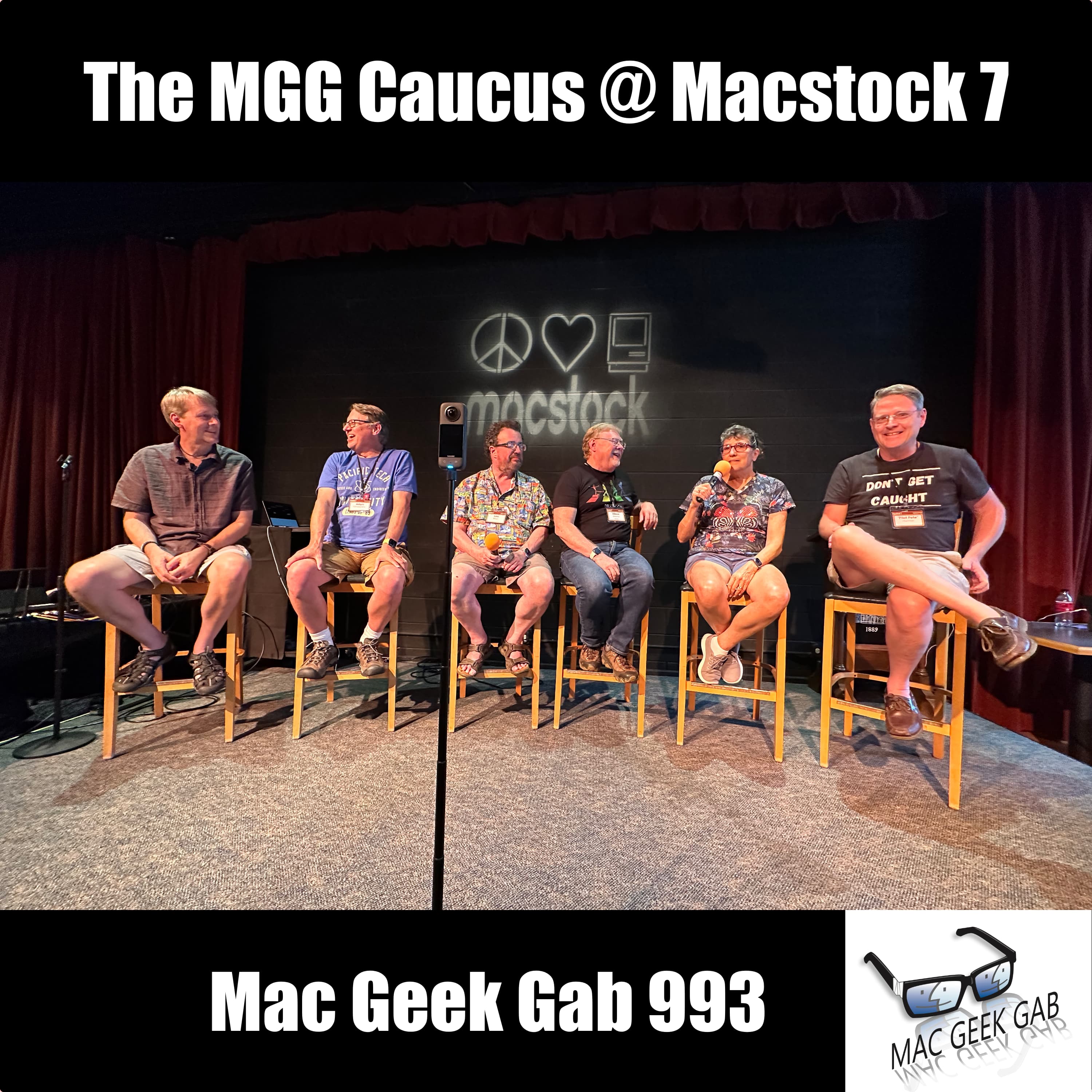
Ep 993The MGG Caucus @ Macstock 7
For this special episode, Dave Hamilton hosts the “Mac Geek Gab Caucus” live from the Macstock Conference. Joined by a robust panel including Pilot Pete, Allison Sheridan, Jeff Gamet, John F. Braun, and Adam Christianson, they launch into a retrospective on automation on Mac platforms, showcasing their diverse preferences for managing automation tasks. From AppleScript’s humble beginnings to the current state of affairs with JavaScript, IFTTT, and Zapier, listeners are offered a wealth of insight on tools and techniques to enhance their Mac experience. They then segue into the critical subject of backups, reminiscing about the evolution from third-party software to the now ubiquitous Time Machine, and the panelists impart wisdom on the myriad of contemporary options for data protection. As the conversation flows, the topic of backups converges with the advent of cloud storage, leading the group to discuss the challenges and benefits of the streaming revolution. The divide between the cable cutters and sports devotees gets addressed, offering creative tips for optimizing one’s viewing experience across platforms. The final leg of their journey centers around Apple’s pain points, particularly Siri’s issues, product line complexity, and inconsistent interfaces. They cap off the episode with Stump The Geeks: answers to live listener queries on web browsers, iCloud spam filters, and Bluetooth connectivity issues on Mac. Guided by their collective motto “Don’t Get Caught,” the caucus offers its gratitude to listeners and opens the floor for impromptu Q&A, ensuring Mac enthusiasts walk away enlightened and entertained. Press play and enjoy! Thanks to Steve Sheridan for capturing this photo of us all! Chapters/Timestamps/Stuff mentioned: 00:00:00 – Introduction and Setting the Scene at MacStock 00:03:20 – MacGeekGab Caucus: Introducing the Talking Stick Tradition 00:07:19 – Topic 1: Automation Tools on Mac 00:10:42 – Introduction to AppleScript and Script Editor 00:11:54 – Sources for learning programming: Apple Developer site and a book 00:15:18 – Happiness with current state of automation versus the past 00:16:12 – SPONSOR: HOPWTR – Get 20% off! 00:18:00 – Podcast: T-Minus Space Daily 00:19:08 – Topic 2: Backups! 00:22:14 – Importance of Snapshots and Network Backups 00:27:54 – Backing up data with Drobo and cloud storage 00:31:19 – The benefits of cloud storage. 00:32:43 – Topic 3: Media Consumption 00:40:43 – Dilution of TV programming and quality 00:48:11 – Time Machine Backup for External Drive 00:50:29 – The Uninteresting Devolution of the Conversation 00:52:14 – Complexity in product line and decision-making difficulties 00:55:06 – Troubles with Wi-Fi calling and default email addresses 00:58:54 – Frustrations with Apple’s iCloud spam filters and missing emails 01:02:19 – Troubleshooting Bluetooth Issues on Mac MGG 993 Outtro The Mac Geek Gab iPhone app Active MGG Sponsors and Coupon Codes List BackBeat Media Podcast Network
Ep 992Tech, Travel, AI, & Audio Cool Stuff Found
This week on Mac Geek Gab, hosts Pilot Pete and Dave Hamilton delve into a plethora of Cool Stuff Found. There are too many to list, but they include a new listener find, YouGetSignal, an open port check tool crucial for maintaining seamless connectivity by revealing blocked and open ports in user networks. The discussion then transitions to the controversial tool, watermarkremover.io, which removes watermarks from photos. Despite its impressiveness, it elicits ethical questions about intellectual property theft. Drawing parallels with Napster’s decline and Apple Music’s affordable, legal alternative, they underline the importance of accessible legal choices over morally questionable methods. With the show’s ethos in mind, “Don’t Get Caught” using such tools without considering their implications. The conversation later veers towards technicalities and challenges in the digital age. They clarify a detail about the Eve weather device, explaining its connection via matter and thread instead of Wi-Fi, and express their plan to further explore this topic in future episodes. They also introduce SMTP2go.com, a free service acting as an SMTP server, ideal for sending emails from custom domains. A lighthearted discussion ensues about the comical possibility of massive email volumes due to increasing listener counts. As they wrap up, your two favorite geeks emphasize nurturing the geek culture, fostering a community bound by common interests. Pilot Pete exemplifies this by blossoming into a geek, courtesy of the show, reminding listeners of the transformative power of shared knowledge. Chapters/Timestamps/Stuff mentioned: 00:00:00 Mac Geek Gab 992 for Monday, July 24th, 2023 The MGG Discord Server is Live! The MGG Merch Store is Live! Quick Tips 00:00:01 Bob-990-Use macOS’s Built-in Wi-Diagnostics 00:03:55 Tony-QT-Reply to Messages with Voice on Apple Watch Eats Shoots and Leaves 00:06:21 QT-Rename an SD Card that’s locked 00:07:52 QT-Allow for Urinal Inspiration Business Brain Podcast 00:11:31 Ben-QT-Quit the Dock to Empty Trash Again 00:12:56 Bob-QT-990-Ideas for Remembering Ideas 00:15:58 QT-Invoke Emergency Call and Medical ID Sponsors 00:17:31 SPONSOR: Hello Fresh. Skip trips to the grocery store and count on HelloFresh to make home cooking easy, fun, and affordable. Visit HelloFresh.com/MGG50 and use code MGG50 for 50% off plus free shipping. 00:19:21 SPONSOR: Notion Projects includes new, powerful ways to manage projects and leverage the power of their built-in AI features, too. For a limited time, try Notion Projects for free when by visiting Notion.com/MacGeekGab. 00:20:42 SPONSOR: This Week In Tech: Every week, This Week in Tech gives you a no-holds-barred, deep dive into how big tech influences our culture and our lives. Cool Stuff Found 00:21:37 David-CSF-988-There IS a Qi Mouse: Corsair Dark Core JoinHoney.com/MGG 00:24:40 Matt-CSF-Espanso, a free, github-hosted Text Expansion tool 00:26:22 Donna-CSF-Aldi’s Wood Grain Wireless Charging Clock 00:27:53 CSF – Outdoor Movie Screen 00:29:18 CSF-JBL Flip 6 Portable Waterproof Bluetooth Speaker 00:31:38 Greg-CSF-MakePass to Convert Barcodes into Apple Wallet Genius Scan 00:34:13 Blake-CSF-SpaceReclaimer to Free Up Storage on Apple TV (and only Apple TV) AI CSF 00:37:02 Tony-CSF-Use Siri and ChatGPT with S-GPT 00:40:32 CSF-Opera Generative AI Browser 00:41:19 Robert-All AI Tools and ChatGPT Prompts in 1 Article Also, from Ral605-CSF-How to use AI to do Practical Things 00:42:54 Ral605-CSF-Automate OpenAI with Zapier 00:45:05 Ari-Using ChatGPT to Write Blog Posts Travel CSF 00:51:00 Jamie Hotel Thermostat Travel Hack – $ Honeywell/Incomm Hotel Room Hack – VIP Mode/Override Amana Hotel Room Hack MOAR CSF 00:58:13 Rob-CSF-Shortery to Automate Shortcuts on the Mac Keyboard Maestro 00:59:33 Tony-CSF-Apple Launching a Monitor that Turns into a Smart Home Display 01:01:39 CSFR-Snap 3 Pro MagSafe compatible iPhone grip 01:04:24 SteveHammond-CSF-YouGetSignal’s Open Port Check Tool ShieldsUP! 01:05:50 CSF – Watermarkremover.io 01:11:16 Eve Weather isn’t Wi-Fi, it’s Matter (and Thread) 01:12:16 Rod L-CSF-SMTP2Go for FREE Email delivery (up to 1K/month) 01:16:46 Mac Geek Gab 992 Outtro Bandwidth Provided by CacheFly Follow us on Mastodon Mac Geek Gab on Mastodon Dave Hamilton on Mastodon Pilot Pete on Mastodon Mona for Mastodon (for Mac, iPhone, iPad) Pilot Pete’s Aviation Podcast: So There I Was (for Aviation Enthusiasts) Dave’s Business Brain (for Entrepreneurs) and Gig Gab (for Working Musicians) Podcasts MGG Merch is Available! Mac Geek Gab YouTube Page Mac Geek Gab Live Calendar This Week’s MGG Premium Contributors MGG Apple Podcasts Reviews [email protected] 224-888-GEEK The Mac Geek Gab iPhone app Active MGG Sponsors and Coupon Codes List BackBeat Media Podcast Network

Ep 991That's Not Junk Mail, Apple
Opening with a hack about the Apple Watch weather app, hosts Dave Hamilton and Pilot Pete journey into diverse topics including naval aviation in Pensacola and how to navigate the tricky waters of Apple Mail’s spam filters. They exchange insights on Apple’s seemingly erratic spam filtering and propose potential solutions such as disabling the feature entirely or seeking mail hosts with robust spam filtering systems. A cautionary reminder: “Don’t get caught” with legitimate emails in your junk folder! The hosts continue with their deep dive into Apple’s ecosystem, discussing third-party alternatives to Finder like Forklift. Tackling listener queries, Pilot Pete and Dave share solutions on importing burst photos and tips for managing Finder tabs. The show is also punctuated with helpful tidbits such as the value of keyboard shortcuts on iPads and Macs alike, as well as using the Adaptive Transparency feature of AirPods Pro Gen 2 for hearing protection. As tech problems arise—such as MacBook Pros mysteriously disconnecting from the internet or wallpaper settings reverting to default—the hosts offer practical troubleshooting tips, emphasizing the importance of regularly checking settings and controls. The dynamic duo further delve into device management during power outages and offer advice on resetting the Apple TV remote. Wrapping up the episode, your two favorite geeks discuss recent events at Plex, potential storage solutions, and share personal anecdotes, reminding listeners to continually engage, explore, and “Don’t get caught” in tech snafus. Chapters/Timestamps/Stuff mentioned: 00:00:00 Mac Geek Gab 991 for Monday, July 17th, 2023 Naval Aviation Museum in Pensacola The MGG Discord Server is Live! The MGG Merch Store is Live! Quick Tips 00:00:01 QT-Apple Watch Weather – Tap in the middle of the hourly “circle” to change from temp, to temp+precip, to precip percentage 00:02:52 MyFaceIsTooBig-QT-Follow Github Repositories for App Updates MacUpdater MGG Calendar MGG Discord 00:05:43 macOS Apple Mail catching too much spam 00:15:42 PCUnix-QT-Select Text Using the Keyboard…on both Mac and iPad 00:20:30 Chicago Tom-QT-Option-Click Sound Menu Bar to change input device Sponsors 00:21:28 SPONSOR: HOP WTR. No alcohol, calories, or sugar in this refreshing, hoppy-flavored beverage with mood-boosting benefits! Get 20% off your first purchase (and free shipping when you order 24 cans) at HOPWTR.com/MGG. 00:23:06 SPONSOR: BBEdit, the power tool for text from Bare Bones Software; now with integrated Notebooks and extended language support. 00:24:48 PODCASTS: Visit Twit.TV/Apple for Mac Break Weekly, iOS Today, Hands-On Mac and more! Your Questions Answered and Tips Shared! 00:25:54 Judy-How to Import a Stubborn Photo into Apple Photos? 00:29:09 KYEngineer-What does Show Tab Bar on the Mac’s Finder do? ForkLift PathFinder Setapp 00:34:22 Aron-Using AirPods Pro 2 Adaptive Transparency for hearing protection. 00:41:12 NedH-Mac Connects to Local Devices, but Not Internet. Why? 00:49:29 ManicBlogger-My Devices Keep Asking for my WiFi Password 00:52:06 Roger-How can I reboot my router when the Internet goes out? Keep Connect ConnectSense Router Rebooter Pass-thru Restarter (maybe?) – Probably not 00:58:15 Barb-My Apple TV Remote stopped working 01:03:25 Bypassing a Bad Wi-Fi Chip 01:09:44 Javier-Aerial ScreenSaver Filled Up My Apple TV 01:12:00 Pete’s Aurora Borealis Story 01:15:05 Mac Geek Gab 991 Outtro Bandwidth Provided by CacheFly Follow us on Mastodon Mac Geek Gab on Mastodon Dave Hamilton on Mastodon Pilot Pete on Mastodon Mona for Mastodon (for Mac, iPhone, iPad) Pilot Pete’s Aviation Podcast: So There I Was (for Aviation Enthusiasts) Dave’s Business Brain (for Entrepreneurs) and Gig Gab (for Working Musicians) Podcasts MGG Merch is Available! Mac Geek Gab YouTube Page Mac Geek Gab Live Calendar This Week’s MGG Premium Contributors MGG Apple Podcasts Reviews [email protected] 224-888-GEEK The Mac Geek Gab iPhone app Active MGG Sponsors and Coupon Codes List BackBeat Media Podcast Network

Ep 990If It Ain't Broke, Fix It 'Til It Is!
In this high-flying episode of Mac Geek Gab, Pilot Pete and Dave Hamilton unleash a treasure trove of quick Mac tips and tricks. They kick things off by zooming through system settings, with Pilot Pete navigating users on a shortcut to access them with the Option key. Not stopping there, the duo dive into accessibility customization, chat about the iPhone’s app icon wiggle-speed, and unleash the power of Siri on Macs – who knew typing to Siri could be so handy? But wait, “Don’t Get Caught” unprepared, as they segue into the savvy world of phone insurance, exploring self-insurance and credit card backup plans. The action doesn’t stop as they turn the Wi-Fi up to 11, discussing network upgrades, optimizing power levels, and channel selection. A hiccup with Time Machine backups on Synology NAS is thwarted with potential fixes. Phone in hand, they then globe-trot into mobile carriers and eSIMs, perfect for those Alaskan escapades. On the final descent, they spotlight the podcast-perfect Mackie DLZ Creator mixer, and before the landing gear comes down, they share gratitude for the community, plug Pilot Pete’s aviation-centric podcast “So There I Was”, and give a shoutout to Mac Stock. Strap in, because this episode takes you on a roller-coaster ride of Mac wisdom. Chapters/Timestamps/Stuff mentioned: 00:00:00 Mac Geek Gab 990 for Monday, July 10th, 2023 The MGG Discord Server is Live! The MGG Merch Store is Live! Quick Tips 00:00:01 PilotPete-QT-Option+[Keyboard Controls] Brings up System Settings for Brightness, Mission Control/Appearance, or Sound 00:02:52 Tony-QT-Take a Screenshot to Easily Zoom Everything on iPad or iPhone 00:05:22 Todd-QT-Get Your iPhone Apps to Wiggle Mode Faster! 00:06:56 Chicago Tom-QT-989-Use Siri on the Mac to Take a Quick Note…Silently, and without Stealing Focus 00:13:19 Matt-July 11-12 is Indie App Sales Day…Over 60 apps with discounts! 00:14:38 OldGuy-PSA-T-Mobile Autopayment Discount Only for Debit Cards now 00:20:34 Allison-PSA-Tailscale Breaks Keyboard in Sonoma Sponsors 00:21:48 SPONSOR: Zocdoc, the easiest way to find a great doctor and instantly book an appointment. Sign up for FREE at Zocdoc.com/MGG and download the app today. 00:23:33 SPONSOR: LinkedIn Jobs. Go to LinkedIn.com/MGG and post your first job for free! 00:25:10 SPONSOR: Notion Projects includes new, powerful ways to manage projects and leverage the power of their built-in AI features, too. For a limited time, try Notion Projects for free when by visiting Notion.com/MacGeekGab. Your Questions Answered and Tips Shared! 00:26:56 Gary – Why Can’t I Take a Screenshot of my Prime Video? 00:29:37 JTRay-How can I get more than 2TB of iCloud Storage? 00:32:34 Melissa-When Is It Time to Upgrade My Wi-Fi? TP-Link Deco 00:40:21 Jamie-Advice for Setting Up My Own Wi-Fi Mesh? eero Wi-Fi Explorer Cell Phone Signal Strength: *3001#12345#* Cool Cell Phone Codes 00:49:47 Rich-Repairing a Broken Time Machine Network Connection 00:56:12 Steve-“To Photos” or “Not to Photos” 01:00:59 Mark-What to do about Travel when Dropping from one of the big mobile carriers? eSIMdb.com PokeFi Cool Stuff Found 01:09:34 CSF-Mackie DLZ Creator 01:17:23 Mac Geek Gab 990 Outtro Bandwidth Provided by CacheFly Follow us on Mastodon Mac Geek Gab on Mastodon Dave Hamilton on Mastodon Pilot Pete on Mastodon Mona for Mastodon (for Mac, iPhone, iPad) Pilot Pete’s Aviation Podcast: So There I Was (for Aviation Enthusiasts) Dave’s Business Brain (for Entrepreneurs) and Gig Gab (for Working Musicians) Podcasts MGG Merch is Available! Mac Geek Gab YouTube Page Mac Geek Gab Live Calendar This Week’s MGG Premium Contributors MGG Apple Podcasts Reviews [email protected] 224-888-GEEK The Mac Geek Gab iPhone app Active MGG Sponsors and Coupon Codes List BackBeat Media Podcast Network
Ep 989Just Call It Touch-Touch
In this Mac Geek Gab episode, Dave Hamilton and Pilot Pete start with app permissions and then dive into the world of shortcuts, offering valuable resources like MacSparky’s field guide. Listener Ben contributes a shortcut for opening folders in the Finder, and the hosts discuss the magic of the option key and terminal shortcuts. They highlight advanced Mac OS command-line tools and share tips for activating Siri without a mouse. They urge listeners to experiment with Siri’s efficiencies across devices. A travel tip comes from a listener about manually adjusting the iPhone time when traveling, and they debunk the myth about phones causing flight disruptions. The hosts emphasize the need for system-wide clipboard managers and explore the usefulness of keyboard automation tools. Dave and Pete endorse training Apple’s filters to manage junk mail, stressing consistent efforts for efficiency. They recommend QR code scanner apps, share a unique QR code usage at a Dutch restaurant, and suggest attaching receipts to digital user manuals. They wrap up discussing Duck.com email service, CleanMyMac X, QuickTime Player for video editing, and encourage listener questions. Press play and enjoy! Chapters/Timestamps/Stuff mentioned: 00:00:00 Mac Geek Gab 989 for Monday, July 3rd, 2023 CBDfx with Melatonin 00:04:10 Hangout on July 9th, 4pm EDT: SHORTCUTS. Come and share! MGG Calendar MGG Discord MacSparky’s Shortcuts Field Guide Quick Tips 00:00:01 QT-Go into Your Mac’s System Prefs/Settings > Privacy and check every category 00:05:45 Ben-QT-Command-Option-Click Dock Folder to Open in Finder Eighty Shades of Option Key 00:06:36 Chicago Tom-Run Shortcuts from the command line with “shortcuts run” 00:08:26 Lawyer Jeff-CSF-Advanced macOS Command-Line Tools 00:10:02 Chicago Tom-QT-Set a Keyboard Shortcut for Siri on your Mac 00:15:02 Martin-QT-Manually Change Your iPhone’s Time Zone 00:19:53 Ben-QT-Adjust iPhone and iPad Haptic Touch Speed Settings > Accessibility > Touch > Haptic Touch 00:22:10 Ben-QT-Relaunch Finder to Resolve Clipboard Failure killall pboard 00:23:37 Clipboard Managers Paste Clipboard Manager 00:27:59 Setup Shortcuts for your email addresses and phone numbers 00:29:35 QT Shift-Option-Command-v does a “Paste and Match Style” in MacOS 00:31:17 Grumpy-QT-988-Open Code Scanner in Safari and Add Model & Serial to Manuals in Notes Sponsors 00:34:45 SPONSOR: Hello Fresh. Skip trips to the grocery store and count on HelloFresh to make home cooking easy, fun, and affordable. Visit HelloFresh.com/MGG50 and use code MGG50 for 50% off plus free shipping. 00:36:13 PODCAST: The Jordan Harbinger Show. Jordan is a master interviewer, obsessed about audio quality, and focused on producing a great show that we think you’re going to love. Your Questions Answered and Tips Shared! 00:37:43 Larry-How do I manage iCloud Junk Mail? Manage Junk Mail for your iCloud Account SaneBox MailChimp ConvertKit 00:49:49 Kent-Google Results in Safari not what I expected on iPhone & iPad 00:53:22 CarPlay Speed Limits Follow Local Units instead of System Settings 00:59:25 Steve Hammond-How do I keep my Apple TV from repeatedly locking up? 01:01:41 Brent-Best Malware Scanner for Mac? Malwarebytes CCleaner Duck.com Email Cleaner CleanMyMac X 01:05:32 Gary Stitcher Going Away Aug 29th Gary-How to Stream (and not Download) Podcasts? Overcast 01:08:28 Chad – Overcast isn’t a video player 01:11:04 Mac Geek Gab 989 Outtro Hangout on July 9th, 4pm EDT: SHORTCUTS. Come and share! Bandwidth Provided by CacheFly Follow us on Mastodon Mac Geek Gab on Mastodon Dave Hamilton on Mastodon Pilot Pete on Mastodon Mona for Mastodon (for Mac, iPhone, iPad) Pilot Pete’s Aviation Podcast: So There I Was (for Aviation Enthusiasts) Dave’s Business Brain (for Entrepreneurs) and Gig Gab (for Working Musicians) Podcasts MGG Merch is Available! Mac Geek Gab YouTube Page Mac Geek Gab Live Calendar This Week’s MGG Premium Contributors MGG Apple Podcasts Reviews [email protected] 224-888-GEEK The Mac Geek Gab iPhone app Active MGG Sponsors and Coupon Codes List BackBeat Media Podcast Network
Ep 988Watch Out For ConWare
Kicking off this week’s Mac Geek Gab, Dave Hamilton and Pilot Pete share a listener’s clever suggestion about storing receipts and user manuals in the Books app, a novel way to keep things organized and easily accessible. Your two favorite geeks then explore the little-known trick of shrinking the picture-in-picture screen on Microsoft Teams using a trackpad, as well as a hidden feature in iOS and iPadOS that brings text on a photo to life, simply by long-pressing on it. Dave and Pilot Pete also tackle troubleshooting tricks for Safari issues, spanning from the basics of uninstalling and reinstalling, to the more intricate reasons that may prevent a user from logging into websites or staying logged in. They ponder the likelihood of Safari being set to private browsing mode or having the “block all cookies” setting turned on, providing a comprehensive guide for the perplexed. The dynamic duo further discuss the intricacies of using eSIMs and physical SIMs, shedding light on the potential use of multiple active eSIMs across different iPhone models. Cool Stuff Found finds Dave and Pete sharing reviews of the Logitech G PowerPlay system for Qi-compatible mice and the Zenz Liberty, a versatile wireless charging pad that caters to a range of devices, including the Apple Watch. They further endorse the Eve Weather sensor as a dependable, Thread-connected weather station and the Brilliant smart home control system, which seamlessly integrates with HomeKit and devices like Sonos. Wrapping it up, Dave shares his recent experience with the iOttie Velox Mini MagSafe air vent mount, a handy gadget for the car that utilizes a MagSafe connector to charge phones on-the-go. They wholeheartedly recommend this device to their listeners for its practicality and convenience. Press play, enjoy, and Don’t Get Caught! Chapters/Timestamps/Stuff mentioned: 00:00:00 Mac Geek Gab 988 for Monday, June 26th, 2023 The MGG Discord Server is Live! The MGG Merch Store is Live! Quick Tips 00:00:01 QT – Rebuild your inbox in Mail 00:03:20 The Brown M&M Litmus Tests 00:04:40 Mark – QT-Launch the iPhone’s QR Code Scanner with Control Center, Spotlight, or a Shortcut 00:06:45 If you Wait until you’re ready, you’ll never begin. 00:06:58 Tigg – QT- Use Books app to store User Manuals and Receipts 00:09:37 Jim-QT – Picture-in-Picture is Resizable with a Pinch 00:11:40 PCUnix-QT – Long-press on a Photo to get Safari’s “Show Text” option 00:14:14 PorthosJon – QT – Manually Install Rosetta 2 on Your New Mac Right Away softwareupdate –install-rosetta –agree-to-license 00:18:06 Tim – QT –Restart Your Apple TV Remote If Its Not Functioning Properly 00:20:43 What Else Have You Been Hiding From Us? 00:22:21 Cory-986 – PSA: Quick Videos are lower quality Adrian Clark-QT – 986-Drag Left in iPhone Camera for Burst Mode 00:24:17 Paul-986 – Swipe Up-and-Down on iPhone Camera Shutter to Zoom Sponsors 00:25:57 SPONSOR: Notion Projects includes new, powerful ways to manage projects and leverage the power of their built-in AI features, too. For a limited time, try Notion Projects for free when by visiting Notion.com/MacGeekGab. 00:27:37 SPONSOR: Hello Fresh. Skip trips to the grocery store and count on HelloFresh to make home cooking easy, fun, and affordable. Visit HelloFresh.com/MGG16 and use code MGG16 for 16 free meals plus free shipping. 00:28:56 SPONSOR: Kolide – Kolide ensures only secure devices can access your cloud apps. It’s Zero Trust tailor-made for Okta. Book a demo today. Try Kolide Today at Kolide.com/MGG Your Questions Answered and Tips Shared! 00:30:20 Jim – What’s The Best Way to Upgrade my Wi-Fi Network? Eero Plume TP-Link Deco BE33000 Quad-Band WiFi 7 Mesh System (Deco BE95) 00:41:28 Terry – Can Safari be Stopped from Logging me Out 00:49:41 GoForTech – How to stop scam Pop-Up Notifications? Beware of Conware! 00:54:14 Todd – Can I Use my Phone as a Hotspot with an eSIM? 00:57:26 eSIM advice eSIMdb 01:04:35 Steve – Hot Mac and SMC Reset Question Cool Stuff Found 01:08:10 Jon-CSF – Get a Qi Mouse with the Logitech G PowerPlay System 01:09:19 CSF – Zens Liberty – 16 coil wireless charger (clear glass or black) 01:11:31 PCUnix-CSF – Motion Sensing Stick-on Lights for Closets and Cabinets YeeLight 01:13:21 CSF – Eve Weather – HomeKit Outdoor Weather Sensor (and tracker) 01:14:28 Jon-CSF – Brilliant Smart Home Controls and Switches 01:17:48 CSF – iOttie Velox Mini MagSafe Air Vent Mount for Car 01:20:05 Mac Geek Gab 988 Outtro Bandwidth Provided by CacheFly Follow us on Mastodon Mac Geek Gab on Mastodon Dave Hamilton on Mastodon Pilot Pete on Mastodon Mona for Mastodon (for Mac, iPhone, iPad) Pilot Pete’s Aviation Podcast: So There I Was (for Aviation Enthusiasts) Dave’s Business Brain (for Entrepreneurs) and Gig Gab (for Wor
Ep 987Unexpected Ripple Effects
Hey there, fellow tech enthusiast! Dave and Pete kicked things off by discussing some neat ideas to keep you organized. They talked about the power of creating a dedicated Notes folder, where you can jot down important information or even take pictures of where you’ve placed items. It’s like having a digital memory to rely on when you need it most! If you’re an iPhone user, you’re in for a treat. The dynamic duo shared some handy messaging tips that will make your life easier. They talked about merging contact threads to keep your conversations streamlined and avoid any confusion. Plus, they highlighted the importance of not setting a default voice number to prevent any hiccups with sending and receiving texts. It’s all about ensuring smooth communication in the digital realm. But it doesn’t stop there! Dave and Pete also emphasized the ripple effects of our tech decisions. They encouraged listeners to leverage keyboard shortcuts and custom menu shortcuts to supercharge their workflow. And for those drowning in emails (we’ve all been there), they offered some fantastic advice on navigating and managing them efficiently. Trust me, you’ll be thanking them when your inbox feels less overwhelming! When it comes to troubleshooting Apple devices, these geeks have got you covered. They discussed practical solutions like restarting your Mac and even reinstalling the operating system if necessary. It’s all about keeping your tech running smoothly and avoiding unnecessary headaches. But hold on, the conversation didn’t stop at tech alone! Dave and Pete shared their wisdom on other intriguing topics, such as online security. They highlighted the importance of using VPNs like PIA (Private Internet Access) to safeguard your online privacy. And hey, did you ever think you’d hear them talking about harmony and theory classes for singing? These guys surprise us every time! They also dove into battery management tips for Mac laptops, helping you get the most out of your device’s power. And brace yourself for one last gem: the Ultimate Vocal Remover. It’s an open-source audio editing software that can isolate vocals and preserve reverb, perfect for karaoke lovers or those looking to learn harmony parts. It’s amazing what you can do with technology these days! So, MGG family, we encourage you to press play on the latest episode of Mac Geek Gab. Dave and Pilot Pete will undoubtedly deliver a wealth of knowledge, and you’re guaranteed to learn at least five new things that will make your tech life more awesome. Happy listening…and Don’t Get Caught! Chapters/Timestamps/Stuff mentioned: 00:00:00 Mac Geek Gab 987 for Monday, June 19th, 2023 PCUnix-QT-Create a “Where did I put it?” folder in Notes The MGG Discord Server is Live! The MGG Merch Store is Live! Quick Tips 00:03:35 Robb-QT-Merge Contacts to Retain History 00:10:33 Neal-QT-Click the PDF icon in Mac Print dialog to Save as PDF (2nd half) MacSparky says – Create keyboard shortcut Option-Semicolon gets you Ellipses… 00:14:58 Larry-QT-Verizon did a “network sync” to fix SMS issues 00:18:47 You Can Share Your iPhone/iPad Directly in Zoom 00:20:45 Dimming Your Screen…and Getting It Back 00:25:46 Rod L-QT-Enable Voice Isolation when calling from iPhone Vacuum Pack bags for travel 00:29:05 Saurabh-QT-Add Command-key to jump to top or bottom of Mac Mail lists Option arrow to jump to different emails in a thread 00:34:27 Pensacola Craig-QT-Option-Click the Apple Logo for System Information report 00:35:20 Louis-986–iFramix Pricing Correction: US$39 Sponsors 00:36:38 SPONSOR: Private Internet Access VPN – Save 82% off your VPN service PLUS four free months with a two-year plan at PIAVPN.com/mgg. 00:38:15 SPONSOR: Kolide – Kolide ensures only secure devices can access your cloud apps. It’s Zero Trust tailor-made for Okta. Book a demo today. Try Kolide Today at Kolide.com/MGG Your Questions Answered and Tips Shared! 00:39:34 Paul creating Calendar Events on iPhone without errors 00:43:49 Steve-Keeping Network Drives Mounted Keyboard Maestro AutoMounter 00:46:58 Jim-Setting a Timer on iCloud Keychain’s Password Unlock 00:48:40 Gary iMessage Crashing in Ventura – Ventura Messages Quit(s) Unexpectedly OnyX 00:54:52 Saurabh-How to Make Phone Calls Without a SIM? Skype to Phone Calls MySudo Google Voice Cool Stuff Found 01:00:41 CSF-Smartish Cable Wrangler (and “Bigger”) and Crown Joule 01:03:26 Aron-CSF-Ultimate Vocal Remover for splitting vocals from instruments “Botched Amalgamations” by FLING 01:13:43 Neal-CSF-Eufy SmartTrack Card for FindMy in your Wallet 01:14:58 Joe-CSF-AlDente for Enhanced Battery Management (a revisit to 859, where the same Joe originally CSFed this!) Mac Geek Gab 987 Outré Bandwidth Provided by CacheFly Follow us on Mastodon Mac Geek Gab on Mastodon Dave Hamilton on Mastodon Pilot Pete on Mastodon Pilot Pete’s Aviation P
Ep 986Just Use Your Nose
In this episode, your two favorite geeks share some incredible quick tips, cool stuff found, and answer burning questions from the Mac geek community. So, fasten your seatbelts and join us as we dive into the world of Mac tips and tricks. Remember, as Dave and Pilot Pete always say, “Don’t Get Caught” without the latest knowledge! Quick Tips The show kicked off with an array of quick tips to supercharge your Mac experience. Here are some highlights: Hold iPhone Shutter for Quick Video, Slide Right to Lock Video Recording – Jeff revealed a time-saving tip for iPhone users. By holding the shutter button, you can instantly start recording a video. Sliding right locks the video recording, ensuring you don’t accidentally stop capturing those precious moments. Trigger-then-drag iPhone Volume Gauge to Fine-Tune – James shared a nifty trick to fine-tune your iPhone volume. After triggering the volume control, simply drag your finger up or down on the gauge for precise adjustments. macOS Ventura’s Image Capture includes OCR to PDF – Bill enlightened the audience about a powerful feature in macOS Ventura’s Image Capture. It allows you to convert images to searchable PDFs using OCR (optical character recognition) technology. Say goodbye to manual data entry! Tapback from Notification Center – JamCycler showcased a time-saving gem for iPhone users. Now you can quickly send Tapbacks, those expressive little reactions, directly from the Notification Center. Function-key equivalents for Home and End Keys – Bill shared a useful tip for keyboard warriors. You can replicate the functionality of the Home and End keys on a Mac keyboard using function-key equivalents. Use Creation Dates to Help Find Related Materials – Josh unveiled a clever way to organize your digital clutter. By leveraging creation dates, you can easily locate related files and materials, streamlining your workflow. Immediately Delete Unwanted Screen Recording on iPhone – JamCycler empowered iPhone users with a quick tip to reclaim storage space. Now, you can instantly delete unwanted screen recordings, ensuring your device stays clutter-free. Cool Stuff Found Dave and Pete never disappoint when it comes to unearthing the coolest stuff for Mac enthusiasts. Here are some of their exciting finds: iOS 17 Public Beta App Compatibility Chart – Adrian shared a valuable resource for those eager to explore the upcoming iOS 17 beta. The iOS 17 Public Beta App Compatibility Chart helps you ensure your favorite apps will run smoothly on the new operating system. Thermacell LIV Mosquito Prevention System – Stay bite-free this summer with the Thermacell LIV Mosquito Prevention System, shared by CSFR. It’s a must-have gadget for outdoor enthusiasts. Play to Track Your “Watch Later” Lists – David introduced “Play,” a fantastic tool for organizing your “Watch Later” lists across various platforms. Never miss out on your favorite content again. Number Shield for Pattern-Based Call-Blocking – Lee brought attention to Number Shield, a powerful call-blocking solution based on patterns. Say goodbye to unwanted calls and spam with this handy app. Keyboard Clean Tool Free! – Pete shared a cool free tool, Keyboard Clean, perfect for keeping your Mac’s keyboard tidy and grime-free. Remember, a clean keyboard is a happy keyboard! Notion Boost Browser Extension – Ral605 uncovered the Notion Boost browser extension, a handy add-on that enhances your productivity within Notion, the popular note-taking and task management app. Shottr: Better Screen Capture Tool! – CSFR highlighted Shottr, a fantastic screen capture tool that elevates your screenshot game to the next level. Say goodbye to clunky and limited screenshot options! Conclusion That wraps up the highlights from Mac Geek Gab 986. Dave Hamilton and Pilot Pete share invaluable quick tips, cool discoveries, and expert insights to take your Mac experience to new heights. Remember to subscribe to future episodes for more exciting updates and cutting-edge tech advice. Until then, keep exploring, learning, and as Dave and Pete say, “Don’t Get Caught” without the latest Mac geekery! Chapters/Timestamps/Stuff mentioned: 00:00:00 Mac Geek Gab 986 for Monday, June 12th, 2023 The MGG Discord Server is Live! The MGG Merch Store is Live! Quick Tips 00:00:01 Jeff-QT-Hold iPhone Shutter for Quick Video, Slide Right to Lock Video Recording 00:03:38 James-QT-Trigger-then-drag iPhone Volume Gauge to Fine-Tune 00:05:43 Bill-QT-macOS Ventura’s Image Capture includes OCR to PDF 00:06:47 JamCycler-QT-Tapback from Notification Center 00:08:30 Bill-QT-Function-key equivalents for Home and End Keys MacBook Keys for the Home & End keys found on Apple Extended Keyboard: Home: Fn + Left arrow End: Fn + Right arrow Excel (For Apple Extended Keyboard and for MacBook k
Ep 985We Truly Live in a World of Wonder
Jeff Gamet joins Pilot Pete and Dave Hamilton to talk about Apple’s WWDC announcements including the new 15″ MacBook Air, the Apple Silicon Mac Pro, iOS 17, iPadOS 17, macOS Sonoma and, of course, Apple’s new spatial computing headset: The Apple Vision Pro. Chapters/Timestamps/Stuff mentioned: 00:00:00 Mac Geek Gab 985 for later-in-the-day on Monday, June 5th, 2023 Apple’s WWDC23 Keynote: We Truly Live In a World Of Wonder 00:03:05 New Macs MacBook Air 15” – $1299+ Compare with other MacBooks Air Mac Studio with M2 Max & Ultra – $1699+ Apple Silicon Mac Pro – $6999+ 00:13:22 macOS Sonoma Safari Profiles and Web Apps Share Passwords and Passkeys with a group using iCloud Keychain Sherlocked! Video Conferences Presenter Overlays Desktop Widgets (again!) 00:26:27 Apple Vision Pro: spatial computing headset – $3499 (announced) 00:40:45 iOS 17 Messages Search Filters 00:43:06 Where was AI? There’s no more Ted Lasso 00:52:05 More iOS 17, iPadOS 17, watchOS 10 Contact Cards Live Voicemail Journal app StandBy Use iPhone to Locate Apple TV Remote Mental Health Tracking/InsightsInteractive Widgets Multiple Timers 01:03:00 What else wasn’t mentioned in the keynote? 01:11:28 Mac Geek Gab 985 Outtro <https://mgg.fm/985> Find Jeff Gamet on Mastodon and Instagram; MacVoices Live, In Touch With iOS, The Big Show & The Mac Show, The Context Machine Bandwidth Provided by CacheFly Pilot Pete’s Aviation Podcast: So There I Was (for Aviation Enthusiasts) Dave’s Business Brain (for Entrepreneurs) and Gig Gab (for Working Musicians) Podcasts MGG Merch is Available! Mac Geek Gab YouTube Page Mac Geek Gab Live Calendar This Week’s MGG Premium Contributors MGG Apple Podcasts Reviews [email protected] 224-888-GEEK The Mac Geek Gab iPhone app Active MGG Sponsors and Coupon Codes List BackBeat Media Podcast Network
Ep 984Sit On Your Hands
In this episode Dave Hamilton and Pilot Pete bring you a treasure trove of quick tips, insights, cool stuff found, troubleshooting mistakes, and expert advice. So, fasten your seatbelts and get ready for a mind-blowing Apple journey. As we always say, “Don’t Get Caught” without the latest tech knowledge! Quick Tips for the Savvy Mac User: Disable “Ask Before Running” on Personal Automation Shortcuts (QT-Disable “Ask Before Running” on Personal Automation Shortcuts): Learn how to streamline your workflow and eliminate unnecessary prompts. Use Shortcuts to Re-engage Your iPhone Alarm (Chicago Tom-QT-Use Shortcuts to Re-engage your iPhone alarm): Discover how to make sure your alarm wakes you up when you need it most. Unleashing the Power of Shortcuts In this segment, PorthosJon shares an insightful tip (983-Use Shortcuts to Replace Leading Spaces before Punctuation) that will save you time and effort when working with text. Furthermore, Gary reveals eight fixes for unejectable drives on your Mac (QT-8 Fixes for unejectable drives on your Mac), ensuring a smooth experience when handling external storage devices. CeeDub559 discusses mobile data usage tracking and resetting (981-Mobile Data Usage Tracking and Resetting), allowing you to manage your data consumption effectively. Quick-Hit Cool Stuff Found: Plex ATMOS on Apple TV with Infuse (Zack-CSF-968-Use Infuse to get Plex ATMOS on Apple TV): Elevate your audio experience by integrating Plex and Infuse. Explore the Dimensions of Many Items with Dimensions.com (Pensacola Craig-CSF-Dimensions.com Shows Dimensions of Many Items): Get accurate measurements for various objects with just a few clicks. Download iCloud Photo Library with Docker-iCloudPD (stevehammond-CSF-Use Docker-iCloudPD to Download iCloud Photo Library): Simplify the process of downloading your iCloud Photo Library using Docker-iCloudPD. Bruce presents SystemName (CSF-983-SystemName for Changing/Managing Your Mac’s Network Name), an essential tool for managing your Mac’s network name effortlessly. Mistakes We ALL Make: Troubleshooting and Supporting with Assumptions Pilot Pete shares his exciting experience with his new Mac, offering insights and recommendations for fellow Mac enthusiasts. Dave and Pilot Pete discuss common mistakes when troubleshooting and supporting computer-related issues. Remember, it’s crucial not to assume knowledge when providing assistance. Sit on your hands and listen carefully before jumping to conclusions! Your Questions Answered and Tips Shared! Barry seeks guidance on auto-deleting iCloud junk mail, and the hosts suggest SmallCubed Mailsuite as a helpful tool. Mark raises the issue of Mac restarts due to problems and receives advice on using TechTool Pro and resetting NVRAM and SMC. KYEngineer inquires about porting a landline to an iPhone, and the hosts recommend using a T-Mobile SIM and for a seamless transition to Google Voice if that’s your preference. Rob clarifies the proper use of the “umount” command when removing drives from /Volumes. Drewski seeks assistance with MDS-related CPU usage, and the hosts shed light on the meaning of MDS (metadata server). Cool Stuff Found: Additional Discoveries Discover how to migrate from Twitter to Mastodon using Fedifinder and explore the benefits of Mona and Ivory as clients. Also, learn how Topiary helps you prune inactive followings. Don’t forget to join Mac Geek Gab on Mastodon and follow hosts Dave Hamilton and Pilot Pete for more exciting Mac content! Conclusion In this captivating episode of Mac Geek Gab, Dave Hamilton and Pilot Pete have covered a wide range of topics, including quick tips, cool stuff found, troubleshooting mistakes, and expert advice. They’ve shared valuable insights to help you unleash the full potential of your Mac and avoid common pitfalls. Remember, “Don’t Get Caught” without this essential Apple knowledge! Tune in to Mac Geek Gab for your regular dose of Mac goodness and stay ahead of the curve in the ever-evolving world of technology. Chapters/Timestamps/Stuff mentioned: 00:00:00 Mac Geek Gab 984 for Monday, June 5th, 2023 The MGG Discord Server is Live! The MGG Merch Store is Live! Quick Tips 00:00:01 QT-Disable “Ask Before Running” on Personal Automation Shortcuts 00:02:43 Chicago Tom-QT-Use Shortcuts to Re-engage your iPhone alarm Mac OS Ken 00:10:29 PorthosJon-983–Use Shortcuts to Replace Leading Spaces before Punctuation 00:14:35 Gary-QT-8 Fixes for unejectable drives on your Mac 00:15:27 CeeDub559-981-Mobile Data Usage Tracking and Resetting Sponsors 00:18:05 SPONSOR: Zocdoc, the easiest way to find a great doctor and instantly book an appointment. Sign up for FREE at Zocdoc.com/MGG and download the app today. 00:19:41 SPONSOR: Kolide – Kolide ensures only secure devices can access your cloud apps. It’s Zero Trust tailor-made for Okta. Book a demo today. Try Kolid
Ep 983Mail Doesn’t Get The Hint
Welcome back, Mac Geeks! In this episode of Mac Geek Gab, your go-to podcast for all things Mac, our hosts Dave Hamilton, John F. Braun, and Pilot Pete dive deep into the digital waters of Apple’s ecosystem, covering everything from Quick Tips to solving your burning questions. So, strap in and Don’t Get Caught in the whirlwind of tech unaware! Quick Tips to Streamline Your Apple Experience After our usual friendly banter, we kick off the show with a series of Quick Tips that can completely transform the way you interact with your Mac and other Apple devices: Press-and-hold on your iPhone to prioritize an app update. No more waiting for that crucial app to finally update! Learn how to set default scrolling options on your Mac, thanks to listener Bill. This will certainly smooth your navigation experience. Patrick shares a handy tip on using multiple search/filter terms in Mail. Don’t let your inbox overwhelm you! Avoiding Hidden Dangers: Keeping Your AirPods Safe It’s crucial to remember that hiding your AirPods inside RFID protected places isn’t the best idea. Why? Tune in at 00:16:17 to find out! Making the Most of Your Apple Watch and iPhone We delve into how you can run multiple timers on your Apple Watch and discuss the peculiar fact that the iPhone can’t do this just yet. PCUnix shares a nifty trick to force your iPhone to unlock your Watch, while Scott enlightens us with a shortcut to allow or disallow unknown callers using Siri. We also explore the latest features introduced in iOS 16.5 and macOS 13.4, such as Siri commands for screen recordings and a solution to the slow Bluetooth issue. Your Questions Answered and Tips Shared The most rewarding part of hosting Mac Geek Gab is answering your questions and sharing your tips. In this episode, we tackle several intriguing topics: Michael’s query about receiving notifications on both his Phone and Watch. Nick’s question about replacing leading spaces before punctuation. We delve into the utility of Rocket Typist and TextExpander in this context. HarveyH’s uncertainty about changing a drive’s name in Finder. InfamousJohnnyB’s issue about unmounting specific volumes for specific users. And Gordon’s struggle with the Fontbook App when attempting to make collections. Cool Stuff Found: Enhance Your Mac Life We wrap up the episode with some of the coolest finds, including a smart plug power strip compatible with HomeKit and Alexa, an Aura Frame for displaying and sharing photos, and Ventura’s AUSoundIsolation Plugin to magically remove background noise. In the end, though Mail Doesn’t Get The Hint, you can stay ahead of the curve with Mac Geek Gab, ensuring you Don’t Get Caught unprepared in this rapidly evolving tech world. So, tune in to this episode and elevate your Apple ecosystem experience today! Chapters/Timestamps/Stuff mentioned: 00:00:00 Mac Geek Gab 983 for Monday, May 29th, 2023 The MGG Discord Server is Live! The MGG Merch Store is Live! 00:02:45 MGG Evolves! Twitterific MacStock Conference Quick Tips 00:00:01 QT-Press-and-hold on iPhone to Prioritize Download for App Updates, too 00:08:40 Bill-QT-982-Setting Default Scrolling Options on the Mac 00:10:24 Patrick-QT-Use Multiple Search/Filter Terms in Mail Mail Doesn’t Get The Hint Find Any File 00:16:17 jkerns-QT-Don’t Hide Your AirPods Inside RFID Protected Places 00:22:13 QT-Run Multiple Timers on Apple Watch, but not iPhone 00:23:35 PCUnix-QT-Launch Watch app to Force iPhone to Unlock Watch 00:24:40 Scott QT – Shortcut to Allow / Disallow unknown callers with Siri Verizon Call Filter 00:27:01 QT-iOS 16.5 adds Siri commands for screen recordings 00:27:38 QT-macOS 13.4 Solves Slow Bluetooth Issue Sponsors 00:28:12 SPONSOR: Shady Rays. What’s better than getting one pair of Shady Rays and not worrying if you break or lose them? Getting two! Go to ShadyRays.com/mgg and use code mgg and for a limited time, when you buy one pair of Shady Rays, you’ll get a second pair FREE. 00:30:11 SPONSOR: Notion. With whatever you’re working on, Notion AI lets you skip to the good part. Save time and write faster by letting Notion AI handle the brainstorm and first draft. For a limited time, try Notion AI for free when by visiting Notion.com/MacGeekGab. Your Questions Answered and Tips Shared! 00:32:13 Michael-Notifications on Both Phone and Watch? Settings > Sounds & Haptics > Prominent 00:39:12 Using ChatGPT to write Ad Scripts! 00:40:34 Nick – Replace Leading Spaces Before Punctuation Rocket Typist TextExpander Setapp 00:45:17 HarveyH-How to Change Drive’s name in Finder? umount unix command 00:48:51 Ventura: Sharing > Local Host Name 00:53:59 InfamousJohnnyB-How to Unmount Specific Volumes for Specific Users? 00:56:48 Gordon – Fontbook App – not able to make collections [home] > Library > FontCollections Cool Stuff Found 01:01:38 PorthosJon-CSF-Meross Smart Plug Power Stri
Ep 982Navigating Hotel Notes-ifornia
In this episode, hosts Dave Hamilton, John F. Braun, and Pilot Pete kicked off with listener Dan’s quick tip on how to select groups of photos on iPhone rapidly. Dan discovered that swiping from left to right, starting from the first desired photo and scrolling downwards without lifting your finger, allows you to select multiple photos in subsequent rows. This efficient method helps you add numerous photos to a shared album swiftly. As always, the hosts continued to share their cool finds and answer listener queries. They emphasized the magic of the ‘Option’ key in Finder that can unfold all ‘Get Info’ details. When you’re looking at the Get Info screen and all the triangles are twisted closed, hold down the Option key while opening one of them; they will all open simultaneously. This also applies when you’re in the Finder itself. Option clicking can either twist them all open or closed at once. In addition, the Option key can be utilized in several other handy ways. For instance, holding down the option key and clicking the keyboard brightness key opens up the monitor system preference. Similarly, if you option click the volume up or down button on your keyboard, it will open up the sound system preference. The hosts were particularly impressed by a feature they discovered this week. When using a scroll bar, instead of trying to grab and drag the little handle, you can option click anywhere in that scroll bar, and it will jump the scroll point to that point. This feature can be a game-changer when navigating through long documents or web pages, making scrolling a breeze. In this episode, Pilot Pete brought an intriguing eSIM tip to the table. One of the listeners, Joao, shared his experience about buying an eSIM in China, which helped him bypass most VPN restrictions. This came handy while traveling, as it solved the Regional Data issue. Add to this some fantastic discussion about Passkeys as well as your questions answered, and it’s action-packed! Stay tuned for more insightful tips, tricks, and tech tidbits in the upcoming episodes. Don’t forget to sign up here to get shownotes delivered to your inbox every week. Remember, “Don’t Get Caught” without the latest tech wisdom from your favorite Mac geeks! Chapters/Timestamps/Stuff mentioned: 00:00:00 Mac Geek Gab 982 for Monday, May 22nd, 2023 The MGG Discord Server is Live! The MGG Merch Store is Live! Quick Tips 00:00:01 Dan-QT-Quickly Selecting Groups of Photos on iPhone 00:03:37 QT-Use the Option key in Finder to Unfold all Get Info details Mac Keyboard Shortcuts 00:07:29 Joao QT bought eSim in China to get by most VPN restrictions -> Follow Up Regional Data is Cheaper! eSIMdb PokeFi 00:09:58 Managing Cellular Data 00:13:10 Apple Human Interface Guidelines Binders 00:14:40 Sacha-QT-980-Tell ChatGPT Which Language to Use 00:16:20 CSF-ChatGPT’s Plugins are now in Beta for many paid users Sponsors 00:21:57 SPONSOR: Kolide – Kolide ensures only secure devices can access your cloud apps. It’s Zero Trust tailor-made for Okta. Book a demo today. Try Kolide Today at Kolide.com/MGG 00:23:11 SPONSOR: Shady Rays. What’s better than getting one pair of Shady Rays and not worrying if you break or lose them? Getting two! Go to ShadyRays.com/mgg and use code mgg and for a limited time, when you buy one pair of Shady Rays, you’ll get a second pair FREE. 00:24:44 ChatGPT AI Usage Navigating Through Hotel Notesifornia Cool Stuff Found 00:27:44 Greg-CSF Map Redirect for Map Links and Opener to make iPhone links open in apps of your choosing 00:29:35 Ben-CSF-Unlox.it (formerly MacID) to unlock Mac with Trackpad tap, face, and more 00:30:31 Tom-CSF-981–Exporter to Export from Notes Attachments 00:33:13 ral605-CSF-Anker 525 Charging Station with 2 USB-C, 2-USB-A and 3 AC outlets 00:38:46 David Kloempken-CSF-CoverageMap.com – A Community-Sourced Cell Coverage/Speed Map (submit your own…if you dare!) Or use OpenSignal. T-Mobile 5G For The Home Starlink Roam for RVs 00:47:18 CSF-Viable and Liviable for virtualizing macOS and Linux from Howard Oakley Sponsors 00:48:29 SPONSOR: Hello Fresh. Skip trips to the grocery store and count on HelloFresh to make home cooking easy, fun, and affordable. Visit HelloFresh.com/MGG16 and use code MGG16 for 16 free meals plus free shipping. 00:50:10 PODCAST: The 5 AM Miracle. Every Monday morning, The 5 AM Miracle is here to help you dominate your day before breakfast, create powerful lifelong habits, and tackle your grandest goals with extraordinary energy. Passkeys 00:51:17 Allison-Passkeys (Currently) Require iCloud Keychain Paul Conaway-1Password will support passkeys in the version coming June 6th 00:54:55 Kyle-980-Passkey Cross-Device Cross-Platform Meet Passkeys at WWDC 00:56:32 Todd-Passcode Security Reminder Settings > Face ID & Passcode > Change Passcode > Passcode Options Your Questions Answered and Tips Shared! 01:04:18 Gary-Low Battery Alert
Ep 981Strong and Wrong on the 5:15
Welcome to another exciting episode of Mac Geek Gab, hosted by Dave Hamilton, John F. Braun, and Pilot Pete. In this episode, we’ll explore a variety of quick tips to enhance your Mac experience, discuss popular notetaking apps, and share some cool stuff we found. So sit back, relax, and let’s dive into the world of Mac Geekery. And remember, Don’t Get Caught! Quick Tips 1. Yufasa-QT: Double-Click Window Edge/Corner to Expand If you want to quickly expand a window on your Mac, simply double-click on its edge or corner. This time-saving tip allows you to maximize your workspace efficiently. 2. Jim-QT: Create Smart Albums for Each Year’s Unfiled Photos Managing your photo library can be a daunting task. Jim suggests creating smart albums for unfiled photos each year. This way, you can easily organize and locate your precious memories without any hassle. 3. Notetaking Apps: When it comes to capturing and organizing your thoughts, there’s no shortage of options. Our hosts discuss some of the top notetaking apps available: – Obsidian: A powerful app for creating interconnected notes, perfect for those who enjoy a more structured approach to notetaking. – Microsoft OneNote: A versatile app that syncs across devices, making it easy to access your notes anywhere, anytime. – Apple Notes: A native app that seamlessly integrates with your Apple devices, offering a simple and intuitive notetaking experience. – Evernote: A feature-rich app with advanced organizational tools, ideal for users who need to manage extensive note collections. 4. Martin-QT: Long Press Control Center To Connect BT & WiFi Without Going into Settings Martin shares a handy tip to quickly connect to Bluetooth devices and Wi-Fi networks by long-pressing the Control Center on your Mac. This shortcut saves you time and eliminates the need to navigate through settings menus. During a tangent about scripting deleted notes, our hosts emphasize the importance of data backup and recovery. Remember, accidents happen, so it’s crucial to have a backup system in place to protect your valuable information. As we always say, “Don’t Get Caught” without a backup! Listener Questions Answered: 1. Jens24: Changing Drive Icons and Viewing the Clipboard Jens24 seeks advice on customizing drive icons and accessing the clipboard on a Mac. Our hosts share their insights and provide helpful solutions to make these tasks a breeze. 2. Joe: Photos Consuming Cellular Data While Traveling Joe wonders why his photos are consuming cellular data while he’s traveling. Our experts explain the concept of “Current Period” in cellular data settings on the iPhone and offer tips to manage data usage effectively. 3. Fernando: What is Recovered Messages in Mail? Fernando seeks clarification about the “Recovered Messages” feature in the Mail app. Our hosts shed light on this useful feature, which helps recover deleted or lost emails effortlessly. 4. Create a Shortcut to Set Low Data Mode If you want to enable low data mode on your Mac quickly, our hosts guide you through creating a shortcut that simplifies the process. Save data and streamline your browsing experience with this nifty tip. 5. Jon: Use Command-Line to Rebuild Spotlight in Ventura Jon provides instructions about rebuilding Spotlight in Ventura using the command-line instead of OnyX. Cool Stuff Found: In the world of tech, there’s always something new and exciting to discover. Our hosts present some cool stuff they found: – Sonos Era 300 with Dolby Atmos: Get ready to elevate your audio experience with the Sonos Era 300, featuring Dolby Atmos technology. This speaker delivers immersive sound with precise object-based audio, making you feel like you’re right in the middle of the music. – Scosche PowerVolt Travel30: Stay powered up on the go with the Scosche PowerVolt Travel30. Its foldable plug design makes it ideal for travel, ensuring you can stay connected wherever you are, in the car or in the hotel. Don’t get caught with a dead battery—grab the Scosche PowerVolt Travel30 and keep your devices juiced up. – Velatoy All-In-One Travel Plug Adapter: Traveling internationally? The Velatoy All-In-One Travel Plug Adapter has got you covered. This innovative adapter features a compact design with built-in plugs that support over 150 countries. With multiple USB ports and a universal AC socket, you can charge your devices hassle-free in any corner of the world. Don’t let incompatible outlets slow you down—pack the Velatoy All-In-One Travel Plug Adapter and stay connected wherever your adventures take you. – Catlink Robot Litter Box: For all the cat owners out there, the Catlink Robot Litter Box is a must-have gadget. This intelligent litter box automates the cleaning process, saving you time and effort. With its advanced self-cleaning mechanism, odor control system, and spacio
Ep 980Your Text is Human Written
Are you a Mac user looking to keep up with the latest tech tips and tricks? Then you don’t want to miss Mac Geek Gab 980! In this episode, hosts Pilot Pete, John F. Braun, and Dave Hamilton share their expertise and knowledge on a range of topics, from Apple Maps Favorites to setting up a passkey for your Google Account, and more. Let’s dive in and explore the key takeaways from this episode! Quick Tips: Apple Maps Favorites and Adium’s Option-Up/Down The episode kicks off with Donna’s quick tip on using Apple Maps Favorites to save your favorite locations for easy access. This is a great feature to take advantage of, especially if you frequently visit the same places. Later in the episode, Ben shares a quick tip on how Messages will allow you to use Adium’s Option-Up/Down to scroll through previous messages on Mac. As Dave points out, “Your Fingers Will Remember!” This is a great way to quickly navigate through your message history without having to use the mouse. SaneBox: Organize Your Inbox and Get More Email If you’re like most people, your email inbox is probably overflowing with messages. That’s where SaneBox comes in. In this episode, the hosts discuss how this handy tool can help you organize your inbox and get more email. SaneBox uses algorithms to automatically filter out unimportant messages, leaving you with only the most important ones. This can save you time and help you stay focused on what’s really important. Setting Up a Passkey for Your Google Account In today’s world, online security is more important than ever. That’s why it’s important to use strong, unique passwords for all of your accounts. In this episode, Ricky shares a quick tip on setting up a passkey for your Google Account. This is a secure and easy-to-use system that can help keep your Google Account safe from hackers. Emacs vs. vi: The Eternal Debate For many Mac users, the debate between Emacs and vi is an age-old one. In this episode, the hosts share their thoughts on these two popular text editors. While Emacs is known for its powerful features and ability to handle large files, vi is more lightweight and can be faster to use. As Dave shares, “Emacs = Eight Megs And Continuously Swapping!” Cool Stuff Found: Apple Password Manager Shortcut, BLEUnlock, and More! As always, Mac Geek Gab 980 features a range of cool stuff found by the hosts and listeners alike. In this episode, Dave shares a cool shortcut for accessing Apple’s password manager, Martin talks about BLEUnlock, a tool for unlocking your Mac using your iPhone, and John F. Braun introduces the GPT-4 and ChatGPT detector by ZeroGPT, which can detect OpenAI text. Or can it? Pilot Pete also shares his thoughts on the eufy doorbell and chime. In Conclusion Mac Geek Gab 980 is packed with valuable tips, tricks, and tools for Mac users. From organizing your inbox with SaneBox to setting up a passkey for your Google Account, there’s something for everyone in this episode. So if you’re looking to stay up-to-date with the latest in Mac tech, be sure to give this episode a listen! Chapters/Timestamps/Stuff mentioned: 00:00:00 Mac Geek Gab 980 for Monday, May 8th, 2023 Quick Tips 00:00:01 Donna-QT-Apple Maps Favorites 00:02:49 I Want More Email, and I Think You Do, Too SaneBox 00:12:55 Ask ChatGPT For a List of Things It Fixed Sponsors 00:15:44 SPONSOR: Zocdoc, the easiest way to find a great doctor and instantly book an appointment. Sign up for FREE at Zocdoc.com/MGG and download the app today. 00:17:03 SPONSOR: Notion. With whatever you’re working on, Notion AI lets you skip to the good part. Save time and write faster by letting Notion AI handle the brainstorm and first draft. For a limited time, try Notion AI for free when by visiting Notion.com/MacGeekGab. More Quick Tips 00:18:28 Ricky-Setup a Passkey for your Google Account SQRL 00:29:16 Ben-QT-Use Adium’s Option-Up/Down to scroll through previous Messages on Mac Your Fingers Will Remember! Emacs vs. vi Emacs = “Eight Megs And Continuously Swapping” 00:36:37 Paul-QT-979-Make Sure to Reset Your Cellular Data 00:38:05 Nick-QT-AirPods Reset Tip for One-Ear Noise Canceling QT-Add Hearing to Control Center to Better to Control AirPods Pro Sponsors 00:40:46 SPONSOR: Kolide – Kolide ensures only secure devices can access your cloud apps. It’s Zero Trust tailor-made for Okta. Book a demo today. Try Kolide Today at Kolide.com/MGG 00:41:52 PODCAST: The 5 AM Miracle. Every Monday morning, The 5 AM Miracle is here to help you dominate your day before breakfast, create powerful lifelong habits, and tackle your grandest goals with extraordinary energy. Your Questions Answered and Tips Shared! 00:42:53 Kurt-How to Reset Photos’ People/Faces Database? 00:46:35 Archive Your Email to Your Synology Mail Server 00:52:26 Scott-DAS or NAS for Apple Music Storage (make sure to use “Apple Music” instead of “iTunes”) Cool Stuff
Ep 979Hidden Files, Address Bar Navigation, and HomeKit Cameras
In this episode of Mac Geek Gab, Pilot Pete, John F. Braun, and Dave Hamilton start with some Quick Tips shared by the audience. Bruce, Erik, Ben, and Wayne share the tip of using Cmd-Shift-Period for showing hidden/invisible files in Finder. Scott shares a better way of navigating messages on Mac, while Henry provides more Safari address bar navigation tips. The group also discusses changing Twitter 2FA to a one-time password if you lose text message 2FA support and logging your router’s MAC address if you’re on fiber. The show then moves on to answering listeners’ questions and sharing tips. Jedd asks why Apple Maps became a data hog, and the group discusses the merits of using private networks for iOT devices. Robert suggests using Tailscale as your inbound/outbound VPN, and the group talks about the recently improved Tailscale Free Plan. Craig shares an issue with HomeKit cameras regularly going offline and how HomeBridge can help. John’s Apple Watch stopped unlocking one of his Macs, while Mike’s Apple Watch and phone are on different carriers. Finally, Curt wonders if Apple stopped warning users about macOS memory usage. The show concludes with some Cool Stuff Found. Your three favorite geeks shares the Juice-Jack Defender Plug, a portable charger battery for Apple Watch, and a TerraMaster TNAS F4-423 that costs $499 on Amazon. If you’re looking for quick tips, answers to your tech questions, or just some cool stuff to check out, Mac Geek Gab 979 has it all. Tune in and join the conversation! Chapters/Timestamps/Stuff mentioned: 00:00:00 Mac Geek Gab 979 for Monday, May 1st, 2023 Bruce (and Erik, Ben, Wayne)-QT-978-Cmd-Shift-Period for Showing Hidden/Invisible Files in Finder The MGG Discord Server is Live! The MGG Merch Store is Live! Quick Tips 00:02:20 Scott-QT-978-Better Keys for Navigating Messages on Mac 00:04:05 Henry-QT-978-More Safari Address Bar Navigation Tips 00:05:10 QT-Change Twitter 2FA to a One-Time Password if you Lose Text Message 2FA support 00:06:42 QT-Log Your Router’s MAC Address if You’re On Fiber Sponsor 00:14:02 SPONSOR: Kolide – Kolide ensures only secure devices can access your cloud apps. It’s Zero Trust tailor-made for Okta. Book a demo today. Try Kolide Today at Kolide.com/MGG 00:15:19 PODCAST: Techmeme Ride Home is like TLDR as a service. Listen to the one show that everyone in Silicon Valley listens to. Find Techmeme Ride Home wherever you find your podcasts. Your Questions Answered and Tips Shared! 00:16:34 Jedd-Why Did Apple Maps Become a Data Hog? Sirius XM App 00:23:39 Robert-976-Use Tailscale As your Inbound/Outbound VPN, too (and Jonathan and Mike) Tailscale Free Plan Gets Better! 00:34:43 Craig-HomeKit Cameras Regularly Going Offline HomeBridge A Lengthy discussion of the merits of employing homekit, private networks for your iOT devices, and more 00:48:58 John-Apple Watch Stopped Unlocking One of My Macs 00:53:28 Mike-Apple Watch and Phone on Different Carriers 00:58:11 Curt-Did Apple Stop Warning Us About macOS Memory Usage? Cool Stuff Found 01:01:17 CSF-Juice-Jack Defender Plug 01:04:20 Portable Charger Battery for Apple Watch (and one without a battery) 01:06:31 TerraMaster TNAS F4-423 ($499 on Amazon) 01:10:12 Mac Geek Gab 979 Outtro Bandwidth Provided by CacheFly Pilot Pete’s Aviation Podcast: So There I Was (for Aviation Enthusiasts) Dave’s Business Brain (for Entrepreneurs) and Gig Gab (for Working Musicians) Podcasts MGG Merch is Available! Mac Geek Gab YouTube Page Mac Geek Gab Live Calendar This Week’s MGG Premium Contributors MGG Apple Podcasts Reviews [email protected] 224-888-GEEK The Mac Geek Gab iPhone app Active MGG Sponsors and Coupon Codes List You’re downloading today’s show from CacheFly’s network BackBeat Media Podcast Network

Ep 978Heisenbugs Are Expected Behavior
Welcome back, Mac Geek Gab listeners! In episode 978, our hosts Dave Hamilton, John F. Braun, and Pilot Pete dive into a wide range of Mac tips, tricks, and troubleshooting. This episode is packed with valuable advice for Mac users, covering topics from setting a shared screenshots folder to managing your Mac’s battery life. Setting a Shared Screenshots Folder and OnyX for Mac At the start of the episode, the hosts discuss how to set up a shared screenshots folder for all your Macs, a handy tip for keeping your images organized. They also touch on OnyX for Mac, a versatile utility for optimizing and maintaining your macOS system. Quick Tips The quick tips continue, with Steve sharing how to back tap your iPhone for shortcuts, DJ Mac explaining how to use Control + Tab in Messages on Mac, and Gary providing an update on solving Apple Watch unlock issues. Ben and Bav offer useful Safari and Mac App Store tips to improve your browsing and download experiences. Your Questions Answered and Tips Shared! In this section, our hosts tackle several listener questions: Raymond asks about Apple TV buffering and spinning beach balls. The hosts discuss Speedtest for Apple TV and compare Wi-Fi versus Ethernet. Phil wonders how to manage his Mac’s battery life, and the hosts offer helpful advice. Steve shares an unlikely solution for his MacBook Pro M1 running out of disk space. You’ll want to hear this! Jess asks about Siri reading emails aloud, leading to a discussion about accessibility solutions. Deborah wants to know how to archive email, and the hosts suggest MailSteward and share Dave’s Gmail Archive Deletion Search Criteria. Jürgen shares how he used iperf to solve his Mac to Synology speed issue, with the hosts offering insights on the topic. Heisenbugs and Restoring Wi-Fi Passwords As the episode wraps up, the hosts chat about Heisenbugs and the quirks of expected behavior. Finally, Alex shares a brilliant tip on how to restore Wi-Fi passwords after resetting network settings, and the hosts dissect this long-standing problem for Apple users. Don’t miss this episode of Mac Geek Gab, packed with tips, tricks, and expert advice to help you get the most out of your Mac experience. Press play on episode 978 and join Dave Hamilton, John F. Braun, and Pilot Pete for a fun and informative discussion. Chapters/Timestamps/Stuff mentioned: 00:00:00 Mac Geek Gab 978 for Monday, April 24th, 2023 00:00:01 QT-Set a Shared Screenshots Folder For All Your Macs OnyX for Mac You Outsmarted yourself The MGG Discord Server is Live! The MGG Merch Store is Live! Quick Tips 00:03:10 Steve-QT-Back Tap Your iPhone for Shortcuts and More 00:05:15 DJ Mac-QT-Use Control + Tab in Messages on Mac to jump to next message! 00:08:12 Gary-QT-Update Your Devices to Solve Apple Watch Unlock Issues 00:10:33 Ben-QT-Swipe iPhone Safari Address Bar For Tab Browser 00:11:40 Bav-QT-Hover over Mac App Store Download Progress for Realtime Speed Sponsors 00:12:46 SPONSOR: Shady Rays. What’s better than getting one pair of Shady Rays and not worrying if you break or lose them? Getting two! Go to ShadyRays.com/mgg and use code mgg and for a limited time, when you buy one pair of Shady Rays, you’ll get a second pair FREE. 00:14:23 SPONSOR: Private Internet Access VPN – Save 82% off your VPN service PLUS four free months with a two-year plan at PIAVPN.com/mgg. 00:15:53 SPONSOR: Honey, the FREE shopping tool that scours the internet for promo codes and applies the best one it finds to your cart. Your Questions Answered and Tips Shared! 00:17:19 Raymond-Apple TV Buffering and Spinning Beach Ball Speedtest for Apple TV Channels DVR vs. NBC and TVE 00:26:41 Phil-How Should I Manage My Mac’s Battery? 00:33:02 Steve-Solving MacBook Pro M1 Running Out of Disk Space CCleaner 00:38:12 Comfort Noise Hush 00:39:39 Jess Siri Reading eMail Aloud – Accessibility Solution 00:44:42 Deborah-Archiving Email MailSteward Dave’s Gmail Archive Deletion Search Criteria First: Settings > Conversation View > OFF THEN, the search criteria template: before:2018/01/01 -label:[imap]-archive -in:inbox -in:sent -in:draft has:nouserlabels 00:53:57 Jürgen-Using iperf to Solve the Mac to Synology Speed Issue Heisenbugs are Expected Behavior! 01:04:33 Alex-How to Restore Wi-Fi Passwords After Resetting Network Settings 01:14:33 Mac Geek Gab 978 Outtro Bandwidth Provided by CacheFly Pilot Pete’s Aviation Podcast: So There I Was (for Aviation Enthusiasts) Dave’s Business Brain (for Entrepreneurs) and Gig Gab (for Working Musicians) Podcasts MGG Merch is Available! Mac Geek Gab YouTube Page Mac Geek Gab Live Calendar This Week’s MGG Premium Contributors MGG Apple Podcasts Reviews [email protected] 224-888-GEEK The Mac Geek Gab iPhone app Active MGG Sponsors and Coupon Codes List BackBeat Media Podcast Network
Ep 977Hey Siri, Use Your Words
This week, your three favorite geeks delve into some of the coolest tech finds for Apple users, share insightful tips, and answer listener questions. Let’s explore the highlights of Mac Geek Gab 977, aired on Monday, April 17th, 2023. Cool Stuff Found The podcast starts with an interesting collection of cool stuff found by the hosts and listeners. Gary shares a wonderful resource called “Make Something Wonderful” on Apple Books. Next, Ben introduces Jitouch, a handy tool that enhances multi-touch gestures for mouse and trackpad users. Pilot Pete follows with his recommendation of TimeKettle WT2-Edge Translator Earbuds, an innovative device for real-time translation. Saurabh brings attention to Smart Scroll, a convenient tool to speed up scrolling on your Mac, while John recommends DoYourClone, an application that allows you to create bootable external clones of your Mac. Dave’s Experience Downgrading from macOS Ventura to Monterey In this segment, Dave shares his experience downgrading from macOS Ventura to Monterey. He explains that while he noticed improvements in Logic’s performance and CoreAudio device responsiveness, he advises listeners not to follow his example, as downgrading can be risky and may cause issues. More Cool Stuff Found The podcast continues with more cool finds, such as Dave’s discovery of TwelveSouth AirFly SE, a Bluetooth accessory for airplane entertainment systems. John Payne contributes by mentioning the New File Menu app, a helpful right-click application for Mac users. Barry brings nostalgia with MuffinTerm, a software to connect to old-school BBSes. Dave then talks about MacUpdater 3, an app that includes auto-updates, deeper versions, and more features for maintaining your Mac. Lastly, in honor of Earth Day, Dave recommends Anker’s bio-based cables. Your Questions Answered and Tips Shared John F. Braun, Dave Hamilton, and Pilot Pete address various listener questions and share valuable tips. They discuss the possible reasons behind DukeSilver’s MacBook discharging during sleep and suggest using Sleep Aid to resolve the issue. Joe shares advice about tracking places to visit with Google Maps, and the hosts provide guidance on using the feature effectively. Larry’s question on WiFi/Eero connection issues is tackled, while J-Bryner seeks an explanation for numbers being added to remote volume names. Lastly, Dave shares his experience with Siri’s devolving functionality, particularly in audibly providing elevation data. Conclusion Mac Geek Gab 977 delivers an insightful and engaging discussion on cool gadgets, software, and tips for Apple users. Dave, John, and Pilot Pete continue to answer listener questions and provide valuable advice to help users get the most out of their devices. Subscribe now so you won’t miss out on future episodes for more exciting discoveries and tips! Chapters/Timestamps/Stuff mentioned: 00:00:00 Mac Geek Gab 977 for Monday, April 17th, 2023 Barry-CSF-Modem Dialup Audio and Explanation Flashback The MGG Discord Server is Live! The MGG Merch Store is Live! 00:03:04 MGG AI-focused Hangout on Sunday, April 23rd! Cool Stuff Found 00:05:33 Gary-CSF-Make Something Wonderful on Apple Books 00:12:13 Ben-CSF-Jitouch-Multi-touch gestures for mouse and trackpad 00:13:14 CSF TimeKettle WT2-Edge Translator Earbuds 00:18:45 Saurabh-CSF-Smart Scroll to Speed Up Scrolling 00:19:30 John-CSF-DoYourClone to Create Bootable External Clone Sponsors 00:22:08 SPONSOR: Notion. With whatever you’re working on, Notion AI lets you skip to the good part. Save time and write faster by letting Notion AI handle the brainstorm and first draft. For a limited time, try Notion AI for free when by visiting Notion.com/MacGeekGab. 00:24:01 SPONSOR: BBEdit, the power tool for text from Bare Bones Software; now with integrated Notebooks and extended language support. 00:25:48 PODCAST: MacBreak Weekly: Go behind the curtain with TWiT.tv’s Leo Laporte, Jason Snell, Andy Ihnatko, and Alex Lindsay as they dive into everything Apple-related. Dave Downgraded from Ventura to Monterey 00:26:28 Dave Downgraded!- But DO NOT do this!!! Logic Runs fine at 128 sample buffer size in Monterey (Ventura needed 256) No delays in Monterey when adding a new device/app to CoreAudio Do as I say, Not as I do MOAR CSF 00:38:48 CSF-TwelveSouth AirFly SE for Bluetoothing The Plane 00:40:00 John Payne-CSF New File Menu app Right-Click App 00:44:29 Barry-CSF-MuffinTerm to Connect to Old-School BBSes 00:48:00 CSF-MacUpdater 3 includes auto-updates, deeper versions, more 00:50:08 CSF-Anker’s Bio-based cables for Earth Day Your Questions Answered and Tips Shared! 00:51:03 DukeSilver-Why Is My MacBook Discharging During Sleep? Sleep Aid 00:55:08 Joe-Track Places to Visit with Google Maps Fing 00:58:14 Larry-WiFi/Eero Connection Issue 01:04:40 J-Bryner-Why Do Remote Volume Names Have Numbers Added to their Names 01:09:00 Siri Used to Tell Me My Elevation…Why Not
Ep 976We Don't Have Time For Patience!
Welcome to Mac Geek Gab 976 for Monday, April 10th, 2023! Today, your three favorite geeks – Dave Hamilton, Pilot Pete, and John F. Braun – are here to guide you through a fascinating episode filled with Quick Tips, app recommendations, and troubleshooting advice. Remember, our motto is: Don’t Get Caught! Let’s dive into the agenda and see what’s in store for this episode! Quick Tips 00:00:00 – Kicking off with Ral605’s question on taking a screenshot of a full webpage on iPhone, we’ve got a range of Quick Tips to enhance your Mac experience. We’ll discuss restoring Apple Watch functionality in Safe Mode, managing Apple TV apps, monitoring Migration Assistant progress, and using a hub with your iPad. Love for MacBook Pro Touch Bar & USB-C Thunderbolt Ports 00:14:14 – We share our appreciation for the MacBook Pro Touch Bar and the extra two USB-C Thunderbolt Ports on the larger MacBook Pro. Learn about the Better Touch Tool and GoldenChaos-BTT to get the most out of your Touch Bar. Apple Music, Sleep Tracking, and iPhone Shortcuts 00:21:38 – Joe has a question about making Apple Music Classical work with Carplay, then we discuss sleep tracking with Apple Watch and a Quick Tip from Jason on selecting multiple items on your iPhone. Troubleshooting & Tips 00:34:24 – We tackle various questions and issues from our listeners, including dealing with failing drives, using Tailscale and VPNs, Bluetooth connection issues, Apple Watch Lock Screens, and eSIM vs. Physical SIM. We also touch on macOS 13.3’s external drive issue with home directories and the benefits of learning about Focus Modes. Virtualizing Monterey on Apple Silicon Macs 01:14:56 – Doug asks about virtualizing Monterey on an Apple Silicon Mac, and we delve into the possibilities and potential issues. Outtro and More 01:18:06 – We wrap up Mac Geek Gab 976 with a special thanks to CacheFly for providing bandwidth, and remind you to check out Pilot Pete’s Aviation Podcast “So There I Was,” Dave’s Business Brain (for entrepreneurs) and Gig Gab (for working musicians) podcasts. Don’t forget to explore MGG Merch, the Mac Geek Gab YouTube Page, and the Mac Geek Gab Live Calendar! Stay connected with us through [email protected], 224-888-GEEK, the Mac Geek Gab iPhone app, and our list of Active MGG Sponsors and Coupon Codes. And remember, as always, Don’t Get Caught! Chapters/Timestamps/Stuff mentioned: 00:00:00 Mac Geek Gab 976 for Monday, April 10th, 2023 Ral605-QT-Take a screenshot of a full webpage on iPhone The MGG Discord Server is Live! The MGG Merch Store is Live! Quick Tips 00:04:27 MGG at MacStock 00:06:00 Edward-QT-Boot into Safe Mode to Restore Wake with Apple Watch Functionality 00:08:53 Scott-QT-Double Click Home Button to see all running Apps on Apple TV 00:11:12 Ben-QT-Float Over to See Detailed Migration Assistant Progress 00:11:56 Steven-QT-Use a Hub with your iPad to add HDD, Mouse, Keyboard, and More 00:14:14 Love for the MacBook Pro Touch Bar 00:15:00 Love for the extra two USB-C Thunderbolt Ports on the Larger MacBook Pro Better Touch Tool GoldenChaos-BTT 00:21:38 Joe-Making Apple Music Classical work with Carplay 00:24:18 Tracking sleep with Apple Watch Apple Watch Braided Solo Loop Clone 00:29:20 Jason-QT iPhone Select Multiple Items Sponsors 00:30:09 SPONSOR: Kolide – Kolide ensures only secure devices can access your cloud apps. It’s Zero Trust tailor-made for Okta. Book a demo today. Try Kolide Today at Kolide.com/MGG 00:31:25 SPONSOR: Zocdoc, the easiest way to find a great doctor and instantly book an appointment. Sign up for FREE at Zocdoc.com/MGG and download the app today. 00:33:12 PODCAST: Techmeme Ride Home is like TLDR as a service. Listen to the one show that everyone in Silicon Valley listens to. Find Techmeme Ride Home wherever you find your podcasts. Your Questions Answered and Tips Shared! 00:34:24 Wilko-What to do with a failing drive? 00:38:14 Jason-Using Tailscale, Private Internet Access, and Synology VPN It’s So Easy, Even Pilot Pete Can Use It! 00:50:09 Todd-Bluetooth Doesn’t Immediately Connect on Boot sudo pkill bluetoothd The Solution Is…Patience We Don’t Have Time For Patience If You Can’t Connect Your Keyboard, Mouse or Trackpad to Your Mac USB3 interferes with 2.4GHz 00:54:50 Mike-Create Shortcuts for Specific Apple Watch Lock Screens Got 7 Minutes 01:00:29 Jerry-Quality of eSIM vs. Physical SIM 01:04:00 Mint Mobile Bumps Up Data Plans 01:04:51 Axel-Mouse click goes to top of page – Sent him T-Shooting ideas 01:11:06 Grumpy-macOS 13.3 Breaks Home Folders on External Drives 01:13:38 It’s worth learning about Focus Modes 01:14:56 Doug-974–Virtualizing Monterey on an Apple Silicon Mac Parallels will virtualize macOS 01:18:06 Mac Geek Gab 976 Outtro Bandwidth Provided by CacheFly Pilot Pete’s Aviation Podcast: So There I Was (for Aviation Enthusiasts) Dave’s Busin

Ep 975Is It The Yorkshiremen or ChatGPT?
In the latest episode of Mac Geek Gab, our three favorite geeks, Dave Hamilton, John F. Braun, and Pilot Pete, delivered an exciting and informative podcast that touched on a variety of topics. From quick tips to detailed discussions, episode 975 is packed with valuable information for Mac enthusiasts. The podcast started with quick tips (QT) covering various aspects of the Apple ecosystem. Tony shared a helpful trick for currency conversion in Safari, while Aron revealed some handy Finder navigation shortcuts. PCUnix chimed in with a tip about how Apple Reminders can be both shared and assigned, and Keith showed listeners how to cancel family alarms using Siri. The tips continued with Tim discussing how to copy the Finder path to a file, and Paul provided guidance on locking in FaceTime via Favorites. Nick explained how to drag Memojis onto Messages as reactions, and Ari shared a method for using aggregate devices to share audio to multiple AirPods from one Mac. Allen’s QT demonstrated a keyboard shortcut to toggle Zoom, and Dave shared an Apple Pay Cash trick that’s sure to come in handy for users of the payment system. The conversation then moved to the fascinating world of AI, with Scott highlighting the potential of ChatGPT for answering RegEx queries, demonstrating the versatility of the AI model. In the “Cool Stuff Found” (CSF) segment, Bruce introduced Power Manager, an app that helps tweak Ventura’s power settings. Chuck showcased the Moment Pro Tripod Mount for MagSafe for iPhone, while another listener recommended the AirThings View Plus Indoor Air Quality Monitor for monitoring and improving the air quality in your home or office. Greg shared two apps, Nite Time and Work Time (and HD), that can help you manage your daily schedule more effectively. AndrewWoodward excitedly announced that Sonos now supports Atmos with Apple Music, enhancing the listening experience for music lovers. Lastly, Wilko shared a helpful Synology repair video, perfect for those looking to maintain their Synology devices. As the podcast came to a close, our trio of geeks wrapped up Mac Geek Gab 975 with their signature enthusiasm and camaraderie. This episode was filled with valuable tips, tricks, and interesting finds that cater to the interests of Mac users and technology enthusiasts alike. To listen and explore these topics further, check out Mac Geek Gab episode 975 at https://mgg.fm/975. Don’t miss out on the wealth of knowledge and fun that Dave Hamilton, John F. Braun, and Pilot Pete have to offer! Oh, and Don’t Get Caught! Chapters/Timestamps/Stuff mentioned: 00:00:00 Mac Geek Gab 975 for Monday, April 3rd, 2023 Tony-QT Currency Conversion in Safari Quick Tips 00:03:38 Aron-QT-Finder Navigation Shortcuts Default Folder 00:05:32 PCUnix-QT-Apple Reminders Can be Shared *and* Assigned 00:07:49 Keith-QT Cancel Family Alarms with Siri 00:11:48 Tim-QT-973-Copy Finder Path to file and Message Badge.pdf MGG Discord Live Chat 00:15:02 Paul-QT-974-Lock in Facetime via Favorites 00:17:15 Nick-QT-Drag Memojis on to Messages as Reactions 00:20:02 Ari-QT-Use Aggregate Devices to Share to Multiple AirPods from one Mac SoundSource 00:24:20 Allen-QT Keyboard Shortcut to Toggle Zoom 00:26:42 Dave-QT-Apple Pay Cash Trick Neeva.com Sponsors 00:28:45 SPONSOR: CleanMyMac X is an all-in-one utility that helps you delete megatons of junk, check for malware, and make your Mac faster & more organized. Get CleanMyMac X today with 5% off at Macpaw.app/macgeekgab. 00:30:08 PODCAST: Techmeme Ride Home is like TLDR as a service. Listen to the one show that everyone in Silicon Valley listens to. Find Techmeme Ride Home wherever you find your podcasts. Skynet Is Here. Long Live Skynet 00:31:16 Uses for AI 00:32:26 Scott-ChatGPT for RegEx Queries GitHub Copilot Bing AI Whisper AI Notion AI MacGPT Cool Stuff Found 01:04:16 Bruce-CSF-Power Manager to Tweak Ventura’s Power Settings 01:05:18 Chuck-CSF-Moment Pro Tripod Mount for MagSafe for iPhone 01:06:19 CSF-AirThings View Plus Indoor Air Quality Monitor 01:08:46 Greg-CSF-Nite Time and Work Time (and HD) 01:11:03 AndrewWoodward-CSF-Sonos Gets Atmos with Apple Music 01:12:31 Wilko-CSF-Synology Repair Video 01:15:11 Mac Geek Gab 975 Outtro Bandwidth Provided by CacheFly Pilot Pete’s Podcast: So There I Was (for Aviation Enthusiasts) Dave’s Business Brain (for Entrepreneurs) and Gig Gab (for Working Musicians) Podcasts MGG Merch is Available! Mac Geek Gab YouTube Page Mac Geek Gab Live Calendar This Week’s MGG Premium Contributors MGG Apple Podcasts Reviews [email protected] 224-888-GEEK The Mac Geek Gab iPhone app Active MGG Sponsors and Coupon Codes List You’re downloading today’s show from CacheFly’s network BackBeat Media Podcast Network
Ep 974I Didn’t Use The H Word!
Unlock the secrets of Finder with sorting, dragging, and tagging mastery! Experience lightning-fast message reactions, and let John and Dave guide you in conquering Safari spam notifications. Join the thrilling adventure with your two all-time favorite geeks, diving into your questions and unveiling tips, Cool Stuff Found, and more to supercharge your tech life! Hit play now and prepare to be blown away as you learn at least five mind-blowing new things! Chapters/Timestamps/Stuff mentioned: 00:00:00 Mac Geek Gab 974 for Monday, March 27th, 2023 <https://mgg.fm/974> Todd-QT-Finder Quick(er) Find The MGG Discord Server is Live! The MGG Merch Store is Live! Quick Tips 00:05:52 Christopher-QT-Drag Finder Tabs from One Window to Another 00:07:29 QT-Use the iPhone Keyboard as a Trackpad by Pressing and holding Spacebar 00:08:45 Joe-QT-Apply Multiple Tags in macOS Finder 00:10:51 Stephen-QT-Double Tap a Message on iPhone to bring up Reactions 00:12:07 Stephen-QT-Use a Double-i to Create a lowercase i Sponsors 00:12:47 SPONSOR: Notion. With whatever you’re working on, Notion AI lets you skip to the good part. Save time and write faster by letting Notion AI handle the brainstorm and first draft. For a limited time, try Notion AI for free when by visiting Notion.com/MacGeekGab. 00:14:32 SPONSOR: Kolide – Kolide ensures only secure devices can access your cloud apps. It’s Zero Trust tailor-made for Okta. Book a demo today. Try Kolide Today at Kolide.com/MGG Your Questions Answered and Tips Shared! 00:15:55 Jeremy-Removing Safari Spam Notifications 00:18:47 Xavier-IMAP Doesn’t Work on School Wi-Fi PIA VPN 00:25:20 Joe-SMS and Calling Internationally eSIMdb 00:31:00 Lee-Concerns about Losing a Security Key YubiKey 00:36:37 More Wood-Knocking 00:39:14 Scott-How to roll back from Ventura to Monterey? Sponsors 00:42:48 SPONSOR: Shady Rays. What’s better than getting one pair of Shady Rays and not worrying if you break or lose them? Getting two! Go to ShadyRays.com/mgg and use code mgg and for a limited time, when you buy one pair of Shady Rays, you’ll get a second pair FREE. 00:45:00 PODCAST: Software Defined Talk, the weekly podcast that recaps all the news in cloud computing, DevOps, and Enterprise Software. Cool Stuff Found 00:45:51 AlexS-CSF-MacWhisper uses Whisper’s AI to do transcriptions 00:46:58 CSF-Hush for Cleaning Up Audio the Easy Way 00:47:59 Roger-968-CSFR-Hoopla For Watching on Your Apple TV Libby Tubi 00:51:56 CSF-Camo v2 adds support for webcams, built-in cams, and more Logitech Brio 00:55:36 Kamileon-CSF-Use HomePod as Intercom I Didn’t Use The H Word! Siri’s Listening More Than I Realized 00:59:14 CSF-Rolling Square InCharge Cable 01:02:03 AlexS-CSF-Warp is AI in a Terminal ChatGPT 01:05:50 Jeff-CSF-Creator’s Best Friend for YouTube Chapters 01:07:58 Mac Geek Gab 974 Outtro Bandwidth Provided by CacheFly Pilot Pete’s Aviation Podcast: So There I Was MGG Merch is Available! Mac Geek Gab YouTube Page Mac Geek Gab Live Calendar This Week’s MGG Premium Contributors MGG Apple Podcasts Reviews [email protected] 224-888-GEEK The Mac Geek Gab iPhone app Active MGG Sponsors and Coupon Codes List BackBeat Media Podcast Network
Ep 973Safari Swipes, Finder Drags, and Pings Galore
The Finder can be a drag…the good kind! And swiping right in Safari might not have the effect you think. Press play and listen to John F. Braun, Pilot Pete, and Dave Hamilton share these Quick Tips and SO many more. Plus, your three favorite geeks answer your questions and share your Cool Stuff Found, too. You’re guaranteed to learn at least five new things! Chapters/Timestamps/Stuff mentioned: 00:00:00 Mac Geek Gab 973 for Monday, March 20th, 2023 RichardA-QT-Drag onto Finder’s Back Arrow or Path Bar to drop files The MGG Discord Server is Live! The MGG Merch Store is Live! Quick Tips 00:04:18 MarkM-Click The Safari Tab Audio Button to Mute 00:05:46 PCUnix-QT-Clear iPhone Safari History by Time (and on the Mac! History > Clear History…) 00:07:29 Ed-QT Safari Swipe on Address Bar, Photo Lift Lift a Subject from Photo Background on iPhone 00:10:30 Robert-QT-Accessing Alternate Keyboard Entries on iPadOS If your iPad keyboard is small or split in half 00:12:50 QT-iMessages Badge shows a number but no new messages? “Hey Siri, read my unread messages!” Poof HitEmUp 00:19:25 QT-Control macOS Ventura’s Access to USB and Thunderbolt Accessories 00:21:37 JamCycler-QT-971–Keep Folders On Top in Finder Sponsors 00:22:21 SPONSOR: LinkedIn Jobs. Go to LinkedIn.com/MGG and post your first job for free! 00:23:55 SPONSOR: BBEdit, the power tool for text from Bare Bones Software; now with integrated Notebooks and extended language support. 00:25:25 SPONSOR: Kolide – Kolide ensures only secure devices can access your cloud apps. It’s Zero Trust tailor-made for Okta. Book a demo today. Try Kolide Today at Kolide.com/MGG SXSW & Charging Interruptions 00:26:48 Using the Quick Tips! 00:27:26 Two Apple TV+ Movies at SXSW: Still and Tetris 00:36:26 I Know What Happened To My Power/Mic In MGG972 00:44:05 Flashlight with 18650 Battery and Charger VICTAGEN Intelligent Charger 18650 Battery Your Questions Answered and Tips Shared! 00:47:46 Dennis-Mounted Disk Not Visible in Finder 00:52:12 Craig-T-Mobile Acquires Mint Mobile…What’s that mean? Verizon 5G Home Internet for $25 Cool Stuff Found 01:02:24 CSF-Have I Been Pwned? 01:02:59 CSF-Synology DS423+ Has a CPU with a GPU for Transcoding! 01:05:48 Andrew-CSF-Ping in your Menu Bar 01:07:29 Grumpy-CSM-Homebridge Net Nanny to run your 3 pings 01:08:41 CSF-DownDetector to see if websites or services are down 01:10:21 Ben-CSFR-972–TripMode for Managing Data 01:11:50 John-CSF-971–pobox.com for Bouncing Spam 01:15:36 Mac Geek Gab 973 Outtro Bandwidth Provided by CacheFly Pilot Pete’s Aviation Podcast: So There I Was MGG Merch is Available! Mac Geek Gab YouTube Page Mac Geek Gab Live Calendar This Week’s MGG Premium Contributors MGG Apple Podcasts Reviews [email protected] 224-888-GEEK The Mac Geek Gab iPhone app Active MGG Sponsors and Coupon Codes List BackBeat Media Podcast Network
Ep 972Where Did My Memory Go?
Is your Mac running out of memory? It might tell you it is, but is it really, or is something else going on? Listen as John F. Braun, Pilot Pete, and Dave Hamilton talk through this and all your other questions, providing context, answers, and those tangential Quick Tips that you know and love. Cool Stuff Found from both you and your three favorite geeks helps round out this episode. Press play and you’re guaranteed to learn at least five new things! Chapters/Timestamps/Stuff mentioned: 00:00:00 Mac Geek Gab 972 for Monday, March 13th, 2023 PCUnix-QT-Double Tap Time to Set Minute-by-Minute reminders The MGG Discord Server is Live! The MGG Merch Store is Live! 00:02:52 Next Hangout: Sunday, March 26th, 4pm EST Quick Tips 00:03:53 Adam-QT-New iPhone App Placement 00:09:22 Ranelle-QT-971-Filter mail for “unsubscribe” 00:12:52 Eduardo-QT-971–Default Folder adds Option + Up and Down Arrow in Finder 00:17:22 PCUnix-QT-WatchOS 9 Watches Don’t Actually Power Off 00:19:54 FindMy Saved Dave’s iPad Sponsors 00:27:03 SPONSOR: Factor. Save time with Factor’s fresh, never-frozen meals, ready to heat and eat in just 2 minutes! Head to FactorMeals.com/MGG60 to get 60% off your first box. 00:28:50 SPONSOR: Kolide – Kolide ensures only secure devices can access your cloud apps. It’s Zero Trust tailor-made for Okta. Book a demo today. Try Kolide Today at Kolide.com/MGG 00:30:12 SPONSOR: Wildgrain, the first-ever, bake-from-frozen subscription box for sourdough breads, fresh pastas, and artisanal pastries. Get $30 off your first box plus free Croissants (in every box!) when you visit Wildgrain.com/mgg. Your Questions Answered and Tips Shared! 00:31:51 Bill-Managing and Forwarding macOS Mail Email Attachments 00:35:29 Steven-How to publicly share a Calendar? BusyCal 00:41:34 Brian-Throttling Data on iPhone 00:45:49 Using Multiple Calendars for Family Members 00:47:41 Steven-Getting Rid of Annoying Login Dialog Automounter 00:50:31 Allison-970-Managing pesky auto-capitalization 00:52:29 Simon-Running Out of Application Memory/Memory Leak on M1 Mac mini Enable Adobe Native M1 Mode Cool Stuff Found 01:00:25 PorthosJon-CSF-Shottr Screenshot App 01:01:48 Dave has some USB issues…or are they power issues? Stay tuned! 01:04:41 Jason-1Password 8 for iPhone adds Native Verification Code Support 01:07:08 Jared-CSF-H2O Audio Sonar IPX8 Bluetooth Underwater Headphones 01:09:55 CSF-PopSocket Aura Case 01:11:21 Greg-CSF-Schlage Encode Plus Smart Wi-Fi Deadbolt 01:15:05 Mac Geek Gab 972 Outtro Pilot Pete’s Aviation Podcast: So There I Was MGG Merch is Available! Mac Geek Gab YouTube Page Mac Geek Gab Live Calendar This Week’s MGG Premium Contributors MGG Apple Podcasts Reviews [email protected] 224-888-GEEK The Mac Geek Gab iPhone app Active MGG Sponsors and Coupon Codes List You’re downloading today’s show from CacheFly’s network BackBeat Media Podcast Network
Ep 971Spam, Siri, Sorting, and Stuff
What do you use for spam filtering? How do you efficiently file Mail? What’s your favorite trick for the macOS Finder? Listen as your three geeks share their and your thoughts on this while answering your questions and helping to solve your problems. Press play and learn five new things along with Dave, John, and Pilot Pete! Chapters/Timestamps/Stuff mentioned: 00:00:00 Mac Geek Gab 971 for Monday, March 6th, 2023 Todd-QT-Open Folder in new Finder Window (Option-Right Click) The MGG Discord Server is Live! The MGG Merch Store is Live! Quick Tips 00:05:22 Mike-QT-Sort by Kind to Display Folders first in Finder 00:06:32 JFB-Somewhat New? Homepod can report room temp and humidity C-Wire Adapter 00:14:02 Bruno-QT-Your Gmail Address Has Dots In It 00:19:56 MarkM-QT-968–Use Any Apple Remote with Apple TV 00:23:36 Ken-QT-Increasing the Ventura Login Font Size Sponsors 00:24:49 SPONSOR: Zocdoc, the easiest way to find a great doctor and instantly book an appointment. Sign up for FREE at Zocdoc.com/MGG and download the app today. 00:24:16 SPONSOR: Kolide – Kolide ensures only secure devices can access your cloud apps. It’s Zero Trust tailor-made for Okta. Book a demo today. Try Kolide Today at Kolide.com/MGG Your Questions Answered and Tips Shared! 00:27:33 Chuck-Low Memory Warning, Or Is It? Prolong Lifetime of MacBook’s SSD By Disabling Swap Article about it for MacOS 00:37:07 RLee-968-Using Siri for scheduling Home 00:41:19 Jared-How do I file Mail with Single Keystrokes? SmallCubed’s MailSuite 00:47:08 Chris-Filtering Spam? MailRoute Fastmail Space Lens with CleanMyMac to Delete Files Sponsors 00:56:56 SPONSOR: Honey, the FREE shopping tool that scours the internet for promo codes and applies the best one it finds to your cart. 00:58:43 PODCAST: Software Defined Talk, the weekly podcast that recaps all the news in cloud computing, DevOps, and Enterprise Software. Cool Stuff Found 00:59:35 Lee-Reviving a HomePod/mini 01:02:53 Allison-CSF-KYY 4K USB-C Display 01:04:23 Allen-CSF-970-Google PhotoScan to Scan Photos 01:06:03 Fix Expired Tailscale Key 01:11:41 Neal-CSF-Satechi 4-Port USB-C Hub (Data, No Charging or Video) 01:13:57 Streamdeck 01:16:26 CSF-aloSIM in Mexico and elsewhere for data-only Floating drink holders 01:18:17 Mac Geek Gab 971 Outtro Bandwidth Provided by CacheFly Pilot Pete’s Aviation Podcast: So There I Was MGG Merch is Available! Mac Geek Gab YouTube Page Mac Geek Gab Live Calendar This Week’s MGG Premium Contributors MGG Apple Podcasts Reviews [email protected] 224-888-GEEK The Mac Geek Gab iPhone app Active MGG Sponsors and Coupon Codes List BackBeat Media Podcast Network
Ep 970It's an Interrupt Issue
Press play to learn how to use your Apple Pencil to take screenshots and create tags on your iPad, make your iPhone display ALL the entries from Google Calendar, and much more! Join Dave, John, and Pilot Pete as they answer your questions and solve your problems, ensuring you learn at least five new things this week and every week. Oh, and hey…Don’t get caught! Chapters/Timestamps/Stuff mentioned: 00:00:00 Mac Geek Gab 970 for Monday, February 27, 2023 Bob-QT-Swipe up from Lower Left on iPad to Take Screenshot The MGG Discord Server is Live! The MGG Merch Store is Live! Quick Tips 00:03:29 Todd-QT-Navigating macOS Calendar 00:10:40 QT-Use Google.com/Calendar/iPhoneSelect to make Google calendars appear for the iPhone Calendar app 00:13:00 Robbie-QT-Set Up Shortcut to Send Text When Battery is Low 00:15:29 Nic-QT-Hashtag-and-tap in Apple Notes to Handwrite Your Tags Find Any File 00:19:03 Craig-QT-967-Configure AirPods to “When Last Connected” for more Consistency 00:20:01 MarkM-QT-Your Apple Watch Puck will Charge your AirPods Pro (2nd gen) 00:25:10 QT-Search in Settings on iPhone and Mac to Find What You Need 00:26:30 QT-How to Access Roku Secret Menus Sponsors 00:29:04 SPONSOR: Kolide – Kolide ensures only secure devices can access your cloud apps. It’s Zero Trust tailor-made for Okta. Book a demo today. Try Kolide Today at Kolide.com/MGG 00:30:33 SPONSOR: Rocket Money. Get rid of useless subscriptions with Rocket Money now. Seriously, it could save you HUNDREDS per year. Go to RocketMoney.com/MGG to get started. Your Questions Answered and Tips Shared! 00:32:38 Chuck-MacBook Air Freezing Regularly How to read macOS Crash Reports 00:43:29 Joe-968-Is it safe to use NextDNS for Ad Blocking? 00:50:04 How to Use Mac Geek Gab Chapters 00:51:35 Chris-Safari Tab Groups Mirror Instantly 00:54:55 Tony-Digitizing Photos – Epson V39 Scanner $109 (+photos don’t get lost in shipping!) Epson FastFoto FF-680W Wireless High-Speed Photo and Document Scanning System, Black MacSparky’s Paperless Field Guide 01:02:38 Adam-969-Replacing iCloud Drive with Synology Drive 01:09:18 Andrew the 8764th-CSF-968-Use Kanopy or Hoopla to Stream Digitally from your local Library 01:10:41 Mac Geek Gab 970 Outtro Bandwidth Provided by CacheFly Pilot Pete’s Aviation Podcast: So There I Was MGG Merch is Available! Mac Geek Gab YouTube Page Mac Geek Gab Live Calendar This Week’s MGG Premium Contributors MGG Apple Podcasts Reviews [email protected] 224-888-GEEK The Mac Geek Gab iPhone app Active MGG Sponsors and Coupon Codes List BackBeat Media Podcast Network
Ep 969They Find The Beer Fridge First
What is your current backup routine? Do you even need one anymore? John, Dave, and Pete talk through answers to all your questions, including this one! Other questions answered include how to dry wet AirPods, sharing only certain Contact info, using Security Keys with Apple Devices, fixing macOS Ventura’s pesky permissions warnings, and more. Plus, your three favorite geeks share some Cool Stuff Found including a new password manager, a solar keyboard, and AirPlay 2 receiver, and a great Quick Look extension. Press play and you’re guaranteed to learn at least five new things. Don’t Get Caught! Chapters/Timestamps/Stuff mentioned: 00:00:00 Mac Geek Gab 969 for Monday, February 20, 2023 QT-Alexa, Turn that Light Off in 30 Minutes (Siri says no-can-do) The MGG Discord Server is Live! The MGG Merch Store is Live! Quick Tips 00:03:39 Barry Porter-Happy 45th Anniversary to BBSing DiversiDial Phone Phreaking 00:07:41 Mark-File Sharing Broken for Some in macOS Ventura 13.2 (Solved in 13.2.1) Your Questions Answered and Tips Shared! 00:08:10 James-How to Stop a Website From Loading in Safari? System Setting > Screen Time > Content and Privacy > Content Restrictions > Access to Web Content > Limit Adult Websites > Customize… Modify /etc/hosts on macOS Ventura NextDNS OpenDNS ListenNotes 00:14:02 Roy-What Drive Should I Get for Time Machine? Pour One Out For Drobo 00:28:22 Dan-Tip on drying wet AirPods Sponsors 00:32:52 SPONSOR: Factor. Save time with Factor’s fresh, never-frozen meals, ready to heat and eat in just 2 minutes! Head to FactorMeals.com/MGG60 to get 60% off your first box. 00:34:43 SPONSOR: LinkedIn Jobs. Go to LinkedIn.com/MGG and post your first job for free! 00:36:15 SPONSOR: Kolide – Kolide ensures only secure devices can access your cloud apps. It’s Zero Trust tailor-made for Okta. Book a demo today. Try Kolide Today at Kolide.com/MGG More Questions Answered and Tips Shared! 00:37:30 Donna-Sharing Select Contact Info with IOS (not macOS?) 00:40:46 Lawyer Jeff-968-Using Third Party Hardware Keys with Apple Devices 00:43:11 Gary-968-Restart Your Mac after Setting Up a Security Key YubiKey 00:46:53 John Activated a Passkey 00:51:45 968-Dave’s Auto-Capitalization only remained disabled for 9 hours. 00:52:35 968-Use OnyX to rebuild LaunchServices, and check your credit card for International Exchange Fees 00:54:38 964-MGG Advice: delete your macOS Ventura TCC.db Use the “DELETE TCC DATABASE” section of this article. Cool Stuff Found 00:57:52 Doug (and Allison)-CSF-968–Belkin SoundForm Connect AirPlay 2 Adapter & Airplay 2 Receiver How I Fell In Love with AirPlay 2 with HomePod, Apple TV and Belkin 01:00:01 Rotherham-CSF-968–Strongbox for Password Management 01:03:20 CSF-Targus Ecosmart Energy Harvesting Keyboard 01:06:30 Todd-CSF-Kaleidoscope-Find and Eliminate Duplicate text, images, files, and more 01:08:27 AlexS-CSF-Peek, a Quick Look extension for macOS which adds searching, highlighting, and more 01:09:25 Don-CSF-Wifi Porter for Easy Wireless Login 01:13:08 Mike-QT-968–QR Your Wi-Fi with a Built-In Shortcut (and Jamie, and Steve) 01:16:09 Mac Geek Gab 969 Outtro Bandwidth Provided by CacheFly Pilot Pete’s Aviation Podcast: So There I Was MGG Merch is Available! Mac Geek Gab YouTube Page Mac Geek Gab Live Calendar This Week’s MGG Premium Contributors MGG Apple Podcasts Reviews [email protected] 224-888-GEEK The Mac Geek Gab iPhone app Active MGG Sponsors and Coupon Codes List BackBeat Media Podcast Network
Ep 968Don't Mute Me, Bro
iOS 16 Includes a new “Block Sender” shortcut along with a bunch of stuff added to the Lock Screen, and you can use Siri to control your Apple TV. That’s just a sampling of the Quick Tips your two favorite geeks share to start the show. Listen as John and Dave then dig into your questions about managing your iCloud Keychain passwords, using your Apple TV with HomePods as your speakers, extracting Blu-Ray content, and streaming audio from your phone to your stereo! It’s a veritable cornucopia of tips, tricks, and answers to your questions. Press play and you’re guaranteed to learn five new things! Chapters/Timestamps/Stuff mentioned: 00:00:00 Mac Geek Gab 968 for Monday, February 13, 2023 Sylvain-QT-Long Press in iOS 16 Mail Now has Block Sender Option The MGG Discord Server is Live! The MGG Merch Store is Live! Quick Tips 00:03:26 Tony-QT-Bypass Auto-Capitalizing Form Fields 00:05:15 Fix 1Password on Safari for iOS 00:06:58 PorthosJon-QT-HomeKit Automations Can be Converted to Shortcuts Join The MGG Discord Server 00:08:51 Tony-QTR-Lock Screen Camera (and more) Access (recently also from Henry on MGG 949) Access Additional Features from iPhone Lock Screen 00:11:37 Dominic-QT-Force sending as SMS instead of iMessage Change your number from iMessage to SMS 00:14:48 AndrewWoodward in Discord-QT-949-Hey, Siri: Turn on Apple TV (and pause/play, and “Hey Sonos” to do the same thing) Sponsors 00:15:48 SPONSOR: Rocket Money. Get rid of useless subscriptions with Rocket Money now. Seriously, it could save you HUNDREDS per year. Go to RocketMoney.com/MGG to get started. 00:17:29 SPONSOR: Wildgrain, the first-ever, bake-from-frozen subscription box for sourdough breads, fresh pastas, and artisanal pastries. Get $30 off your first box plus free Croissants (in every box!) when you visit Wildgrain.com/mgg. Your Questions Answered and Tips Shared! 00:18:56 QT-Additional Apple TV “Hey, Siri” Tips: “Go back 2 minutes” or “What did they say” (for 10-15 seconds back) 00:20:12 John’s Apple TV Remote Upgrade Identify Your Apple TV Model Even with Apple TV 4K (1st generation) (A1842) whose remote I messed up, it works just fine with the newer Apple TV Siri Remote (2nd Generation) 00:24:03 David-CSF-Function101 Apple Remote now has Bluetooth 00:27:15 Patrick-Moving to TV’s HDMI ARC Port Helped Increase Dialog Clarity 00:31:44 Gary-Playing or Extracting Blu-Ray Content MakeMKV Handbrake Magnavox 4K Blu-Ray Player 00:37:56 Renting from your local library Libby 00:38:51 Tony-Wirelessly Stream Audio to Older Stereo and Speakers? Audioengine B1 Bluetooth Music Receiver Audioengine B-Fi AirPlay (and more) Music Receiver Sponsors 00:42:30 SPONSOR: Honey, the FREE shopping tool that scours the internet for promo codes and applies the best one it finds to your cart. 00:43:40 SPONSOR: BBEdit, the power tool for text from Bare Bones Software; now with integrated Notebooks and extended language support. More Questions Answered 00:45:26 Larry-Best Way to Manage iCloud Keychain Passwords? iCloud Passwords Chrome Extension – ONLY WORKS ON WINDOWS 00:52:46 Gary-Here’s Why You Shouldn’t Use Security Keys with Your Apple ID YubiKey Update to iOS 16.3 CacheFly uses Passkeys 00:56:25 Dan-967-Install tailscaled to have it run as a service before login (also Scott) 01:01:24 Ed-Launching Wrong App for PDF View OnyX for macOS 01:04:04 Gary-Apple Pay in Europe and Elsewhere? 01:08:19 Ari-Removing Typo in Predictive Text Reset Predictive Text Dictionary 01:11:28 Bill-Add More Merch! 01:12:49 Mac Geek Gab 968 Outtro <https://mgg.fm/968> Bandwidth Provided by CacheFly Dave’s Business Brain podcast Pilot Pete’s Aviation Podcast: So There I Was MGG Merch is Available! Mac Geek Gab YouTube Page Mac Geek Gab Live Calendar This Week’s MGG Premium Contributors MGG Apple Podcasts Reviews [email protected] 224-888-GEEK The Mac Geek Gab iPhone app Active MGG Sponsors and Coupon Codes List BackBeat Media Podcast Network
Ep 967You Beat Me To The Ding
Quick Tips for your Mac and iPhone about Siri, QR codes, Voice Isolation, and Multi-Port USB-C Chargers are just the beginning today. After that, your three favorite geeks provide answers to your questions about configuring your network, properly ejecting disks, waking up your Mac remotely, and much more. Plus, John, Pete, and Dave share some Cool Stuff Found, too! Press play and enjoy learning (at least!) five new things! Chapters/Timestamps/Stuff mentioned: 00:00:00 Mac Geek Gab 967 for Monday, February 6, 2023 Mike-QT-Right Click on Ventura System Settings Dock Icon for Deep Links The MGG Discord Server is Live! The MGG Merch Store is Live! Quick Tips 00:03:50 Converting Celsius to Fahrenheit 16C = 61F 28C = 82F 0C = 32F 100C = 212F -40C = -40F Raycast 00:07:36 PorthosJon-QT-Ask Siri, What’s My Update? 00:08:35 QT-Sidecar and Continuity Camera Camo no work on some hotel networks unless USB 00:12:15 Don-QT-965-Long-press QR Codes on your iPhone to Link to them What is Apple Live Text and how does it work on your photos? 00:15:07 Todd-QT Make a Lock Screen Image QR Code of your Biz-Card iQR App – Mac App Store $14.99 QR Factory $29.99 (Tunabelly Software) QR Code Generator (for Wi-Fi) Eero > Settings > Guest Network > Share QR Code 00:22:24 Adam-QT-macOS Ventura adds Voice Isolation Mic Mode to Control Center 00:27:57 LLMMD-QT-Add Custom Effects in the ~/Library/Sounds folder 00:29:19 PorthosJon-QT/PSA-Be Aware Of Multi-port PD Chargers Resetting When a New Device is Plugged in 00:30:54 Jamie-QT-Use Synology to Securely Share Files with Friends/Family Sponsors 00:33:37 SPONSOR: Zocdoc, the easiest way to find a great doctor and instantly book an appointment. Sign up for FREE at Zocdoc.com/MGG and download the app today. 00:35:08 SPONSOR: Kolide – Got Slack? Got Macs? Get Kolide: Device security that fixes challenging problems by messaging your users on Slack. Try Kolide Today at Kolide.com/MGG Your Questions Answered and Tips Shared! 00:36:38 Peter-My Mac Won’t Always See My Printer 00:46:17 Jeremy-How do I properly eject my Photos drive? lsof | grep [DriveName] 00:51:43 Sylvain-Safari Time Travel for Previous or Next Page 00:53:03 Andrew-Create Shortcuts for Push-Button “Radio Stations” via Apple Music Mac Geek Gab app 00:56:02 Ken-Waking Up Mac with CCC Scheduled Task pmset -g sched System Information > Hardware > Power TailScale Starts On Login 01:07:19 PODCAST: The Home Assistant Podcast. If you’re looking to get started with home automation, or are looking to get inspired by some neat things people are doing with their smart home, then look no further, the Home Assistant Podcast has got you covered. Cool Stuff Found 01:08:37 PorthosJon-CSF-965-200W USB Charger with Power Utilization Readout 01:10:23 Mark M-CSF-Uptime Kuma, a free, open source engine to track when your devices/servers go offline UptimeRobot 01:14:39 DanWieder-CSF-Bluesnooze Disables Bluetooth While Your Mac is Sleeping (and may help with sleep/wake issues from MGG 955) 01:16:22 Mac Geek Gab 967 Outtro Bandwidth Provided by CacheFly Pilot Pete’s Aviation Podcast: So There I Was MGG Merch is Available! Mac Geek Gab YouTube Page Mac Geek Gab Live Calendar This Week’s MGG Premium Contributors MGG Apple Podcasts Reviews [email protected] 224-888-GEEK The Mac Geek Gab iPhone app Active MGG Sponsors and Coupon Codes List You’re downloading today’s show from CacheFly’s network BackBeat Media Podcast Network

Ep 966No One Has “Mouse”
Learn keyboard shortcuts for logging into your Mac, tricks for controlling Open/Save dialogs, using Conversation Mode to Translate voice conversations, how to set multiple timers, and more. And it’s not just Quick Tips that your three favorite geeks feature this week, there’s a TON of Cool Stuff Found. John, Dave, and Pete take you through travel monitors, clipboard managers, app installers, charging stations, and more. Press play and you’re guaranteed to learn at least five new things or your money back! Chapters/Timestamps/Stuff mentioned: 00:00:00 Mac Geek Gab 966 for Monday, January 30, 2023 QT-Ventura Battery Menu > Charge to Full Now System Settings > Control Center > Battery > Show in Menu Bar The MGG Discord Server is Live! The MGG Merch Store is Live! Quick Tips 00:06:41 AppleCare Repair Battery Surprise FruitJuice has been discontinued 00:09:19 Joe-QT-Quick Multi-User System Login 00:10:06 Ben-QT-Use Cmd-Plus to Expand/Contract Save Dialog Default Folder 00:11:45 QT-Use Conversation Mode in Apple and Google Translate apps (also, Safari’s “Translate to English” mode) 00:15:51 Keith-QT-Screen Recording with Voice Overs 00:19:04 Scott-QT-Use Crown to Dismiss Apple Watch Timer 00:19:56 QT-The x-man-page://[cmd] URL can link directly to the Terminal for man pages Man the man page 00:21:36 Harvey-QT-Multiple Siri (Apple Watch and Otherwise) Timers 00:25:32 Bill-QT-Pairing AirPods Pro with Older Apple Devices Sponsors 00:27:20 SPONSOR: MasterClass – Imagine learning new recipes from Gordon Ramsay, or photography from Annie Leibovitz. Now you can. Visit MasterClass.com/MGG for unlimited access to MasterClass. 00:29:00 PODCAST: MacBreak Weekly: Go behind the curtain with TWiT.tv’s Leo Laporte, Rene Ritchie, Andy Ihnatko, and Alex Lindsay as they dive into everything Apple-related. Cool Stuff Found 00:29:40 CSF-ViewSonic VP16-OLED portable 15.6” OLED Screen Business Brain episode about Traveling Productively 00:33:41 Steve (and Christopher)-CSF-ClipTools-Gary Rosenzweig’s Clipboard Manager 00:37:03 CSF-YeeLight Motion Sensing Closet Light 00:39:48 Zack-CSF-MightyText for Syncing SMS (and more) Between Android and Your Mac 00:41:02 CSF-WhatsApp for macOS now in Beta 00:44:48 CSF-Use the Mobile Passport Control App when Returning to The USA 00:48:54 CSF-AWOL LTV-2500 Short Throw Projector 00:52:57 CSF from CES-Otterbox 3-in-1 Charging Station with MagSafe 00:57:58 CSF from CES Electronic Caregiver 01:01:03 Jeremy-CSF-Pebblebee FindMy Tracker 01:02:11 Ben-CSF Y2Mate YouTube Downloader 01:04:28 John-CSF-Amazing AI Lets you Easily run Stable Diffusion on M1/M2 Macs 01:06:34 Aron-CSF-Waves Clarity Vx uses AI to Clean-up Vocal Recordings iZotope RX 01:11:06 Mike-CSF-MacApps.link to select apps and have them automatically installed 01:13:04 Mac Geek Gab 966 Outtro Bandwidth Provided by CacheFly Pilot Pete’s Aviation Podcast: So There I Was MGG Merch is Available! Mac Geek Gab YouTube Page Mac Geek Gab Live Calendar This Week’s MGG Premium Contributors MGG Apple Podcasts Reviews [email protected] 224-888-GEEK The Mac Geek Gab iPhone app Active MGG Sponsors and Coupon Codes List BackBeat Media Podcast Network
Ep 965You Don’t Have to Beat The Guillotine
Apple’s new M2-family chips see updated Mac mini and MacBook Pro models, and Dave, John, and Pete talk through the impacts of that…for them and for you. Quick Tips rule the week, with the Finder sidebar getting special attention. Keyboard shortcuts are the runner-up, too, with lots of love there, as well. Lastly but not leastly: your questions. How do you print envelopes? How do you generate passwords? Your three favorite geeks have answers! Chapters/Timestamps/Stuff mentioned: 00:00:00 Mac Geek Gab 965 for Monday, January 23, 2023 Lucas-QT-If You need to Scan a QR code from your phone, put it up on your Apple Watch! (screenshots in Photos or Mail) The MGG Discord Server is Live! The MGG Merch Store is Live! 00:06:17 Apple’s M2 Evolution into Mac mini and MacBook Pro Apple’s M2 Pro and M2 in new Mac mini Create an Aggregate Device to combine multiple audio devices – not sure the time stamp Apple’s new M2 Pro and M2 Max in MacBook Pro Apple’s M2 Pro and M2 Max Chips Sponsors 00:27:19 SPONSOR: Factor. Save time with Factor’s fresh, never-frozen meals, ready to heat and eat in just 2 minutes! Head to FactorMeals.com/MGG60 to get 60% off your first box. 00:29:16 SPONSOR: Kolide – Got Slack? Got Macs? Get Kolide: Device security that fixes challenging problems by messaging your users on Slack. Try Kolide Today at Kolide.com/MGG Quick Tips 00:30:35 Tigg-QT-Rearrange Groups in Finder Sidebar 00:33:04 RichardA-QT-Keeping Finder Tags Simple…and Useful 00:34:50 PorthosJon-QT-Disable Finder Icon Previews to Speed Things Up 00:35:47 Lee-QT-Live Captions (Beta) in iOS and macOS Use Live Captions on Mac 00:39:44 Mark M-QT-Shift-and-Scroll-Wheel to Go Horizontal 00:41:27 PorthosJon-QT-Mass Quit Apps with Cmd-Tab and then Q (with Keyboard Maestro you can “Undo” an oops by Cmd-Q a second time before releasing! P2 ) 00:44:53 Ben-QT-961-Learn iPad Keyboard Shortcuts by Holding Command Key 00:45:59 AQ-QT-Touch and Hold CarPlay’s App Grid Button to Activate Siri 00:47:44 TNPapa-QT-Use Cmd-Opt-W to Close all Finder Windows -> Works on MOST programs! 00:49:09 CheatSheet for macOS 00:50:11 Scott-QT-Use Carbon Copy Cloner to Schedule your Mac’s Weekly Restart 00:52:26 Pete’s advice: restart first! 00:53:18 SPONSOR: Wildgrain, the first-ever, bake-from-frozen subscription box for sourdough breads, fresh pastas, and artisanal pastries. Get $30 off your first box plus free Croissants (in every box!) when you visit Wildgrain.com/mgg. Your Questions Answered and Tips Shared! 00:55:00 Larry-How do you make envelopes? 01:06:06 Joe-Where is macOS’s built-in Password Assistant? 01:10:33 TNPapa-CSF-962-Use PSWD: Password Generator to create tough passwords when Apple can’t. xkpasswd 01:13:34 Mac Geek Gab 965 Outtro Pilot Pete’s Aviation Podcast: So There I Was Bandwidth Provided by CacheFly MGG Merch is Available! Mac Geek Gab YouTube Page Mac Geek Gab Live Calendar This Week’s MGG Premium Contributors MGG Apple Podcasts Reviews [email protected] 224-888-GEEK The Mac Geek Gab iPhone app Active MGG Sponsors and Coupon Codes List BackBeat Media Podcast Network
Ep 964Something Somewhere Is FUBAR
Answers to your questions about USB (including USB 4!), apps not launching in Ventura, the longevity of M1 Macs, formatting external drives, and filtering Mail are all here, courtesy of your three favorite geeks. John, Pete, and Dave also take you through a slew of Quick Tips about Notes, Contacts, VPNs, and playing Atmos Apple Music in your living room. Press play and you’re guaranteed to learn at least five new things or your money back! Chapters/Timestamps/Stuff mentioned: 00:00:00 Mac Geek Gab 964 for Monday, January 16, 2023 Martin-QT-Tap an Apple Note’s Time to Toggle Between Edited and Created Time The MGG Discord Server is Live! The MGG Merch Store is Live! Quick Tips 00:02:56 Wayne-QT-Drag from Contacts to Numbers to Create a Columned Sheet of Contacts 00:05:01 Terry-QT-Favorite Apple Watch Timers in Order to Delete Them 00:07:20 Scott-QT-Apple Support Says: Send Apple Feedback about Ventura’s Wonkiness macOS 13 Ventura ‘Background Items Added’ notification still troubles some, workaround inside 00:10:44 Steven-QT-Disable ExpressVPN’s Network Protection to Re-enable CarPlay and AirPlay 00:12:12 QT-Use Apple TV to Play Apple Music on Sonos Arc Sponsors 00:15:21 SPONSOR: Private Internet Access VPN – Save 82% off your VPN service PLUS four free months with a two-year plan at PIAVPN.com/mgg. 00:17:13 SPONSOR: LinkedIn Jobs. Go to LinkedIn.com/MGG and post your first job for free! Your Questions Answered and Tips Shared! 00:18:53 USB 4 Clarifications 00:24:17 Richard-Extending USB on iMac 2017 Anker USB 3.0 7-port Hub OWC Thunderbolt Dock OWC Thunderbolt 3 Dock 00:35:41 946–Reset security settings for all apps with `sudo tccutil reset All` and deleting the TCC.db file in Recovery Mode Terminal 00:41:01 Ventura is FUBAR? 00:42:53 Randy-How Much Longevity does the M1 Have with Apple? 00:51:40 Extending AppleCare 00:57:43 Podcast: This Week In Tech: Every week, This Week in Tech gives you a no-holds-barred, deep dive into how big tech influences our culture and our lives. 00:58:20 Jeff-Should I use APFS on External SSDs? Time Machine Editor 01:06:03 Joe-Best Way to Always Filter Mail Messages? Schedule your Mac to turn on or off in Terminal 01:15:20 FileVault or not? 01:17:25 Mac Geek Gab 964 Outtro Pilot Pete’s New Aviation Podcast: So There I Was Bandwidth Provided by CacheFly MGG Merch is Available! Mac Geek Gab YouTube Page Mac Geek Gab Live Calendar This Week’s MGG Premium Contributors MGG Apple Podcasts Reviews [email protected] 224-888-GEEK The Mac Geek Gab iPhone app Active MGG Sponsors and Coupon Codes List BackBeat Media Podcast Network
Ep 963CSF from CES 2023
Matter, MagSafe, Turntables, and TVs are just a few of the technologies your three favorite geeks encountered at CES 2023. Listen as John, Dave, and Pete talk through these and more as they share all the Cool Stuff they Found in Las Vegas. That’s not all, though! The episode starts with some Quick Tips that you’re definitely not going to want to miss. Press play and enjoy learning no less than five new things! Chapters/Timestamps/Stuff mentioned: 00:00:00 Mac Geek Gab 963 for Monday, January 9, 2023 QT-Enable 3-Finger-Drag for macOS Trackpad The MGG Discord Server is Live! The MGG Merch Store is Live! Quick Tips 00:04:10 JF-QT-Use Command-Numbers to Select Pinned Messages on macOS 00:05:47 Kenny-QT-Apple Watch multiple timers and Dock Favorites 00:09:57 DLH-QT-Alphabetize Checklists in Notes by Dragging on the Checkbox 00:14:09 CES from beginner’s eyes Sponsors 00:17:46 SPONSOR: Kolide – Got Slack? Got Macs? Get Kolide: Device security that fixes challenging problems by messaging your users on Slack. Try Kolide Today at Kolide.com/MGG 00:19:22 SPONSOR: Rocket Money. Get rid of useless subscriptions with Rocket Money now. Seriously, it could save you HUNDREDS per year. Go to RocketMoney.com/MGG to get started. 00:21:15 SPONSOR: BBEdit, the power tool for text from Bare Bones Software; now with integrated Notebooks and extended language support. Cool Stuff Found from CES 2023 00:23:40 CSF-Snap 3 Pro MagSafe Phone Holder 00:27:43 CSF-OWC’s Thunderbolt Go Dock $399 – Shipping in March 2023 00:30:35 CSF-Eve SmartPlugs with Matter CSF-Homey Pro Smart Home Matter Hub 00:34:37 CSF-Scosche GoBat MagSafe 5K Power Bank QT-Use a Shortcuts Automation to Keep Low Power Mode Active 00:40:46 CSF-Samsung ViewFinity S9 27” 5K Thunderbolt Display 00:42:10 CSF-Wireless TVs at CES (LG, Displace) 00:47:54 CSF-AromaJoin 00:51:38 CSF-SoundFun Mirai Speaker for audio clarity 00:54:51 CSF-Victrola Stream Onyx – $599 01:01:26 CSF-FluentPet lets your pet talk back to you! 01:04:34 CSF-Qi 2 includes collaboration with Apple to bring MagSafe to all 01:05:52 CSF-USB-4 vs. Thunderbolt 4 01:11:04 CSF-Catalyst AirPods Pro Gen 2 Case 01:12:28 MGG 963 Outtro Pilot Pete’s New Aviation Podcast: So There I Was Bandwidth Provided by CacheFly MGG Merch is Available! Mac Geek Gab YouTube Page Mac Geek Gab Live Calendar This Week’s MGG Premium Contributors MGG Apple Podcasts Reviews [email protected] 224-888-GEEK The Mac Geek Gab iPhone app Active MGG Sponsors and Coupon Codes List BackBeat Media Podcast Network

Ep 962LastPass vs. Southwest Airlines: Whose Month Was Worse?
This week your three favorite geeks talk about tunnels! Listen to learn about SSH tunnels, Cloudflare Tunnels, and maybe another kind of tunnel. That’s not all, though! You’ve got Cool Stuff Found, your questions answered about iCloud Keychain, Messages, CarPlay, and Screen Sharing. Plus, John, Pete, and Dave answer the important (titular) question: whose month was worse, Southwest Airlines or LastPass? Press play to learn this…and at least five new things! Chapters/Timestamps/Stuff mentioned: 00:00:00 Mac Geek Gab 962 for Monday, January 2, 2023 <https://mgg.fm/962> Scott-QT-Use Siri to Launch Watch Apps The MGG Discord Server is Live! The MGG Merch Store is Live! Quick Tips 00:02:45 Paul-QT-961-YouTube Supports Picture-in-Picture on iPhone/iPad for everyone 00:04:30 Elbert-QT-961-Scroll Crown in Apple Watch Grid View To Zoom 00:06:01 Brian-QT-961-Siri Remote Undo 00:8:58 coreaudiod vs. Ventura Cool Stuff Found 00:11:13 Ben-CSF-Choosy (another URL-based app/browser picker) OpenIn Velja 00:13:20 Paul-CSF-Use Cloudflare Tunnels to Expose Specific Services from your Home Network 00:19:24 CSF-EZQuest USB-C Multimedia 7-in-1 Hub SHOWANDTELL Sponsors 00:22:04 SPONSOR: Zocdoc, the easiest way to find a great doctor and instantly book an appointment. Sign up for FREE at Zocdoc.com/MGG and download the app today. 00:23:39 SPONSOR: Wildgrain, the first-ever, bake-from-frozen subscription box for sourdough breads, fresh pastas, and artisanal pastries. Get $30 off your first box plus free Croissants (in every box!) when you visit Wildgrain.com/mgg. More Headless Mac Advice 00:25:38 Rob-960-Use a Headless Monitor Adapter on Your Mac mini (no recs, JUST his intro) 00:26:43 Craig (and Bill)-CSF-NewerTech Headless Mac HDMI Dummy Plug Solution 00:28:57 Robert-960-More Headless Mini Thoughts Luna Dongle LastPass vs. Southwest Airlines – Whose Month Was Worse? 00:30:12 David-Starting Over with iCloud Keychain Import LastPass into iCloud Keychain LastPass Disaster GRC’s Haystack, but also use password Padding Notice of Recent Security Incident (LastPass) LastPass Admits Hackers Stole Customers’ Vaults (Gruber) LastPass Breach (Schneier) If You’ve Ever Used LastPass, You Should Change All Your Passwords Now Bitwarden Your Questions Answered and Tips Shared! 00:53:25 Gray-Problem with Messages Delivery 00:56:10 Jeremy-Universal Control for Remote Access 00:58:38 CarPlay’s Apple Maps: If I’m previously in “Alerts Only” and I choose full directions, I still get only Alerts! 01:01:43 Bob-Use Screen Sharing to Login to Multiple Messages Accounts on Same Mac Create a tunnel: ssh -L 12345:localhost:5900 localhost Finder – Go (menu) – Connect to server – vnc://localhost:12345 01:05:06 Barry-GC-Safari Toolbar Icon Names 01:06:55 Tony-Temporary/Travel Data Plans in USA? eSIMdb 01:13:10 Hushed Transmit Forklift CyberDuck MacUpdater CleanMyMac X 01:14:42 MGG 962 Outtro Pilot Pete’s New Aviation Podcast: So There I Was Bandwidth Provided by CacheFly MGG Merch is Available! Mac Geek Gab YouTube Page Mac Geek Gab Live Calendar This Week’s MGG Premium Contributors MGG Apple Podcasts Reviews [email protected] 224-888-GEEK The Mac Geek Gab iPhone app Active MGG Sponsors and Coupon Codes List BackBeat Media Podcast Network

Ep 961macOS Ventura Is Apple's Vista
Quick Tips about Apple Pay, Spotlight, Advanced Data Protection, iCloud Storage, Picture-in-Picture, Apple Watch, and Stage Manager are just the start of today’s episode! Then your three favorite geeks go on to help solve your macOS Ventura woes (as much as that’s possible!), discuss the best way to configure DNS, help you choose a mesh router in today’s world, and so much more. Press play and enjoy learning five new things with John, Pete, and Dave! Chapters/Timestamps/Stuff mentioned: 00:00:00 Mac Geek Gab 961 for Monday, December 26, 2022 Mike-QT-Apple Watch Apple Pay Goes the Distance (through clothing) The MGG Discord Server is Live! The MGG Merch Store is Live! Quick Tips 00:03:28 QT-Use Your Apple Watch Face for Apple Pay 00:06:23 Tim-QT-Spotlight additions: Travel and File Path 00:08:30 AlexS-QT-Use Command-Tab-then-1 to see app windows (“Show Me The Windows” Mode…or “Application Windows”) 00:09:53 Jim-QT-Quitting Apps with Command-W on iPad and Magic Keyboard 00:14:09 Check Calendar > Preferences > General > Default Calendar App 00:15:58 Barry-QT-Advanced Data Protection and Prior macOS Versions 00:19:54 Lawyer Jeff-QT-You can now buy additional iCloud Storage 00:21:48 Karl-QT-960-You Can Disable Scrubbing on AppleTV Remote Control White Lotus Wednesday Sponsors 00:27:28 SPONSOR: Rocket Money. Get rid of useless subscriptions with Rocket Money now. Seriously, it could save you HUNDREDS per year. Go to RocketMoney.com/MGG to get started. 00:29:05 SPONSOR: Factor. Save time with Factor’s fresh, never-frozen meals, ready to heat and eat in just 2 minutes! Head to Go.Factor75.com/MGG60 to get 60% off your first box. More Quick Tips 00:31:15 Jeff-QT-960-“Hey Siri: Turn Bluetooth On” 00:33:43 AndrewWoodward-QT-Use iCloud Link to Send Large Videos 00:35:20 David-QT-Slide Left for Timestamp in Messages 00:37:29 Abhi-QT-Double-Swipe Up to Prevent Picture-in-Picture on iPhone 00:39:49 QT-What to Do When Your Apple Watch Gets Stuck 00:44:56 Ken-QT-Stage Manager requires “Displays Have Separate Spaces” 00:45:55 Kirit-QT-Shift-Click a Window to Add (not Replace) in Stage Manager 00:47:21 AndrewWoodward in Discord-QT-949-Hey, Siri: Turn on Apple TV Your Questions Answered and Tips Shared! 00:48:25 Allen-Resetting Full Disk Access and Other System Settings 00:52:48 Mark-DNS Stalling and DNS Selection and Setup Strategy 1.1.1.1 and 1.0.0.1 = Cloudflare DNS 8.8.8.8 = Google DNS 208.67.222.222 = OpenDNS Fing Desktop 01:00:14 ned63-Eero vs. TP-Link Deco? 01:06:26 Eliot-Cautionary Tale losing admin account on your computer Set a firmware password on your Mac Cool Stuff Found 01:15:08 CSF-DaVinci Resolve for iPad is out! 01:17:02 MGG 961 Outtro Pilot Pete’s New Aviation Podcast: So There I Was Bandwidth Provided by CacheFly MGG Merch is Available! Mac Geek Gab YouTube Page Mac Geek Gab Live Calendar This Week’s MGG Premium Contributors MGG Apple Podcasts Reviews [email protected] 224-888-GEEK The Mac Geek Gab iPhone app Active MGG Sponsors and Coupon Codes List BackBeat Media Podcast Network
Ep 960Headless Macs, Resizing Images, Cable Modems, and More
Finding geeks ways to make your computing life more efficient is fun, and your three favorite geeks share tips for resizing images, managing calendars, using the Finder’s toolbar, controlling your Apple TV and much, much more. Listen as John, Pete, and Dave answer your questions and share your tips, ensuring that you learn at least five new things this week! Chapters/Timestamps/Stuff mentioned: 00:00:00 Mac Geek Gab 960 for Monday, December 19, 2022 Graham-QT-Set Flashlight Brightness in iPhone Control Center The MGG Discord Server is Live! The MGG Merch Store is Live! Cool Stuff Found 00:02:40 Ben-CSF-Meeter Highlights Meeting Links to Join You Faster 00:04:35 Synology Drive for iOS adds ability to edit Docs and Sheets! 00:08:20 Ed-CSF-Imageprep to Use sips for Image Processing Homebrew brew install tldr Cakebrew 00:13:00 What’s Docker and how does it relate to Homebrew? 00:17:21 Resizing Images PP# -> Automator App Created -> Get Selected Finder Items -> Scale Images (set size) -> Copy to a folder (easier to find) – Put the App in your Finder ToolBar at the top! GraphicConverter ImageOptim 00:22:10 The Mac Geek Gab Calendar Feed is now MUCH more Robust Sponsors 00:26:29 SPONSOR: Private Internet Access VPN – Save 82% off your VPN service PLUS four free months with a two-year plan at PIAVPN.com/mgg 00:28:34 SPONSOR: MasterClass – Imagine learning new recipes from Gordon Ramsay, or photography from Annie Leibovitz. Now you can. Visit MasterClass.com/MGG for unlimited access to MasterClass. More Cool Stuff Found 00:30:01 Ben-CSF Visible Verizon MVNO (use Ben’s code for $20 off) Mint Mobile 00:40:38 Jim-CSF-Function101 Button Remote for Apple TV 00:42:20 QT-Fix Brightness of Netflix 00:47:23 CSF-SanDisk Ultra Dual Drive Luxe USB-A/USB-C Thumb Drive Blackmagic Disk Speed Test (for Mac) Your Questions Answered and Tips Shared! 00:51:05 Bruce-Ventura Removes Ability to Set Wi-Fi Priority How Apple Devices Choose Wi-Fi Using Terminal to Reorder Wi-Fi Networks 00:57:19 Eliot-Do I need a cable modem with a 2.5G Ethernet Port? 01:02:24 Setting up a headless Mac mini as a Media Server Channels DVR Tailscale SwitchResX Automounter 01:13:00 Rick–Resolving Duplicate Contacts on iPhone Get Rid of Duplicate Contacts on iPhone Best apps to delete duplicate iPhone contacts in 2022 01:19:51 MGG 960 Outtro Pilot Pete’s New Aviation Podcast: So There I Was Bandwidth Provided by CacheFly MGG Merch is Available! Mac Geek Gab YouTube Page Mac Geek Gab Live Calendar This Week’s MGG Premium Contributors MGG Apple Podcasts Reviews [email protected] 224-888-GEEK The Mac Geek Gab iPhone app Active MGG Sponsors and Coupon Codes List BackBeat Media Podcast Network

Ep 959We Need That Five Sense Experience
Terminal tips to do make tricky things easy, an Apple Pencil alternative, Robots to clean your home and your pool, and a hidden pinball game are just the first few things you’ll hear from John, Pete, and Dave in this week’s Mac Geek Gab episode. Plus, with answers to important questions like, “How do I unmute my husband?” you’re guaranteed to learn at least five new things! Press play and join your three favorite geeks for all this and more! Chapters/Timestamps/Stuff mentioned: 00:00:00 Mac Geek Gab 959 for Monday, December 12, 2022 Tom-Assign Nicknames to Use When Calling with Siri The MGG Discord Server is Live! The MGG Merch Store is Live! 00:05:27 Pairing a Bluetooth Keyboard to a Non-Logged-In Mac Replacing the ML2032 Battery Logitech Solar Keyboard Cool Stuff Found 00:13:40 Scott-CSF-Google App’s Hidden Pinball Game 00:15:24 Mark-CSF Magnetic Wireless Charging Benks Pen 00:18:06 Lawyer Jeff-CSF-Awesome macOS Terminal Commands 00:19:24 CSF-Roborock Q5+ Self-Emptying Robot Vacuum 00:25:33 CSF-Aiper Seagull SE Pool Robot Sponsors 00:27:55 SPONSOR: LinkedIn Jobs. Go to LinkedIn.com/MGG and post your first job for free! 00:29:29 SPONSOR: BBEdit, the power tool for text from Bare Bones Software; now with integrated Notebooks and extended language support. 00:31:01 SPONSOR: Kolide – Got Slack? Got Macs? Get Kolide: Device security that fixes challenging problems by messaging your users on Slack. Try Kolide Today at Kolide.com/MGG More Cool Stuff Found 00:32:35 AlexS-CSF-Howard Oakley’s Spotlight Article 00:35:19 Andrew The 8764th-CSF-USB-C to Lightning Adapter Cables (for cases) Rubber Retainers for your cables and adapters 00:37:29 Allison-CSF-Eufy Security SmartTrack Link (aka AirTag clone…kinda) 00:38:58 CSF-eufy Smart Scale P2 Pro 00:42:02 Ben-CSF-SlingStudio for Multi-Cam Live Streaming 00:44:21 CSF-EZQuest “Ultimate Plus” Dual HDMI USB-C 12-Port Hub with 100W PD Or direct from EZQ.com Bartesian Your Questions Answered and Tips Shared! 00:48:03 Ericka-How Do I Unmute My Husband? 01:02:12 Ben-952–Reducing System Data Usage on iOS 01:08:55 Gary-How do I re-enable Bluetooth after I disable it with my Bluetooth Mouse? sudo killall -HUP bluetoothd 01:12:03 ”We Need That Five Sense Experience” (at CES Media Preview) seems to be replacing “We Need That In-Person Experience” 01:21:31 MGG 959 Outtro Pilot Pete’s New Aviation Podcast: So There I Was Bandwidth Provided by CacheFly MGG Merch is Available! Mac Geek Gab YouTube Page Mac Geek Gab Live Calendar This Week’s MGG Premium Contributors MGG Apple Podcasts Reviews [email protected] 224-888-GEEK The Mac Geek Gab iPhone app Active MGG Sponsors and Coupon Codes List You’re downloading today’s show from CacheFly’s network BackBeat Media Podcast Network
Ep 958NFC Tags are Technological Rabbits
Chapters/Timestamps/Stuff mentioned: 00:00:00 Mac Geek Gab 958 for Monday, December 5, 2022 Paul-QT-Restart Your Apple TV Remote by Pressing TV+Volume-Down for 5 Seconds 00:02:48 Requiem for a Keyboard Matias Tactile Pro Keyboard The MGG Discord Server is Live! The MGG Merch Store is Live! Cool Stuff Found 00:07:15 Ben-CSF-954–Script to Delete all Google Photos 00:09:36 Matt-CSF-Endurance to Stress Test your Mac’s CPU 00:10:47 Scott-957–Keyboard Maestro is a Good Alternative for Quitting Apps in macOS Quitter from Marco MacSparky’s Keyboard Maestro Field Guide 00:14:35 The Terminal “yes” command 00:16:33 Abhimanyu-CSF-Placiibo for writing NFC Tags NFC (John’s app for writing NFC tags) 00:21:47 Eliot-CSF Tons of Menubar Apps via macmenubar.com Vitals Radar AppPolice AppTamer Bartender for Mac Setapp 00:26:10 Shannon-CSF-Bearly.ai “It’s What You Learn After You Know It All That Counts” 00:35:29 Julian-CSF-CopyPaste for Mac adds TriggerClip, a snippets manager 00:37:01 Mark-CSF-SpaceRex for Synology Content 00:39:30 DLH-CSF-QNAP TVS-h474 as Plex Server QNAP TS-453D-4G 00:46:20 SPONSOR: Zocdoc, the easiest way to find a great doctor and instantly book an appointment. Sign up for FREE at Zocdoc.com/MGG and download the app today. 00:48:15 SPONSOR: MasterClass – Imagine learning new recipes from Gordon Ramsay, or photography from Annie Leibovitz. Now you can. Visit MasterClass.com/MGG for unlimited access to MasterClass. Your Questions Answered and Tips Shared! 00:49:43 Bruce-Multiple iCloud/Messages Accounts Best messaging apps for Mac 2022 WhatsApp Signal Telegram WeChat iMessage Web Client AirMessage 00:57:59 Ed-How to Use TVEverywhere with Plex? Cord-Cutting Hangout on Saturday, 12/10 at 1pm EST! 01:02:46 UCSF-Where Did All My Email Go? Careful with that Filter option in macOS Mail Quick Tips 01:06:05 Ben-QT-See the password of Current AND Known WiFi networks in iOS 16 settings 01:07:57 Mark-QT-Double-Click on Apple Watch Stem to Swap Between Last-Used Apps AllTrails 01:10:03 Programming Your Apple Watch Ultra’s Action Button as Flashlight 01:10:47 Tony-QT-Shortcuts as Watch Complications Make Almost Anything Possible 01:11:44 957–watchOS 8’s new Low Power Mode Clarification 01:13:24 Doug-QT-Use Your Military Discount at The Apple Store 01:15:09 MGG 958 Outtro Pilot Pete’s New Aviation Podcast: So There I Was Bandwidth Provided by CacheFly MGG Merch is Available! Mac Geek Gab YouTube Page Mac Geek Gab Live Calendar This Week’s MGG Premium Contributors MGG Apple Podcasts Reviews [email protected] 224-888-GEEK The Mac Geek Gab iPhone app Active MGG Sponsors and Coupon Codes List BackBeat Media Podcast Network
Ep 957Down The Meta Rabbit Hole
Did you know about macOS Ventura’s Background Noise? How about making Apple Pay easier on your Apple Watch? Quick Tips rule the day here…right up until the tangents take over! Yep, this one’s got more rabbit holes than most, but you get to join your three favorite geeks having fun doing what they love: geeking out! Heck, they even geek out about the nerdy particulars that might have caused TicketMaster’s recent Taylor Swift ticketing fiasco. Don’t worry, they also answer your questions and even share some Cool Stuff Found, too! Press play and enjoy learning at least five new things with John, Pete, and Dave! Chapters/Timestamps/Stuff mentioned: 00:00:00 Mac Geek Gab 957 for Monday, November 28, 2022 QT-macOS Ventura Adds Background Noise The MGG Discord Server is Live! The MGG Merch Store is Live! Quick Tips 00:04:06 Cord-Cutting Hangout: Saturday, December 10th, 2022 at 4pm EST (9pm UTC) MGG Calendar 00:06:43 Down The Meta Rabbit Hole 00:09:10 Garry-QT-Slow Down Double-Click on Apple Watch for Apple Pay (Caveman!) 00:10:57 Apple Watch Ultra uses ~ 1.2% hour in theater mode 3+ days! 93% → 19% 62 hours YMMV 00:14:33 Sleep-tracking with Apple Watch 00:15:31 QT-Your Watch Alarm Can Be Set to Wake You Up At the Lightest Stage of Sleep 00:17:02 Jim-QT-Disable AirPlay Receiver to Screen Share over Zoom 00:18:21 Drewski-QT-Apple Maps Offers Location and Quite a Bit More 00:19:29 PP-QT-Single Ear ANC with AirPods Pro added with macOS Ventura 00:21:23 Bill-QT-Use Water Mode to disable Watch Screen when Babies Are Around 00:24:13 Stephen-QT-Use The Watch’s Red Light to Read Menus 00:25:01 SPONSOR: MasterClass – Imagine learning new recipes from Gordon Ramsay, or photography from Annie Leibovitz. Now you can. Visit MasterClass.com/MGG for unlimited access to MasterClass. 00:26:47 PODCAST: HTML All The Things – Matt and Mike from the HTML All The Things Podcast have you covered with weekly episodes on all things web development, web design, and small business. Your Questions Answered and Tips Shared! 00:28:02 Kevin-Why Is My Mac Out Of Memory? (Touch column header to sort!) Quitter from Marco Arment 00:36:14 Bob-My Externally-Stored Photo Libraries Keep Getting Corrupted 00:40:29 Gary-Sending to People Not Accepting Apple Cash Set Up Apple Cash If You Can’t Send Or Receive Money with Apple Cash 00:43:53 Allison-Tailscale Slows Down The Network … At Least a Little 00:51:01 SPONSOR: Upside – Earn cash back with Upside on gas, groceries, and dining out. Use promo code macgeekgab after downloading the app to get $5 (or more) cash back on your first purchase of $10 or more. 00:53:00 Ticketmaster vs. The Bots Cool Stuff Found 01:09:26 Bruce-CSF-Actions to enhance macOS Shortcuts 01:11:01 Bob-CSF-940-Use One Switch When Cleaning Your Mac’s Screen Screen Cleaning Mode for macOS 01:12:05 Buy USB-A-to-USB-C adapters (and the reverse) 01:13:06 MGG 957 Outtro Pilot Pete’s New Aviation Podcast: So There I Was Bandwidth Provided by CacheFly MGG Merch is Available! Mac Geek Gab YouTube Page Mac Geek Gab Live Calendar This Week’s MGG Premium Contributors MGG Apple Podcasts Reviews [email protected] 224-888-GEEK The Mac Geek Gab iPhone app Active MGG Sponsors and Coupon Codes List BackBeat Media Podcast Network