
Today, I want to introduce you to Kelly Exeter. Kelly is one of those people who just manages to produce a whole heap of great content, but also runs a business on the side. She’s one of the go to people here in Australia when it comes to blog design. Many of Australia’s biggest bloggers have been designed by her. She actually design Vanessa, my wife’s blog and has really helped hundreds if not thousands of Australian bloggers to get their blogs up and running. She’s a speaker at our ProBlogger event and today, she’s going to talk to you about choosing a great WordPress theme for your blog.
We actually had a question come in (which I will play for you in a moment) from Nils from soulthoughts.com who asks about how to choose the best WordPress theme. When I got the question, I was like, we really need to do a podcast on this, but I’m not the right person to do this podcast because I am not a designer. While I’ve chosen WordPress themes, there are other people like Kelly who can give you much better expertise on how to make that decision.
She’s recorded ten minutes of just great advice when it comes to choosing a WordPress theme. If you are starting a blog at the moment and need to get a design in place, a premium WordPress theme or even a free one might be the best way to go to get things up and running, and Kelly really walks you through how to make a decision on what’s the best theme for you.
This is also really suitable for anyone who’s wanting to do a re-design of their blog. I know a lot of bloggers, about a year after they start blogging, they look at their theme and they think, “Oh, it’s not quite working for me anymore. I’m going to redesign my blog,” and basing that on a WordPress theme might be the way to go. Kelly has also put together a blog post version of this exact podcast. We are going to publish that post, it’s pretty much a transcript of this podcast over at problogger.com/podcast/119.
If you do want to come back to her advice and there’s a lot in it, there’s lots of links that she mentions, lots of different resources that she mentions, I would encourage you to head over to the show notes where you can pretty much get all of these information in the written form. But for those who like to listen, I’m going to play it for you now Nil’s question (thank you Nils for asking it) and then I’ll get straight into playing Kelly’s answer to that and at the end, I’ll wrap it all up. Thanks for listening.
Nils: Hi, Darren. My name is Nils and I’m a freelance writer. I blog at soulsthoughts.com. I’m just wondering what your thoughts are about the best themes to use for WordPress blogs? I currently use the themes called Hemingway. I just downloaded one called […] how to use it. I just want to get your thoughts on what are the best themes to use. Thanks very much.
Kelly: Hey, guys. This is Kelly Exeter from Swish Design and I am here today to try and answer a very big question and that is, “What are the best themes to use if you have a WordPress blog?” The very short answer to this is there is no best theme, but there are many themes out there that will work well for your particular needs.
The hard part is really narrowing down the list. If you type, “WordPress themes” into Google, you’ll usually end up some place like ThemeForest where (at current count) there are over 6000 themes to choose from. Even somewhere with a smaller selection like Elegant Themes or Studiopress, those places have over 80 and 50 themes on offer, respectively.
How do you narrow down from this wealth of choice? My number one suggestion is to stop looking at those theme libraries and start instead with the blogs out there whose designs you love.
Most WordPress websites these days are built on off-the-shelf themes or off-the-shelf templates, so that means that you’ve got access to the exact same theme that the blog you love used. You just need to figure out which theme that is.
Before I get to that, I do have to say one quick word about that blog that you love. You just need to check in and ask, is it their header that you particularly love? Or is their typography? Or is it their imagery? Because if so, these are design things that can be incorporated into any theme out there.
When you are deciding on a theme, you really need to choose one based on having a layout that you like.
You like, for instance, in their header, how their logo and menu are placed side to side, or how their blog archives are laid out with the giant thumbnail image and their heading beneath, or how their blog posts are laid out with the featured image at the top.
Most importantly when choosing a theme, you are choosing it based on how that theme’s home page is laid out, where all the elements are positioned because most themes on the inside, especially for blog posts, you are going to have that content on the left, the sidebar on the right, the header at the top, and the footer at the bottom. But it’s really the home page’s layout is what you are looking at when you are choosing a theme.
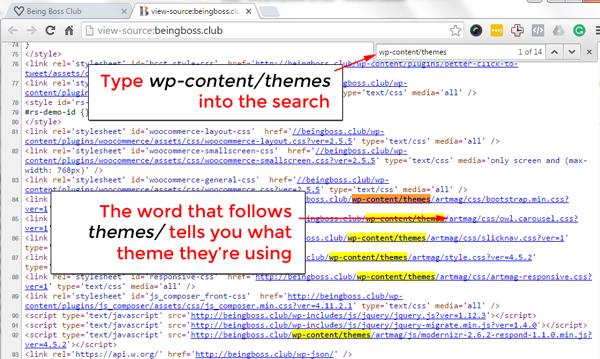
How do we figure out which theme our favorite website is using? Let’s say you love the new Being Boss blog design at beingboss.club and you are thinking that one could work well for you. The first thing you do is view the source code of that website and if you are not sure how to do this, just Google, “find out website source code” and you’ll find instructions for your particular setup there.
Once you are viewing the source code, do a search for this: wp-content/themes. Just search for that phrase, it will come up in a couple of places in the source code and the word that directly follows the wod ‘themes’ in the source code is going to be the name of the theme that that particular website is using.
This is a quick word. If you are setting like the ProBlogger website or the Fat Mum Slim website, chances are when you see the theme that they are using, it will say, “ProBlogger” or “Fat Mum Slim.” That means they’ve had custom designs or custom themes developed for them and you won’t be able to buy those in any theme library out there.
For the Being Boss […] however, I could see their theme is called Art Mag and when I Google ‘Art Mag WordPress theme’ I can see it’s a theme that you can buy from Themeforest for $49.
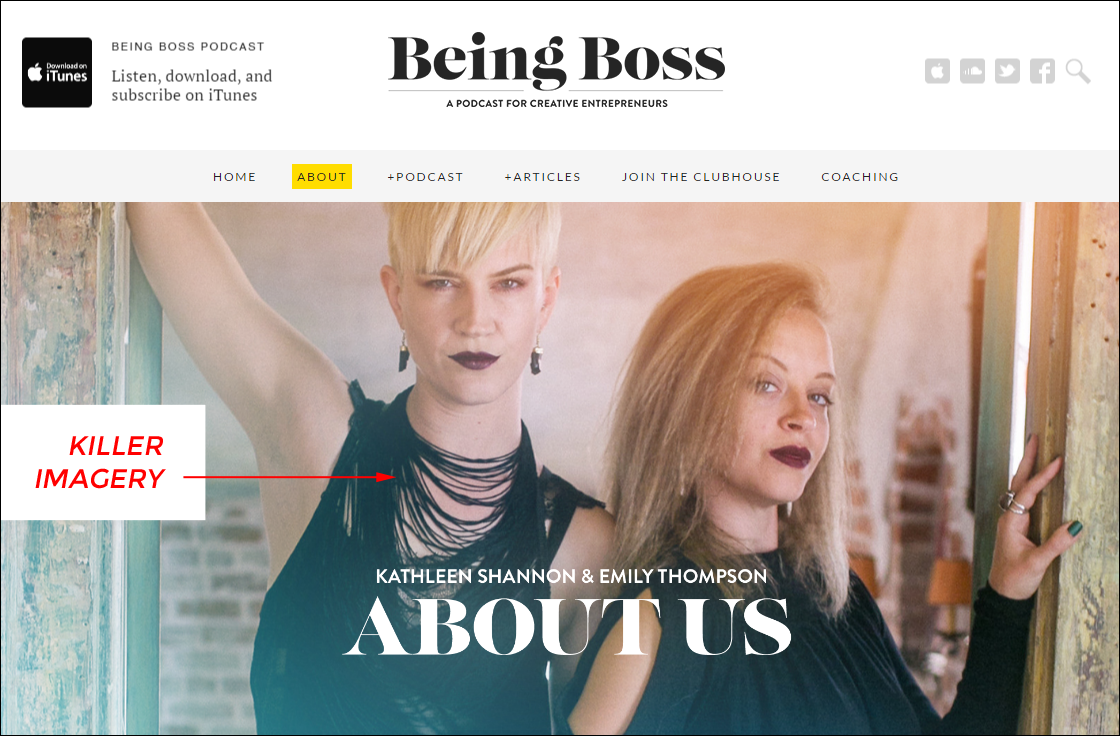
Another word of caution. When you are checking out your favorite website, you are loving how it looks, and you are thinking, “I can just buy the same theme and my site can look like that too,” there’s a giant caveat here and that is, it’s probably looks the way it does because they’ve got killer imagery and if you don’t have the same killer imagery to use on your site, then it doesn’t matter how much you use the same theme as them. Your site won’t look like theirs.
This incidentally is both a good and a bad thing. The bad comes from the disappointment you feel because your site doesn’t look as good as theirs. The good comes from the fact that you can use exactly the same theme as someone else, but your two sites will look kind of different because you are using different imagery, logo, fonts, and colours.
If ever you are thinking, “Oh, that person might hate me because I am using the same theme as them,” don’t stress because there are so many people using similar themes out there. You would be surprised.
Another thing that is important to remember is when you install a theme on your website, any theme, it needs to be set up to look like the demo version or the website that you love. It won’t look exactly the way you want it to straight out of the box. If you are able to follow instructions, then using the theme documentation, you should be able to get the layout looking the way it was sold to you in the demo.
If you are struggling to make that happen, get in touch with the guys at ThemeValet.com for $99 or thereabouts. They will set up the theme to look exactly like the demo for you.
Another quick thing to understand or consider is that if your site has no pages and has no post, so no content, it’s going to be very difficult to get it looking like anything at all so always recommend creating at least an About and Content page and loading in two to three blog posts before they are loading a theme and trying to make everything look pretty.
What if there aren’t any sites out there that have caught your eye? Are there any common themes out there that a lot of people are using?
Yes, there are. Simple Mag is one that can be found on ThemeForest.com. This is a particularly great one if you are looking for a magazine style layout. They offer heaps of different layouts for Home pages depending on how many things you want on there, how great your imagery is, how busy you want things to be. The Simple Mag Home page is going to be quite busy if you want them.
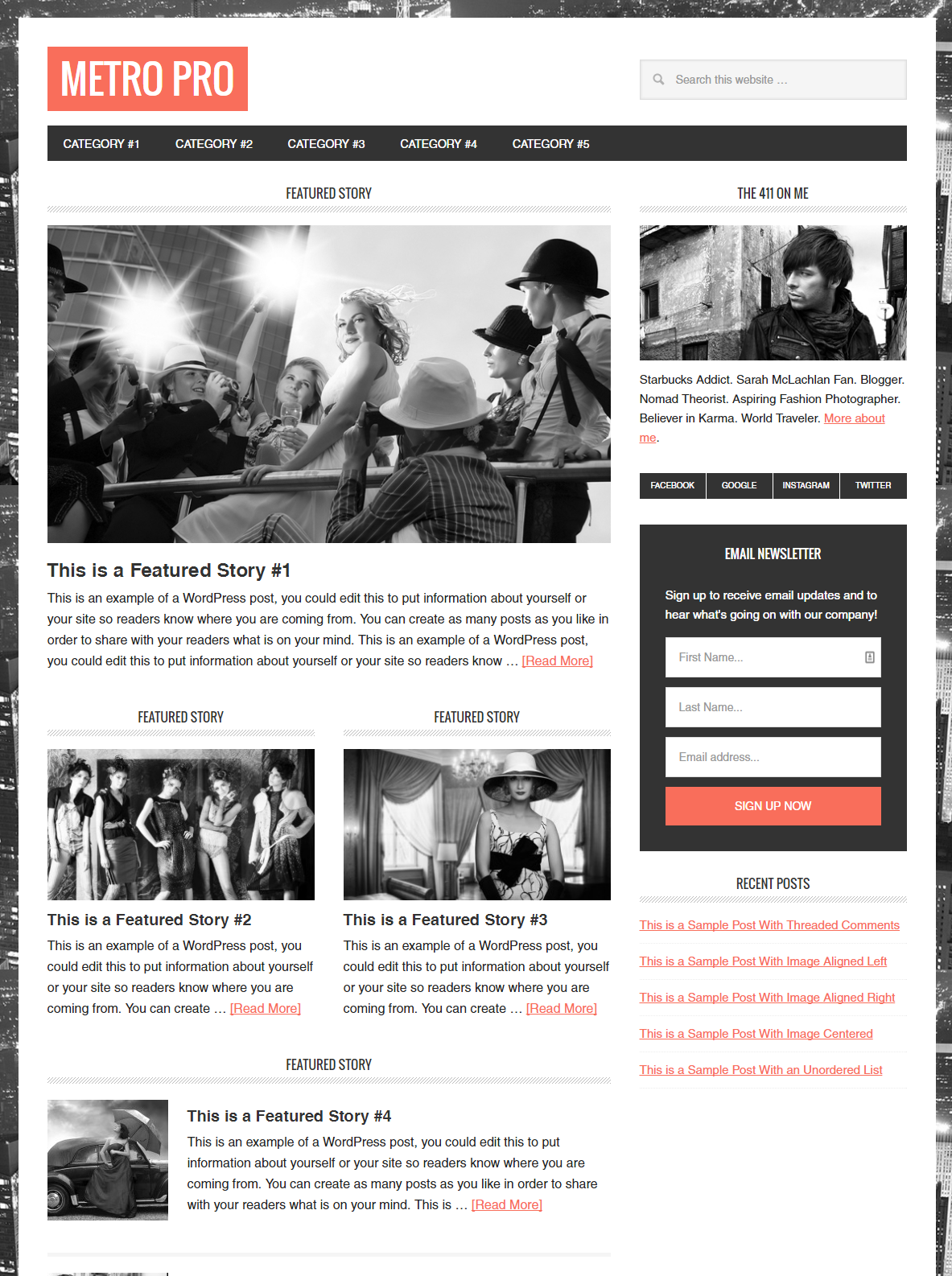
If you are looking for more bloggy type layout, then the Foodie theme, Metro theme, and Lifestyle Pro theme are all great looking, easy to use Genesis themes and they can be found at StudioPress.com.
Just a quick note. With the Genesis themes, you first have to install the base Genesis framework which comes as a theme quite confusingly and then you install and activate whichever of those look and feel themes you’ve chosen on top of it.
Another really important theme you need to keep in mind when choosing themes these days is that they need to be responsive on mobile. Happily, most themes in most marketplaces these days are responsive. It’s just something to check before you spend your hard earned on anything that you find.
A quick word about themes like Divi, Bridge, and the X theme. Divi and the X theme are quite popular themes right now because they are Page Builder type themes which means that you can set your pages up pretty much anyway you like and you can set different pages on that to look quite different to each other because they have this inbuilt Page Builders that allow you to drag and drop elements.
This sounds like a dream, but in reality, I have found these Page Builders to be very slow and painful to use. You make a small tweak to say the padding around an image, or the size of a heading, then you have to save a draft of the page, and then preview it, it’s really slow going and frustrating.
The exception to these rules I have found has is the X theme with Cornerstone or the X theme using the Beaver Builder page builder. That combination allows you to make little changes and preview the changes like in real time without having to save, preview, or do any really time-consuming stuff.
That’s more for the tech savvy people out there. These themes do try to sell themselves as being for the non-tech savvy people and I can assure you, I’ve been building websites for 15 years, I consider myself fairly tech savvy and I have troubles with some themes sometimes. If you are not tech-savvy, stay away. If you are very, very tech-savvy, then they do offer amazing flexibility and design freedom.
Just a quick word about the X theme + Beaver Builder. At Swish Design, we have the ability to design and build custom themes and this is what I intended to do quite recently with my own website redesign at kellyexeter.com.au. I did what I always do. I did the flat sheet page design. I designed exactly the way I wanted it to look and then because I needed the new site up faster than my guys would be able to code it, I rebuilt it using the X theme as a temporary measure.
Guess what? it did the job so well. I haven’t bothered to get my guys to code a custom theme for me after all of that. Just for those who are a little bit more tech-savvy, are looking for something that gives you quite a lot of freedom and the ability to build out pages anyway that you like, and people who are looking to build landing pages as well, the combination of X theme + Beaver Builder for me, I haven’t found anything quite like it out there at the moment.
There you go guys. As I mentioned at the start, this is not an easy question to answer as there are so many variables that go into choosing a WordPress theme. My major tip is that if you are in doubt, choose the simplest solution and remember that people are coming to your blog to read and they are mostly doing it so on mobile devices. So as long as your theme is responsive, loads fast, and makes it easy to read your posts on mobile devices, you’ll be laughing.
Darren: I always love it when Kelly speaks. I hope you enjoyed hearing from here today. We will be hearing more from her in the future, particularly I run a blog where she will be contributing articles as one of our subject matter experts. In the meantime, you can find out more about Kelly.
I’ve read her blog at kellyexeter.com.au where you’ll also find her fantastic podcasts and her book, A Life Less Frantic. You’ll also find more from her on a design front over at swishdesign.com.au. I highly recommend you to check out her and the resources and services that they offer over at Swish Design.
I hope it’s been helpful for you today. If you’ve got more questions that you like us to address in a future episode of the podcast, I’m more than happy to tackle them myself for being in one of our subject matter experts.
You can find today’s show at problogger.com/podcast/119 where you’ll also find at the bottom of that shownote, a green bottom which allows you to record your question like Nils did today, and you might just find yourself appearing on the show. Just let us know what your name is and your URL and we’ll be happy to link back to you as well from the show notes.
Thanks so much for listening today and we’ll be back with you in a couple of days time with Episode 120. Thanks for listening.
You’ve been listening to a ProBlogger. If you’d like to comment on any of today’s topics or subscribe to the series, find us at problogger.com/podcast, tweet us @ProBlogger, find us at facebook.com/ProBlogger, or search ProBlogger on iTunes.
Before I go, I want to give a big shout out and say thank you to Craig Hewitt and the team at PodcastMotor, who has been editing all of our podcast for sometime now. PodcastMotor have a range of services for podcasters at all levels. They can help you to set up your podcast, but also offer a couple of excellent services to help you to edit your shows and get them up with great show notes. Check them out at podcastmotor.com.